
Remove Alpha Channel vs GIMP Flatten Image
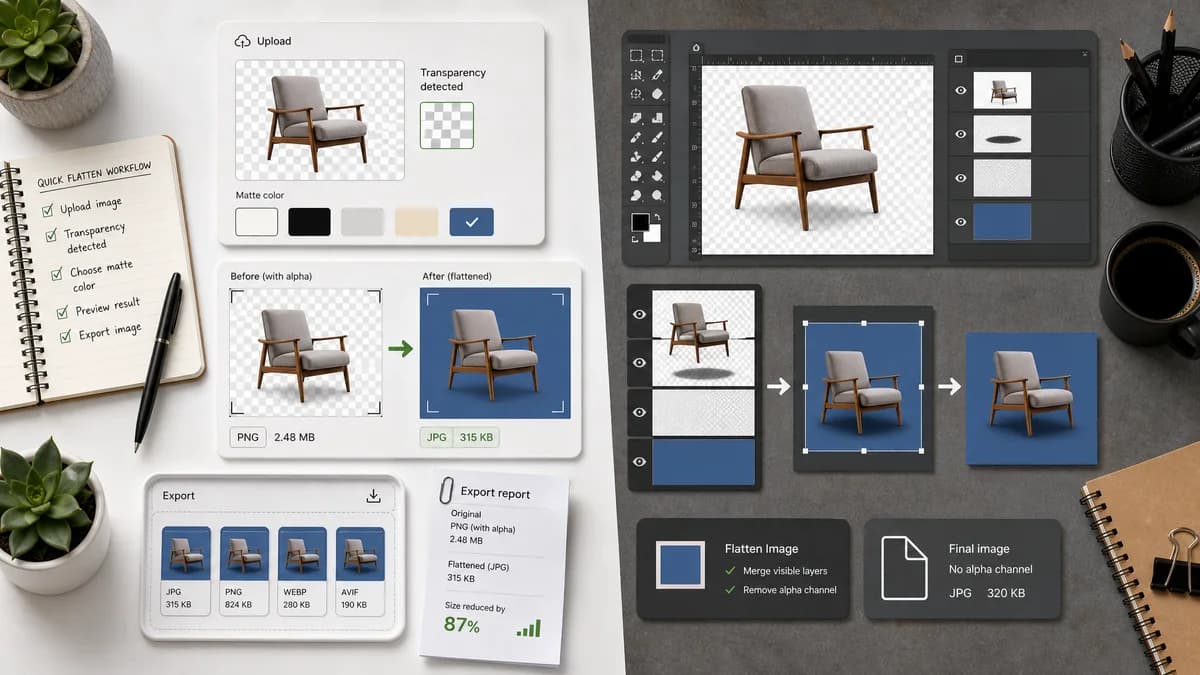
Remove Alpha Channel is the baseline in this comparison: Flatten PNG, WebP, AVIF, BMP, or JPEG images over a matte color and export an opaque PNG or JPEG locally in your browser.
GIMP's Flatten Image command merges layers into one layer with no alpha channel and fills transparent areas with the background color.
Quick verdict
GIMP is a strong open-source editor option for users already editing layers. TextFaker be better for quick one-off image flattening, reporting, and export without opening a full desktop editor.
How Remove Alpha Channel fits
TextFaker provide a narrower, browser-local workflow for uploaded images: detect transparency, flatten over a selected matte, and export an opaque result without a full editor interface.
How GIMP Flatten Image fits
GIMP's official manual says Flatten Image merges all layers into a single layer with no alpha channel; when areas are transparent through all layers, the background color is visible.
Side-by-side comparison
| Decision point | Remove Alpha Channel | GIMP Flatten Image | Takeaway |
|---|---|---|---|
| Scope | Our workflowSingle-purpose alpha removal and opaque export. | Competitor workflowFull desktop image editor with flattening among many commands. | TextFaker avoid editor complexity. |
| Flatten behavior | Our workflowComposite transparency over the selected matte color. | Competitor workflowFlatten Image removes alpha; transparent-through areas reveal the background color. | GIMP confirms background color matters when flattening. |
| Layer handling | Our workflowDecode final image pixels from upload; no layer editing expected. | Competitor workflowDesigned for layered documents and image editing. | GIMP is better for layer-aware projects. |
| Reporting | Our workflowShow transparent, semi-transparent, and opaque source-pixel counts. | Competitor workflowFlatten command changes the image but is not a reporting tool. | TextFaker can serve QA and handoff use cases better. |
| Access | Our workflowBrowser-local tool page. | Competitor workflowInstalled desktop application. | TextFaker is more convenient for occasional web users. |
| Adjacent TextFaker tools | Our workflowSeparate from Alpha Channel Extractor and Image Transparency Checker. | Competitor workflowGIMP combines many transparency operations in one editor. | TextFaker's registry needs clear separation of intent. |
Use Remove Alpha Channel when
- Users who only need to remove transparency from an existing image
- Users who need a result report and preview quickly
- Users without GIMP installed
Use GIMP Flatten Image when
- Users already editing multi-layer images
- Open-source desktop workflows
- Advanced image manipulation beyond alpha removal
Detailed comparison
Positioning
GIMP is the canonical open-source desktop alternative. The comparison respect that GIMP is more powerful while explaining why a dedicated browser tool is faster for this task.
- Mention GIMP for layer editing and open-source workflows.
- Keep TextFaker framed as a conversion and QA utility.
Copy Guidance
Use terms like flatten, background color, alpha channel, and opaque result because they match GIMP's documented behavior and user vocabulary.
- Explain that fully transparent pixels become matte color.
- Explain that semi-transparent edge pixels blend with the matte.
Test Guidance
GIMP's behavior implies TextFaker needs precise background-color compositing tests.
- Test white default matte.
- Test custom matte.
- Test alpha-free input no-charge path.
SEO
Users searching for GIMP alternatives may want a no-install way to flatten transparent PNGs.
- Create comparison copy for remove alpha without GIMP.
- Include open-source alternatives content listing GIMP and ImageMagick.
Research notes
- Official GIMP manual explicitly says the flattened image has no alpha channel.
- It also says transparent-through areas show the background color.
- This source is useful for explaining why matte color selection is required.
Official source
The only outbound competitor link on this page is placed here for source checking after the comparison.
Official GIMP Flatten Image source