
Remove Alpha Channel vs LunaPic Background Tool
Remove Alpha Channel is the baseline in this comparison: Flatten PNG, WebP, AVIF, BMP, or JPEG images over a matte color and export an opaque PNG or JPEG locally in your browser.
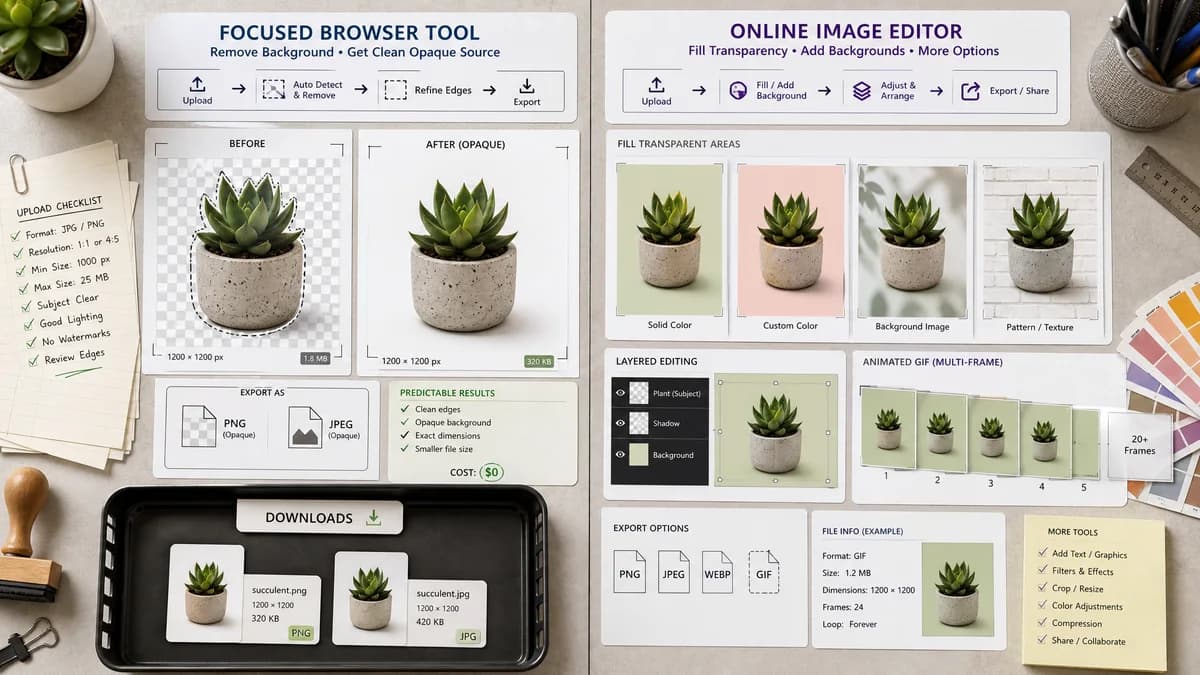
LunaPic documents removing existing transparency by setting a background color or image to fill transparent areas, including support for animated GIFs.
Quick verdict
LunaPic is useful for background filling and animated GIF transparency cases. TextFaker be stronger for static-image alpha diagnostics, predictable matte compositing, and a cleaner no-charge opaque-source result path.
How Remove Alpha Channel fits
TextFaker focus on static browser-local image alpha removal with precise pixel counts, matte-color compositing, and opaque PNG/JPEG export.
How LunaPic Background Tool fits
LunaPic's official FAQ says removing transparency is done by setting a background color or image to fill it in, and notes that its background tool includes animated GIF support.
Side-by-side comparison
| Decision point | Remove Alpha Channel | LunaPic Background Tool | Takeaway |
|---|---|---|---|
| Main method | Our workflowComposite transparent pixels over a selected matte color. | Competitor workflowSet a background color or image to fill transparency. | Both fill transparency, but TextFaker expose alpha diagnostics. |
| Animation | Our workflowBuilt for browser-decoded images, likely static output first. | Competitor workflowFAQ states animated GIF support in the background tool. | LunaPic is stronger for animated GIF cases. |
| Pixel classes | Our workflowReport fully transparent, semi-transparent, and opaque pixels. | Competitor workflowFAQ focuses on the fill workflow, not pixel statistics. | TextFaker be better for QA and handoff. |
| Output formats | Our workflowOpaque PNG and JPEG where supported. | Competitor workflowOnline editor output depends on LunaPic workflow. | TextFaker make output choices explicit. |
| Privacy | Our workflowBrowser-local processing. | Competitor workflowThe cited FAQ does not claim local-only processing. | TextFaker be explicit about local image handling. |
| Related tools | Our workflowSeparate from Alpha Channel Extractor and Transparency Checker. | Competitor workflowTransparency operations live inside a broader editor. | Registry separation helps search intent and UX. |
Use Remove Alpha Channel when
- Static images that need alpha removed and verified
- Users who want transparent and semi-transparent pixel percentages
- Users who need opaque PNG or JPEG output
Use LunaPic Background Tool when
- Users working with animated GIF backgrounds
- Users who want to fill transparency with a background image
- Users already using LunaPic's online editor
Detailed comparison
Positioning
LunaPic is an adjacent online editor with documented transparency-removal guidance. Its animated GIF support makes it a useful comparison even if TextFaker starts with static browser-local images.
- Be clear about static versus animated support.
- Do not overstate LunaPic upload or privacy behavior without a source.
Feature Gap
TextFaker's biggest distinction is measurement before conversion: users can know whether a file actually had transparency.
- All-opaque images does not trigger paywall value flow.
- Transparent images show conversion stats and downloadable output.
SEO
The comparison can target users asking how to remove existing transparency and make image opaque.
- Include transparent GIF caveat if TextFaker does not support animation.
- Keep PNG as the central page intent.
Testing
Generated test images include a transparent logo, a semi-transparent drop shadow, and an all-opaque JPEG.
- Verify all-opaque source returns informational result.
- Verify semi-transparent pixels blend with matte.
Research notes
- Official LunaPic FAQ says transparency can be removed by setting a background color or image to fill it in.
- The same FAQ states the background tool supports animated GIFs.
- Use LunaPic primarily as a background-fill and GIF-adjacent comparison.
Official source
The only outbound competitor link on this page is placed here for source checking after the comparison.
Official LunaPic Background Tool source