
Remove Alpha Channel vs Online PNG Tools PNG Alpha Channel Remover
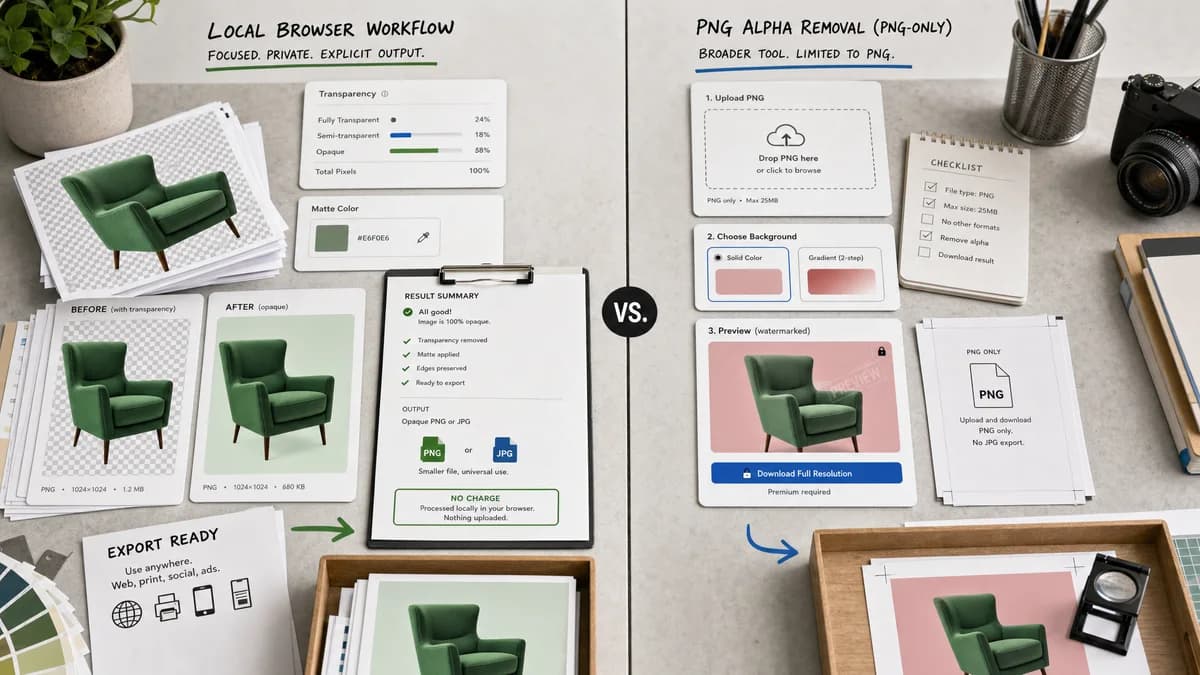
Remove Alpha Channel is the baseline in this comparison: Flatten PNG, WebP, AVIF, BMP, or JPEG images over a matte color and export an opaque PNG or JPEG locally in your browser.
A PNG-specific web tool that removes alpha from a PNG and replaces transparent regions with a selected color or gradient.
Quick verdict
Online PNG Tools is the closest direct comparison. TextFaker can differentiate by adding source-pixel transparency counts, no-charge informational results for all-opaque images, a copy-all result summary, and broader image input handling while staying explicit that output is opaque.
How Remove Alpha Channel fits
TextFaker Remove Alpha Channel is a browser-local image tool that accepts common decoded image inputs, reports transparency statistics, composites transparent and semi-transparent pixels over a user-selected matte color, previews before and after, and exports an opaque PNG or JPEG when supported.
How Online PNG Tools PNG Alpha Channel Remover fits
Online PNG Tools focuses directly on PNG alpha removal. Its page describes importing a PNG and producing a PNG without alpha, with options for single-color and gradient replacement, but its download flow is presented as a premium preview.
Side-by-side comparison
| Decision point | Remove Alpha Channel | Online PNG Tools PNG Alpha Channel Remover | Takeaway |
|---|---|---|---|
| Primary job | Our workflowDetect alpha and flatten transparent or semi-transparent pixels over a chosen matte color. | Competitor workflowRemove the alpha channel from a PNG and replace alpha pixels with color or gradient. | Both serve the same intent, but TextFaker pair conversion with diagnostics. |
| Input scope | Our workflowBuilt for browser-decodable images through the shared upload drop zone, with PNG as the core use case. | Competitor workflowPositioned specifically around PNG input. | TextFaker can be clearer for users with WebP or other browser-decodable images. |
| Transparency reporting | Our workflowShould show fully transparent, semi-transparent, and opaque pixel counts and percentages. | Competitor workflowThe researched page explains alpha removal but does not foreground pixel-count reporting. | Statistics are a meaningful product gap. |
| Matte options | Our workflowDefault white matte with user-selectable background color for compositing. | Competitor workflowOffers single-color replacement and gradient replacement. | Competitor has more decorative fill options; TextFaker prioritize predictable opaque results. |
| Output formats | Our workflowAt least PNG and JPEG where browser canvas export supports them. | Competitor workflowOutput is described as PNG without alpha. | JPEG is a practical differentiator for users who simply need an opaque file. |
| Access flow | Our workflowCharge only for successful transparency-removing conversions; all-opaque inputs return an informational no-charge result. | Competitor workflowPage labels the tool as premium preview with upgrade prompts for download. | TextFaker can make value gating more aligned with actual conversion value. |
Use Remove Alpha Channel when
- Users who need quick local alpha detection plus flattening in one workflow
- Users who want clear counts for fully transparent, semi-transparent, and opaque source pixels
- Users who want PNG or JPEG opaque output instead of a PNG-only framing
Use Online PNG Tools PNG Alpha Channel Remover when
- Users specifically searching for a PNG alpha remover
- Users who want gradient replacement for transparent regions
- Users already using the Online Tools family
Detailed comparison
Positioning
This is the clearest direct competitor because the title, workflow, and user intent match alpha-channel removal rather than AI background removal.
- Comparison copy avoid implying Online PNG Tools is unsafe or server-based unless verified.
- Emphasize TextFaker's alpha statistics and opaque-file no-charge handling.
Feature Gaps
The competitor exposes color and gradient replacement options, while TextFaker's tool is stronger as a precise flattening and verification utility.
- Add before/after checkerboard and solid preview modes.
- Add matte color picker with white default.
- Add one copy-all result button.
SEO Angle
Target searches such as remove alpha channel from PNG, make PNG opaque, and flatten transparent image.
- Use comparison headings that distinguish alpha removal from extracting alpha masks.
- Add FAQ content explaining semi-transparent edge compositing.
Implementation Notes
Focused tests cover a fully transparent pixel, a semi-transparent pixel, and an all-opaque source image.
- Verify exported PNG has alpha 255 everywhere when decoded back through canvas.
- Verify JPEG option appears only when supported by browser canvas.
Research notes
- Official page says transparent alpha pixels are converted into non-transparent single-color pixels, and options include solid color or gradient replacement.
- The page also presents premium upgrade prompts for instant download and copy-to-clipboard features.
- The comparison keep URLs only in URL fields and avoid naming pricing details beyond neutral workflow differences.
Official source
The only outbound competitor link on this page is placed here for source checking after the comparison.
Official Online PNG Tools PNG Alpha Channel Remover source