
Remove Alpha Channel vs PineTools Remove Background
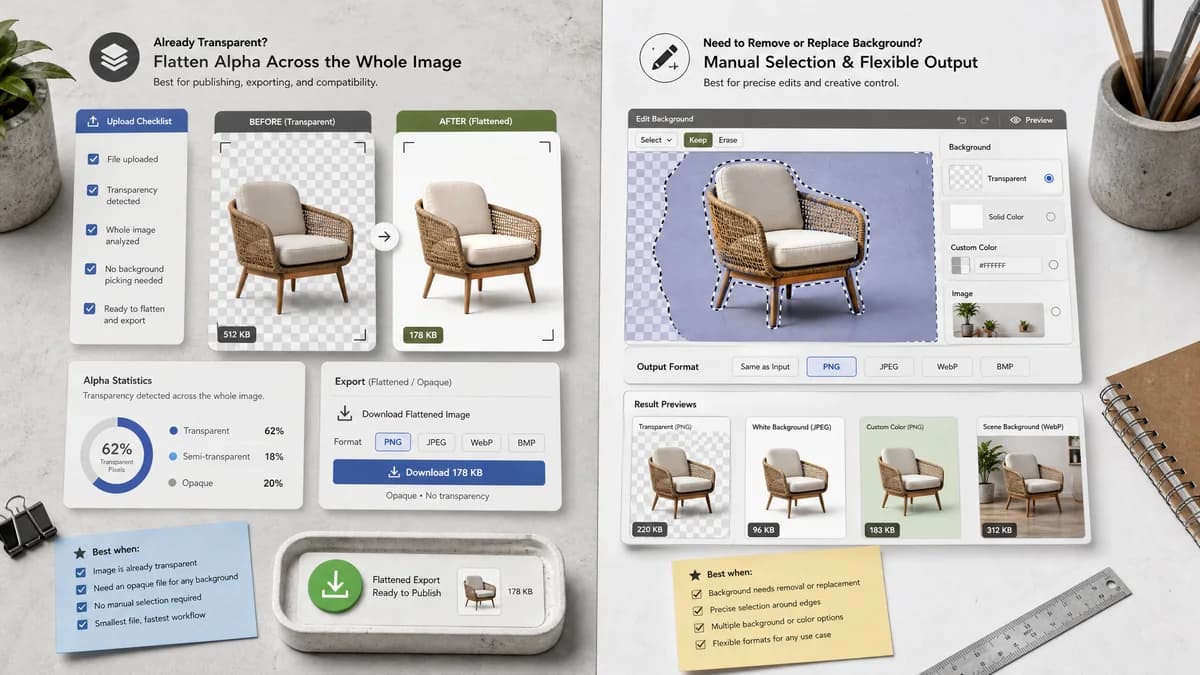
Remove Alpha Channel is the baseline in this comparison: Flatten PNG, WebP, AVIF, BMP, or JPEG images over a matte color and export an opaque PNG or JPEG locally in your browser.
A web tool for selecting and removing background areas, leaving them transparent or filling them with a solid color.
Quick verdict
PineTools is better for manual background selection and replacement. TextFaker is better for already-transparent assets that need an opaque flattened export with alpha statistics.
How Remove Alpha Channel fits
TextFaker flatten existing alpha from the whole image rather than selecting background areas, while reporting exactly how much transparency existed in the source.
How PineTools Remove Background fits
PineTools' official page says users can select and remove background areas, leave the result transparent, or fill it with a solid color; it also shows output formats based on browser support, including same as input, PNG, JPEG, WebP, and BMP.
Side-by-side comparison
| Decision point | Remove Alpha Channel | PineTools Remove Background | Takeaway |
|---|---|---|---|
| Workflow trigger | Our workflowDetect alpha channel and transparency in decoded pixels. | Competitor workflowUser selects areas of a background to remove or fill. | TextFaker is data-driven; PineTools is selection-driven. |
| Output color | Our workflowUser-selected matte color with white default. | Competitor workflowTransparent or custom solid-color background option. | Both support solid color, but TextFaker treats it as matte compositing. |
| Output formats | Our workflowAt least PNG and JPEG when supported by browser canvas. | Competitor workflowPage lists same as input, PNG, JPG/JPEG, WebP, and BMP, depending on browser support. | PineTools is a useful benchmark for browser-supported format labeling. |
| Alpha reporting | Our workflowCounts and percentages for pixel alpha classes. | Competitor workflowPage does not foreground alpha distribution reporting. | TextFaker own measurement and result copy. |
| Transparency source | Our workflowWorks on real alpha in uploaded image data. | Competitor workflowCan create transparency by removing selected background areas. | These are adjacent, not identical. |
| No-charge opaque handling | Our workflowAll-opaque images return an informational no-charge result. | Competitor workflowPage is a general tool workflow without this TextFaker access model. | Access behavior is a TextFaker-specific differentiator. |
Use Remove Alpha Channel when
- Existing transparent images that need alpha removed
- Users who want automatic transparency detection
- Users who want before/after alpha QA
Use PineTools Remove Background when
- Manual background selection
- Removing white, black, or solid-color backgrounds
- Users who need browser-supported output format choices after background work
Detailed comparison
Positioning
PineTools overlaps through background fill and output formats, but its main job is background selection/removal rather than alpha-channel flattening.
- Compare manual background removal versus automatic alpha flattening.
- Use PineTools as a benchmark for showing browser-supported formats.
UX Lessons
PineTools exposes advanced options and browser-supported output choices. TextFaker can adopt the useful idea of only showing viable formats while keeping controls simpler.
- Show format availability clearly.
- Avoid manual selection tools in the alpha remover.
SEO
Some users say remove transparency when they mean fill a removed background. The page clarify that TextFaker removes existing alpha.
- Add internal links to Transparency Checker and Alpha Channel Extractor.
- Explain real alpha versus solid background.
Testing
Test output format controls and custom matte behavior across desktop and mobile smoke tests.
- Verify JPEG export has no alpha by format.
- Verify PNG export decodes with alpha 255 throughout.
Research notes
- Official PineTools page says users can leave the background transparent or fill it with solid color.
- It lists output formats that are shown depending on browser support.
- This source supports the planned browser-canvas output-format wording.
Official source
The only outbound competitor link on this page is placed here for source checking after the comparison.
Official PineTools Remove Background source