
Open Source Alternatives to Ezgif
Remove Alpha Channel is a browser-based alternative for users who need this focused result without installing a proprietary desktop app or entering a larger hosted workflow.
This research compares that workflow with Ezgif while keeping the outbound source link at the bottom after the analysis.
Why Remove Alpha Channel fits
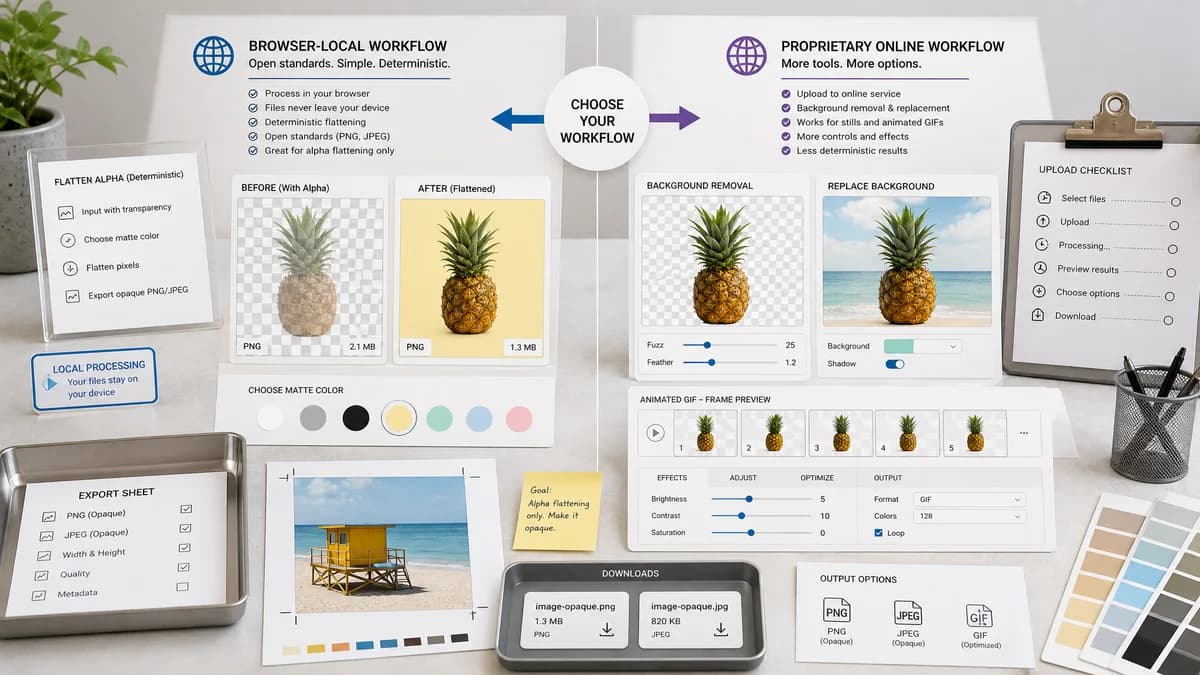
Remove Alpha Channel is a browser-local tool for flattening transparent and semi-transparent image pixels over a chosen matte color, then exporting an opaque PNG or JPEG without installing desktop software.
What Ezgif offers
Ezgif removes or replaces background colors across animated and still image workflows with color and fuzz controls.
Open alternative signals
Setup
Remove Alpha ChannelRuns in the browser with one upload and no editor workspace to configure.
EzgifEzgif is part of a broader product or hosted tool workflow.
Main task
Remove Alpha ChannelFlatten existing alpha over a chosen matte color and export an opaque file.
EzgifEzgif removes or replaces background colors across animated and still image workflows with color and fuzz controls.
Transparency reporting
Remove Alpha ChannelShows fully transparent, semi-transparent, and opaque source pixel counts.
EzgifThe researched product is broader and does not center the same alpha-count report.
Best fit
Remove Alpha ChannelOne-off opaque export for transparent PNG, WebP, AVIF, GIF frame, JPEG, or BMP inputs that decode in the browser.
EzgifUse Ezgif for the larger workflow it is built around.
Decision guide
Use Remove Alpha Channel when you need a quick browser-local matte flatten, alpha counts, before and after preview, and an opaque PNG or JPEG export for one selected image.
Use Ezgif when the job requires its broader editor, batch, animation, AI, platform, or production workflow instead of a focused alpha-removal utility.
Side-by-side open source alternative comparison
| Decision point | Remove Alpha Channel | Ezgif | Takeaway |
|---|---|---|---|
| Primary outcome | Our workflowMake an already-transparent image fully opaque with a selected matte color. | Proprietary workflowEzgif removes or replaces background colors across animated and still image workflows with color and fuzz controls. | Choose by whether the source already has alpha or whether the broader product workflow is needed. |
| Installation and setup | Our workflowNo desktop app, command line, account workspace, or API setup is needed for a single file. | Proprietary workflowEzgif belongs to a larger hosted, editor, batch, platform, or design workflow. | The focused web utility is faster for one-off opacity cleanup. |
| Matte control | Our workflowUses white by default and lets the user choose a custom HEX matte color before export. | Proprietary workflowThe compared product may include background or fill controls as part of a broader interface. | TextFaker keeps the control tied directly to alpha compositing. |
| Alpha diagnostics | Our workflowCounts fully transparent, semi-transparent, and opaque pixels before generating the output. | Proprietary workflowThe compared workflow is not primarily an alpha diagnostics report. | Counts help users know whether a conversion was actually needed. |
| Output path | Our workflowExports an opaque PNG or JPEG through browser canvas when source transparency exists. | Proprietary workflowOutput behavior depends on the wider product or tool workflow. | A direct download is better when the final file is the only deliverable. |
| All-opaque inputs | Our workflowShows a no-charge informational result when every decoded pixel is already opaque. | Proprietary workflowThe compared product is not organized around this TextFaker access rule. | No-change files are explained, not treated as successful alpha-removal jobs. |
Detailed research
Why This Alternative Exists
Many searches for Ezgif alternatives come from users who only need one narrow result. Remove Alpha Channel is useful when the source image already contains transparency and the desired result is simply an opaque file.
- Use the focused tool for one image.
- Use the broader product when its editor or platform capabilities matter.
Workflow Difference
The important distinction is alpha flattening versus background removal, layer editing, batch processing, or hosted delivery. Alpha flattening preserves the visible image by compositing it over a known matte color.
- Real transparency is read from decoded RGBA pixels.
- Semi-transparent edges are blended with the matte color.
- The exported result has full opacity.
Decision Guide
Choose Remove Alpha Channel for a quick browser-local conversion. Choose Ezgif when its wider feature set, account workflow, animation support, AI tools, or production pipeline is the actual reason for the job.
- A transparent logo needing a white background fits TextFaker.
- A complex design edit or production system may fit the compared product.
Result Quality
The matte color matters because anti-aliased edges blend into the destination background. A white matte is common, but a dark or brand-colored matte can prevent halos on non-white destinations.
- Use PNG for sharp graphics.
- Use JPEG for opaque photo-style output.
- Copy the result summary when documenting the conversion.
Research notes
- Ezgif is included because users often search for a lighter alternative when they only need to remove transparency or make an image opaque.
- The comparison focuses on workflow fit, setup, output control, and whether the source image already has real transparency.
- Remove Alpha Channel is positioned as a browser-local utility and is not described as an open-source project.
Official source
The proprietary product link is included once here for source checking after the alternative analysis.
Official Ezgif source