
Scan Border Cropper
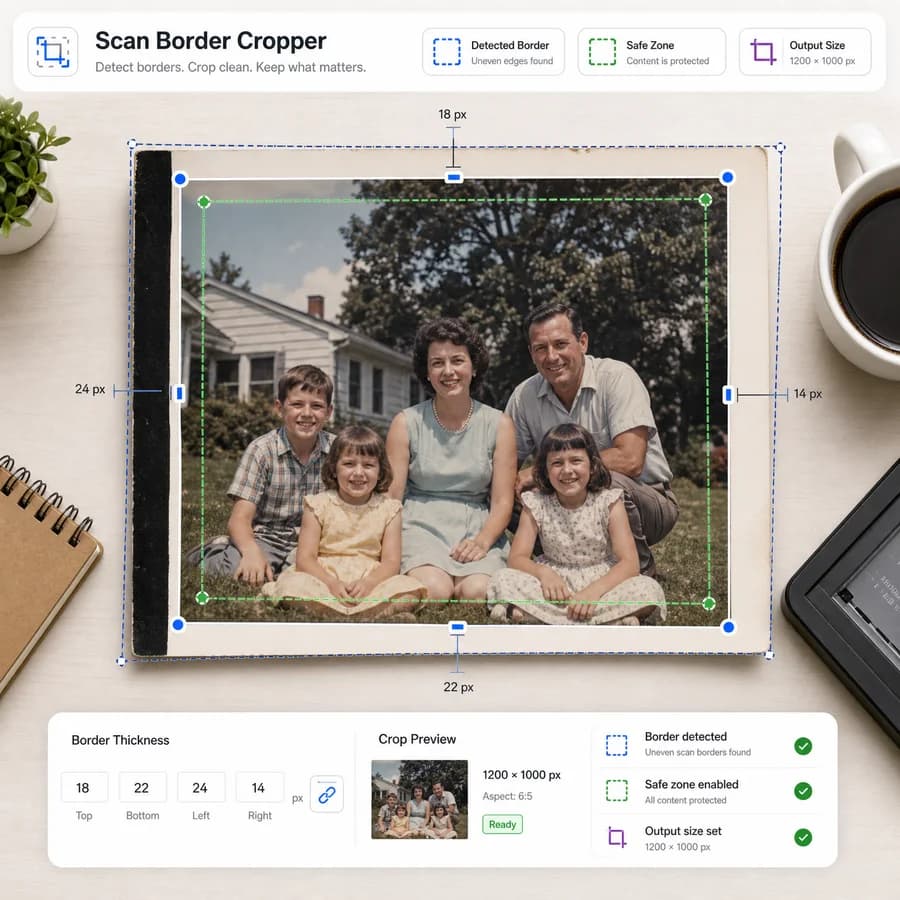
Scan Border Cropper finds the unwanted edge area around scanned photos, slides, receipts, and documents, then returns a precise crop box you can apply or adjust.
It runs locally in the browser and shows deterministic measurements such as top, right, bottom, and left border size, output dimensions, threshold settings, and export file details.
Drop one scanned image here
PNG, JPG, WebP, GIF, BMP, or AVIF up to 100 MB.
Detection settings
Auto mode samples the corners, then chooses light, dark, or sampled detection. Increase tolerance when scanner borders have shadows or paper texture.
No scan selected
Choose an image to detect scanner borders, crop box, removed edges, and output dimensions.
Crop Scan Borders Without Guessing
What It Detects
The tool should analyze edge pixels to locate uniform scan borders caused by flatbed lids, scanner beds, photo print margins, slide mounts, or document shadows. Users should be able to choose white, black, light gray, dark gray, or automatic border detection, then tune tolerance and minimum content contrast.
- Reports crop box as x, y, width, and height in pixels.
- Reports detected border sizes for top, right, bottom, and left edges.
- Supports a keep-margin control so users can preserve a fixed number of pixels around the detected content.
- Flags low-confidence cases when the detected border color is too close to the page or photo content.
Useful Outputs
The page should make the result measurable before download so users do not need to judge the crop by eye. The preview can help, but the primary output should be numbers and validation states.
- Original dimensions, cropped dimensions, removed pixel counts, and percent area removed.
- Crop status such as ready, no border detected, crop would remove too much, or manual review needed.
- Downloadable cropped PNG or JPEG with verified MIME type, filename, dimensions, and Blob size.
- Optional JSON or CSV summary for people processing many scans.
Good Fit Cases
This is most useful when someone already has scans and needs to remove the repeated border afterward, especially when scanner software did not crop correctly or when every image has a slightly different margin.
- Scanned family photos with uneven white print borders.
- Slides or negatives with black scanner edges.
- Documents that look unprofessional because of dark bars along page edges.
- Receipts, worksheets, and forms photographed or scanned with extra background around the page.
Limits To Explain
Automatic cropping should be conservative because scan edges can contain real content, handwritten marks, page numbers, or thin photo details. The UI should show warnings instead of silently cutting too deep.
- Do not crop when the detected content rectangle is below a minimum width or height.
- Warn when any side would remove more than a user-set maximum percentage.
- Let users add back a safety margin after detection.
- Preserve the original file untouched and export a new cropped copy.
Compare Scan Border Cropper
Review this tool beside related online utilities, dedicated apps, and adjacent workflows.
Compare Scan Border Cropper with other toolsOpen Source Alternatives
Compare this focused browser workflow with proprietary software and online tools that solve similar jobs.
View Scan Border Cropper open source alternatives