
SRT to VTT Converter vs GoTranscript SRT to VTT Converter
SRT to VTT Converter is the baseline in this comparison: Convert .srt subtitles to WebVTT locally in your browser with validation, cue counts, warnings, copy-ready VTT text, and a downloadable .vtt file.
Compare TextFaker with GoTranscript's free SRT to VTT converter.
Quick verdict
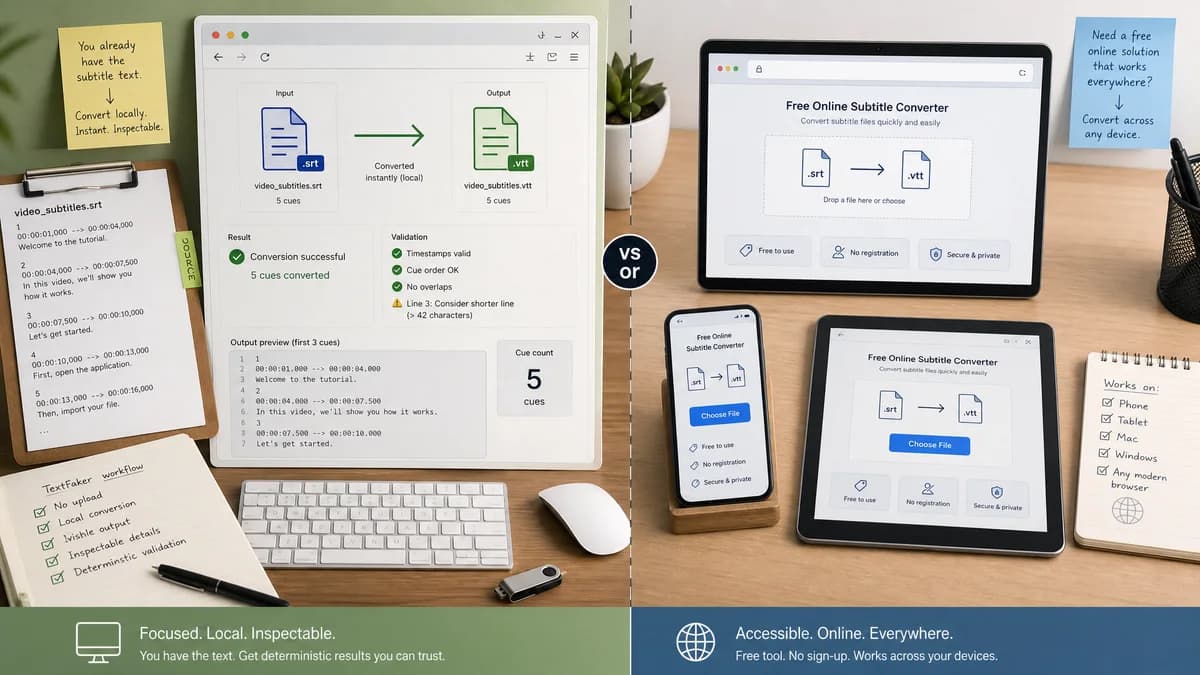
GoTranscript is a strong free converter, but TextFaker can compete by avoiding upload, making output visible, and exposing deterministic validation details.
How SRT to VTT Converter fits
TextFaker should make SRT-to-VTT conversion instant, local, and inspectable, with cue counts and validation messages for users who already have subtitle text.
How GoTranscript SRT to VTT Converter fits
GoTranscript offers a free online SRT to VTT converter positioned as browser-accessible, no-registration, and usable on phones, Macs, and Windows devices.
Side-by-side comparison
| Decision point | SRT to VTT Converter | GoTranscript SRT to VTT Converter | Takeaway |
|---|---|---|---|
| Registration | Our workflowNo account should be required. | Competitor workflowGoTranscript states the converter does not require registration. | TextFaker must match this low-friction expectation. |
| File handling | Our workflowConvert in browser without uploading captions. | Competitor workflowGoTranscript says uploaded and converted files are deleted after a period of time. | Deletion policies help, but local conversion is stronger for sensitive files. |
| Mobile friendliness | Our workflowResponsive text areas and download controls should work on mobile browsers. | Competitor workflowGoTranscript says it works from mobile phones and other web-enabled devices. | Mobile support is table stakes for this category. |
| Output verification | Our workflowExpose cue count, warnings, and downloadable VTT Blob details. | Competitor workflowEmphasizes successful conversion and download. | TextFaker can be more transparent about correctness. |
| Input flexibility | Our workflowFile upload plus direct paste input. | Competitor workflowFile-based converter flow. | Paste input helps users editing captions in a text editor. |
| Scope | Our workflowFocused utility inside a text tools library. | Competitor workflowPart of a transcription company website. | TextFaker should avoid service upsell complexity. |
Use SRT to VTT Converter when
- Users who cannot upload proprietary captions
- People who want to copy converted text into another system
- Creators who need parse warnings before a platform upload
- Automated QA of subtitle conversion cases
Use GoTranscript SRT to VTT Converter when
- Users comfortable with a hosted free converter
- People already using GoTranscript services
- Users who value simple cross-device conversion messaging
Detailed comparison
Demand Signal
GoTranscript's dedicated converter page is evidence that SRT to VTT is a common enough job to support as a standalone free utility.
- Video creators need captions in multiple software-specific formats.
- Official platform help pages show both SRT and WebVTT appear in publishing workflows.
- Community users complain when their editor cannot export VTT directly.
Privacy Opportunity
GoTranscript addresses privacy with deletion language, but the Adobe user asking about proprietary information creates a stronger case for never uploading files at all.
- Local parser
- Local Blob download
- No server round trip for subtitle contents
Output Design
A split input/output layout works on desktop, while mobile can stack input, summary, and output.
- Input SRT textarea
- Warnings panel
- Converted VTT textarea
- Download action
Validation Path
Tests can simulate a file upload and a paste conversion and assert the same resulting WebVTT string.
- File and paste inputs should produce identical output.
- Invalid input should preserve user text and show warnings.
- Cue count should update after every conversion.
Research notes
- GoTranscript's no-registration positioning shows low-friction conversion is expected.
- The local TextFaker promise should be stated carefully and implemented honestly.
- Community demand includes users with proprietary caption content, so server deletion is not the same as no upload.
Official source
The only outbound competitor link on this page is placed here for source checking after the comparison.
Official GoTranscript SRT to VTT Converter source