
SRT to VTT Converter vs Happy Scribe SRT to VTT Converter
SRT to VTT Converter is the baseline in this comparison: Convert .srt subtitles to WebVTT locally in your browser with validation, cue counts, warnings, copy-ready VTT text, and a downloadable .vtt file.
Compare TextFaker's local subtitle converter with Happy Scribe's server-based SRT to VTT workflow.
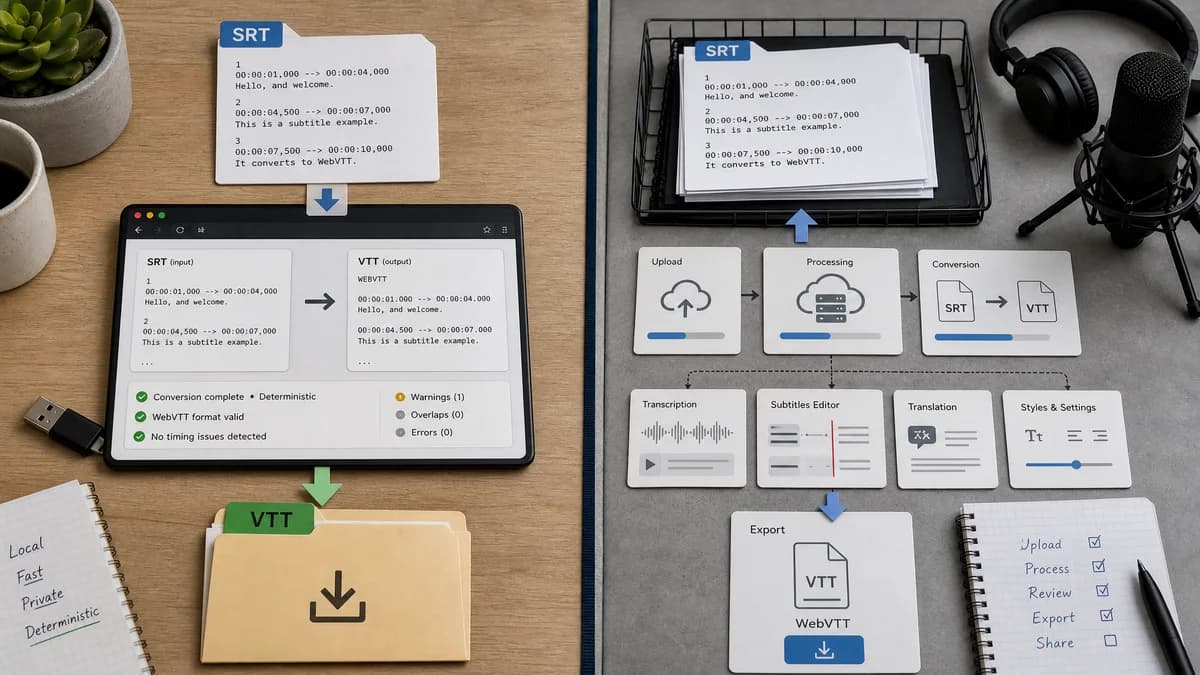
Quick verdict
Happy Scribe is stronger for users who need transcription services around the conversion, while TextFaker is better for private, instant, deterministic format conversion.
How SRT to VTT Converter fits
TextFaker should be a focused utility for users who already have an SRT file and want immediate VTT text, validation feedback, and a local download.
How Happy Scribe SRT to VTT Converter fits
Happy Scribe provides a broader transcription and subtitle platform where users upload an SRT file, choose WebVTT, convert on the server, and download the result.
Side-by-side comparison
| Decision point | SRT to VTT Converter | Happy Scribe SRT to VTT Converter | Takeaway |
|---|---|---|---|
| Core workflow | Our workflowPaste or upload SRT and convert locally immediately. | Competitor workflowUpload SRT, select WebVTT, server converts, then download. | TextFaker should feel faster for simple format changes. |
| Privacy posture | Our workflowSubtitle text remains in the browser. | Competitor workflowThe page states the file is uploaded to their server to convert. | Local processing directly addresses community concerns about proprietary files. |
| Output visibility | Our workflowShow converted VTT text before download. | Competitor workflowEmphasizes downloading the ready VTT file. | Visible output helps users inspect and copy small subtitle files. |
| Diagnostics | Our workflowShow cue count, line ending normalization, timestamp fixes, and parse warnings. | Competitor workflowThe page emphasizes conversion steps, not detailed warnings. | Diagnostics can reduce failed uploads to Vimeo, LMS, or web players. |
| Scope | Our workflowSingle-purpose SRT to VTT utility. | Competitor workflowPart of a transcription and subtitle service ecosystem. | Single-purpose is better for people avoiding account or media-suite overhead. |
| Testability | Our workflowDeterministic output and warnings are stable for automated tests. | Competitor workflowHosted conversion output may be opaque from the page UI. | TextFaker can align with the existing testable tool pattern. |
Use SRT to VTT Converter when
- Existing SRT files that only need WebVTT syntax
- Privacy-sensitive training, internal, or client caption files
- Users who need copyable output text, not just a downloaded file
- Automated regression tests for subtitle conversion behavior
Use Happy Scribe SRT to VTT Converter when
- Users already paying for or using Happy Scribe transcription
- Workflows that need many subtitle-related services in one account
- Teams that want hosted conversion plus broader media tooling
Detailed comparison
Demand Signal
The Adobe and Articulate community sources show users often already have captions but need a platform-compatible VTT file. They are not necessarily looking for transcription.
- A Premiere user asked for secure conversion because a sharing platform rejected SRT.
- An Articulate user wanted an effective path to VTT files for Rise 360.
- A Reddit instructional design thread noted AI conversion can alter punctuation.
Differentiation
Happy Scribe's strength is its broader subtitle service. TextFaker should not imitate a media platform; it should make the plain-text conversion transparent and local.
- Local text parser
- Copyable output
- Downloadable VTT
- Warnings for bad cues
User Experience
The UI should support both file upload and paste because many users edit captions in text editors and may want to convert a short snippet quickly.
- One primary Convert button
- Secondary Copy VTT and Download VTT actions
- Compact cue summary for mobile
Validation Path
Tests should cover valid SRT, missing cue numbers, CRLF input, overlapping cues, and timestamp comma normalization.
- Expected cue count is deterministic.
- Expected warning text is deterministic.
- Expected output file extension is .vtt.
Research notes
- Happy Scribe's page explicitly describes server upload during conversion, which creates a clear privacy contrast for TextFaker.
- Community sources show the audience includes educators and video editors, not only developers.
- The tool should avoid claiming transcription, translation, or video editing unless implemented.
Official source
The only outbound competitor link on this page is placed here for source checking after the comparison.
Official Happy Scribe SRT to VTT Converter source