
SRT to VTT Converter vs Subtitle Tools Convert to VTT
SRT to VTT Converter is the baseline in this comparison: Convert .srt subtitles to WebVTT locally in your browser with validation, cue counts, warnings, copy-ready VTT text, and a downloadable .vtt file.
Compare TextFaker with Subtitle Tools' multi-format Convert to VTT tool.
Quick verdict
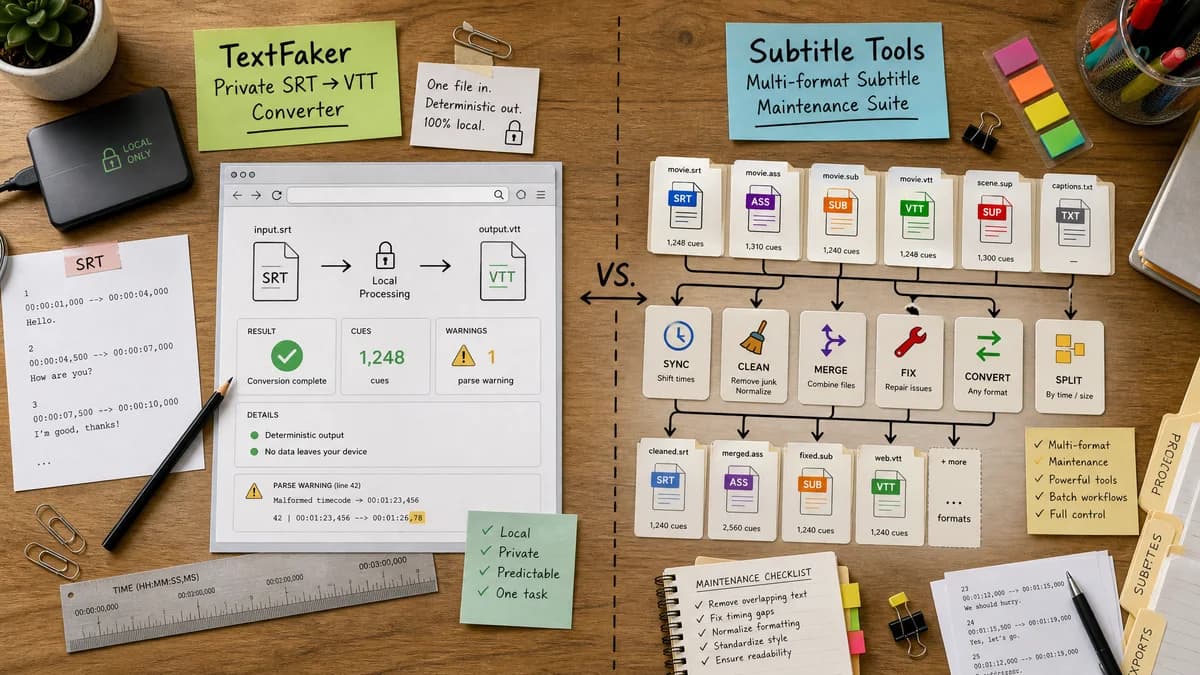
Subtitle Tools is stronger for multi-format subtitle maintenance, while TextFaker can be cleaner for one private SRT-to-WebVTT job with visible validation.
How SRT to VTT Converter fits
TextFaker should provide a focused SRT-to-VTT converter with explicit browser-local processing, deterministic output text, cue counts, and parse warnings.
How Subtitle Tools Convert to VTT fits
Subtitle Tools converts several subtitle formats to WebVTT and is part of a larger suite for syncing, cleaning, merging, and fixing subtitle files.
Side-by-side comparison
| Decision point | SRT to VTT Converter | Subtitle Tools Convert to VTT | Takeaway |
|---|---|---|---|
| Format breadth | Our workflowSRT input to WebVTT output, optimized for correctness and clarity. | Competitor workflowSupports multiple text-based subtitle inputs such as SRT, ASS, SSA, SMI, and SUB. | Subtitle Tools wins breadth; TextFaker should win focused simplicity. |
| Privacy claim | Our workflowRun locally in the browser and state that captions are not uploaded. | Competitor workflowThe page is an online file converter and describes uploaded files. | Local processing is an important differentiator. |
| Validation | Our workflowSurface parse warnings and validation messages in the UI. | Competitor workflowEmphasizes conversion and related subtitle tools. | TextFaker can reduce failed platform uploads by showing problems early. |
| Output review | Our workflowShow the full generated VTT text in a textarea for copy and inspection. | Competitor workflowPrimarily a file conversion workflow. | Copyable output helps users working inside CMS or LMS caption fields. |
| Batch handling | Our workflowInitial scope can focus on one file for deterministic behavior. | Competitor workflowSubtitle Tools has broader batch and premium-adjacent capabilities in its suite. | Batch can be a future enhancement, not required for first release. |
| Automated tests | Our workflowUse fixtures to assert exact output, cue totals, and warnings. | Competitor workflowExternal service behavior is not part of TextFaker tests. | TextFaker's value includes stable local behavior. |
Use SRT to VTT Converter when
- Single SRT to VTT conversion without broader subtitle maintenance
- Privacy-first caption conversion
- Users who want exact output visible in the page
- QA workflows that need warnings and counts
Use Subtitle Tools Convert to VTT when
- Users converting ASS, SSA, SMI, SUB, or other subtitle formats
- People who also need subtitle sync, merge, cleanup, or batch tools
- Users familiar with dedicated subtitle utility sites
Detailed comparison
Market Position
Subtitle Tools validates demand for a full subtitle utility category and reports large ongoing subtitle file processing activity on its site. TextFaker can enter with a narrower, privacy-forward SRT-to-VTT slice.
- Dedicated subtitle sites already exist.
- Users need conversion in addition to sync and cleanup.
- A local converter can serve cautious users.
Use Cases
The strongest initial use cases are LMS uploads, web video players, Vimeo captions, and handoff from editing tools that export SRT.
- Convert Premiere-exported SRT for a platform that requires VTT.
- Prepare captions for HTML video track elements.
- Check cue count before upload.
Implementation Notes
SRT and WebVTT are both text formats, so the conversion can avoid heavy dependencies.
- Normalize BOM and line endings.
- Parse cue timestamps with comma milliseconds.
- Emit WEBVTT followed by blank line and cue blocks.
- Preserve subtitle text lines.
Validation Path
Automated tests should not rely on video rendering. They should inspect strings and metadata only.
- Output text equality for canonical fixtures.
- Warnings for bad timestamp order.
- Download Blob MIME and filename checks.
Research notes
- Subtitle Tools is a strong adjacent suite, so TextFaker should avoid claiming unique category ownership.
- Public Adobe discussions mention Subtitle Tools as a practical workaround for missing VTT export.
- The initial version should not overreach into multi-format conversion unless the parser supports it reliably.
Official source
The only outbound competitor link on this page is placed here for source checking after the comparison.
Official Subtitle Tools Convert to VTT source