
Open Source Alternatives to Descript
SRT to VTT Converter is a browser-based alternative for users who need this focused result without installing a proprietary desktop app or entering a larger hosted workflow.
This research compares that workflow with Descript while keeping the outbound source link at the bottom after the analysis.
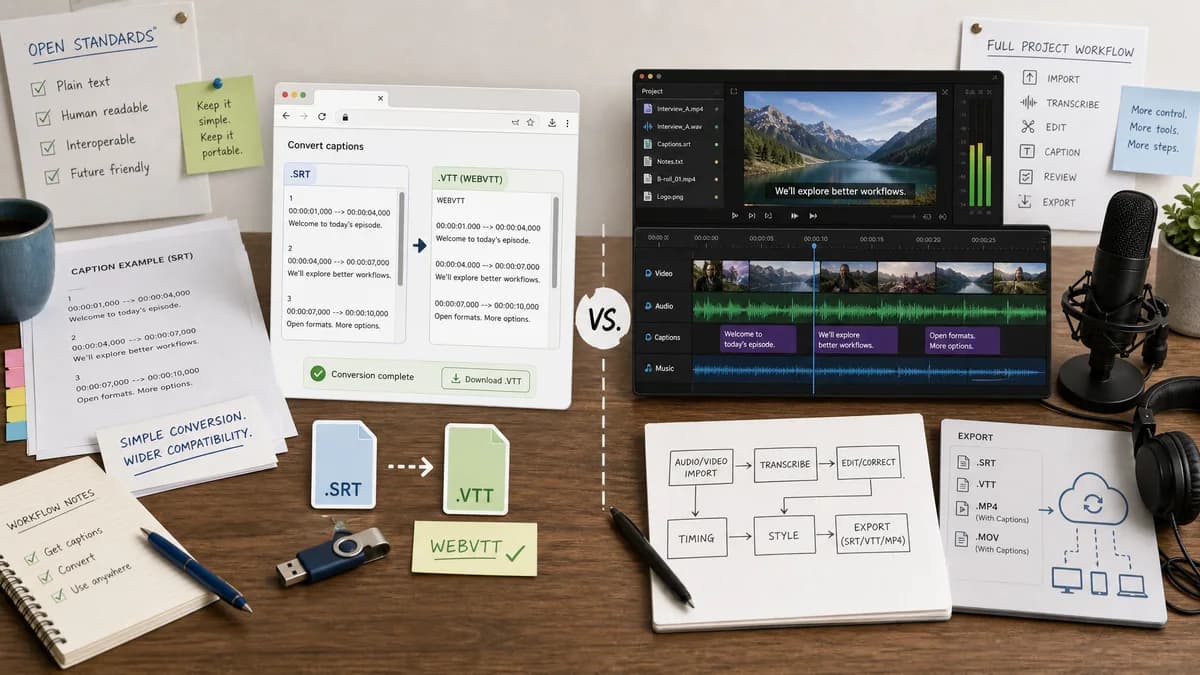
Why SRT to VTT Converter fits
TextFaker can provide a smaller browser-local SRT-to-VTT converter for users who already have caption text and want exact WebVTT output without entering an editor workflow.
What Descript offers
Descript is stronger for creators who need transcription, editing, captions, video export, or subtitle workflows inside a media project.
Open alternative signals
Workflow
SRT to VTT ConverterStandalone text conversion utility.
DescriptMedia project editor with subtitle export and conversion tools.
Processing
SRT to VTT ConverterCan run entirely in browser for SRT text.
DescriptHosted editor and tool ecosystem.
Determinism
SRT to VTT ConverterRules-based conversion without AI or project settings.
DescriptSubtitle handling can be tied to project export behavior.
Output visibility
SRT to VTT ConverterConverted VTT text and validation are visible before download.
DescriptSubtitle export is part of a broader export workflow.
Decision guide
Existing subtitle file conversion with deterministic warnings, cue totals, copy, and download.
Editing media, generating transcripts, exporting subtitles from a project, and creating captioned video content.
Side-by-side open source alternative comparison
| Decision point | SRT to VTT Converter | Descript | Takeaway |
|---|---|---|---|
| Best starting point | Our workflowA ready .srt file or pasted SRT text. | Proprietary workflowA media project or subtitle file in a broader editor context. | TextFaker serves a narrower and faster workflow. |
| AI/media features | Our workflowNo transcription, editing, or caption styling unless separately built. | Proprietary workflowStrong AI audio/video editing and transcription features. | Descript is better for media creation. |
| Privacy | Our workflowLocal conversion can avoid uploading subtitle text. | Proprietary workflowHosted tool/editor workflow. | TextFaker is more appropriate for sensitive file conversion. |
| Validation | Our workflowCan expose malformed cue warnings and exact cue count. | Proprietary workflowGeneral converter/export workflows may not show detailed parser warnings. | Diagnostics are TextFaker's differentiator. |
| Output control | Our workflowCopy WebVTT text and download .vtt directly. | Proprietary workflowExports are available through product or hosted tool flows. | Direct output is better for simple conversion. |
| Testing | Our workflowFixtures can test exact output and UI messages. | Proprietary workflowExternal proprietary software behavior is not part of TextFaker tests. | Implementation should be easy to verify automatically. |
Detailed research
Demand fit
Descript is a realistic comparison because users often discover subtitle conversion while working in creator editing tools. TextFaker should address the cases where using the full editor is unnecessary.
- Users ask public questions about subtitle export behavior in Descript-like workflows.
- SRT and VTT are common handoff formats for captions.
- A converter should not change approved caption text or timing unexpectedly.
Implementation angle
Keep the converter file-format oriented and avoid media-project assumptions. Every important result should be represented as text or metadata.
- Input: pasted SRT or uploaded .srt.
- Output: generated WebVTT text and .vtt Blob.
- Validation: cue count, warning count, error state, output byte length.
- Tests: exact string matching and stable UI labels.
Positioning
The comparison should make clear that TextFaker is not a replacement for Descript's editing suite. It is a local converter for a specific subtitle-file handoff.
Content risks
Avoid phrases that imply TextFaker can generate subtitles from audio, burn captions into video, or edit video timing unless those features are actually implemented.
- Use open standards language, not unproven open source claims.
Research notes
- Descript's official subtitle converter page says it supports a wide range of formats including SRT and VTT.
- Descript help documentation describes exporting subtitle files from the product's Export flow.
- Public Descript community and support discussions show users ask about subtitle export behavior, which indicates subtitle-file workflow friction in broader editors.
Official source
The proprietary product link is included once here for source checking after the alternative analysis.
Official Descript source