
Open Source Alternatives to GoTranscript Subtitle Converter
SRT to VTT Converter is a browser-based alternative for users who need this focused result without installing a proprietary desktop app or entering a larger hosted workflow.
This research compares that workflow with GoTranscript Subtitle Converter while keeping the outbound source link at the bottom after the analysis.
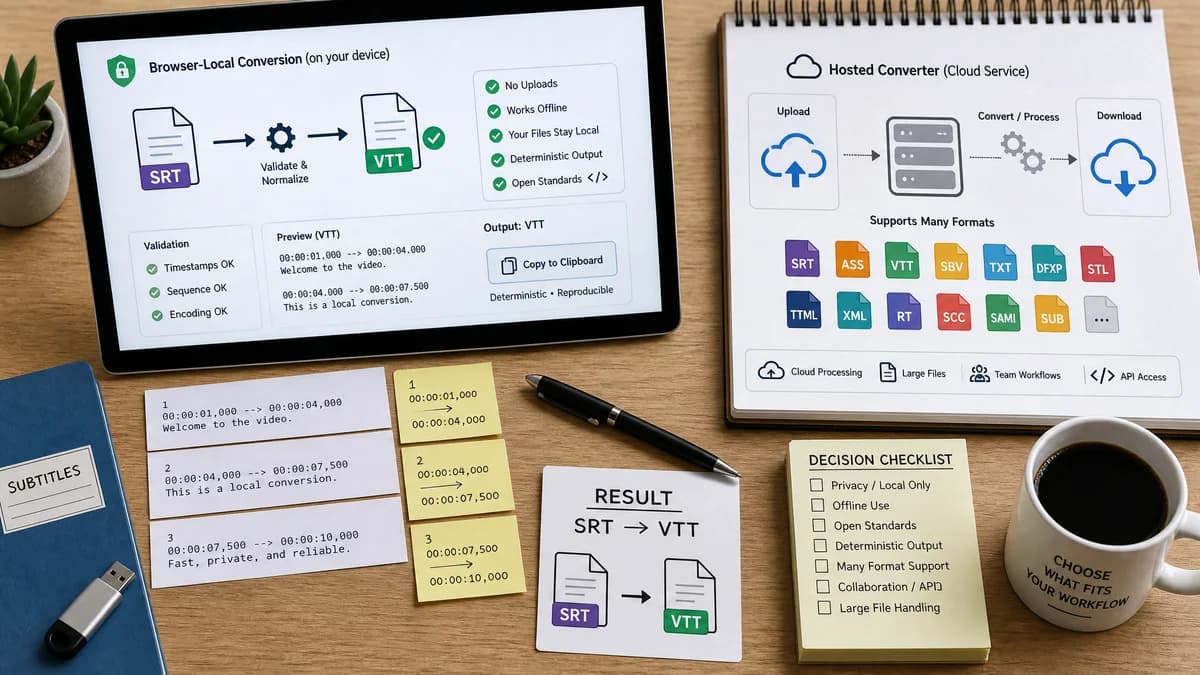
Why SRT to VTT Converter fits
TextFaker can offer a narrower browser-local alternative for SRT to WebVTT that emphasizes privacy, deterministic validation, and copyable output.
What GoTranscript Subtitle Converter offers
GoTranscript is useful when users want broad subtitle-format conversion in a hosted transcription-service ecosystem.
Open alternative signals
Processing model
SRT to VTT ConverterBrowser-local processing for subtitle text.
GoTranscript Subtitle ConverterHosted online conversion service.
Format scope
SRT to VTT ConverterFocused SRT to VTT conversion.
GoTranscript Subtitle ConverterLarge list of subtitle and document-like output formats.
Output inspection
SRT to VTT ConverterFull converted VTT text is visible and copyable.
GoTranscript Subtitle ConverterWorkflow emphasizes upload, conversion, and file retrieval.
Validation
SRT to VTT ConverterCan display deterministic cue and warning counts.
GoTranscript Subtitle ConverterGeneral converter may not expose parser internals.
Decision guide
Converting one existing SRT file to WebVTT locally with exact output and validation state.
Users who want many subtitle formats or who already use GoTranscript's transcription and caption services.
Side-by-side open source alternative comparison
| Decision point | SRT to VTT Converter | GoTranscript Subtitle Converter | Takeaway |
|---|---|---|---|
| Privacy | Our workflowSubtitle content can stay on the user's device. | Proprietary workflowA hosted converter receives the uploaded subtitle file. | Privacy is a clear TextFaker advantage for sensitive captions. |
| Breadth | Our workflowOne narrow conversion path. | Proprietary workflowMany subtitle formats and related outputs. | GoTranscript is better for multi-format delivery. |
| Simplicity | Our workflowPaste or upload SRT, inspect VTT, download file. | Proprietary workflowOnline converter flow may include source/target choices and broader format options. | TextFaker can reduce decisions for the common SRT-to-VTT job. |
| Diagnostics | Our workflowLine-level warnings and validation messages can be part of the UI. | Proprietary workflowConversion service focuses on producing files. | Diagnostics help users fix broken caption files. |
| Mobile | Our workflowTextarea-first responsive design can support small subtitle snippets and file upload. | Proprietary workflowGeneral converter pages can work in browsers but are less specialized for this one task. | A focused mobile layout is useful for general users. |
| Testing | Our workflowAutomated tests can assert exact WebVTT text and metadata. | Proprietary workflowExternal service behavior is outside the local test suite. | Deterministic UI state should be part of the implementation contract. |
Detailed research
Demand fit
GoTranscript appears in user-facing subtitle conversion searches and tutorials, making it a realistic comparison. The TextFaker version should focus on users who do not need a transcription provider, just a clean WebVTT file.
- SRT and VTT are widely used subtitle formats across video players and publishing platforms.
- Users discuss converter options when platforms reject or require specific subtitle formats.
- A local converter is especially relevant when caption text includes unpublished course, client, or internal material.
Implementation angle
The main technical work is not media processing; it is reliable text parsing and clear errors. This makes the tool a good fit for browser-only implementation.
- No server upload required.
- No video decoding required.
- Can support drag-and-drop .srt and paste input.
- Can generate downloadable .vtt through Blob and URL APIs.
Content guidance
Use plain-language examples that show the SRT comma timestamp becoming a WebVTT dot timestamp. Do not add developer-only framing.
- Mention YouTube, Vimeo, HTML5 players, LMS uploads, and course videos as user contexts.
- Avoid overpromising format repair beyond implemented warnings.
Validation path
Use a fixture with two cues and assert that the output begins with WEBVTT, contains two timestamp arrows, and has dot milliseconds.
- Invalid timestamp fixture should show a stable warning.
- Empty input fixture should show a stable validation message.
- Download button should be disabled until valid output exists.
Research notes
- GoTranscript's official SRT to VTT page describes a free online converter for transforming transcripts into video subtitles.
- Its broader subtitle converter lists many source and target formats, including SRT and WebVTT.
- Public creator discussions mention GoTranscript and similar tools as ways to convert subtitle or caption files without installing software.
Official source
The proprietary product link is included once here for source checking after the alternative analysis.
Official GoTranscript Subtitle Converter source