
SVG Color Extractor Replacer
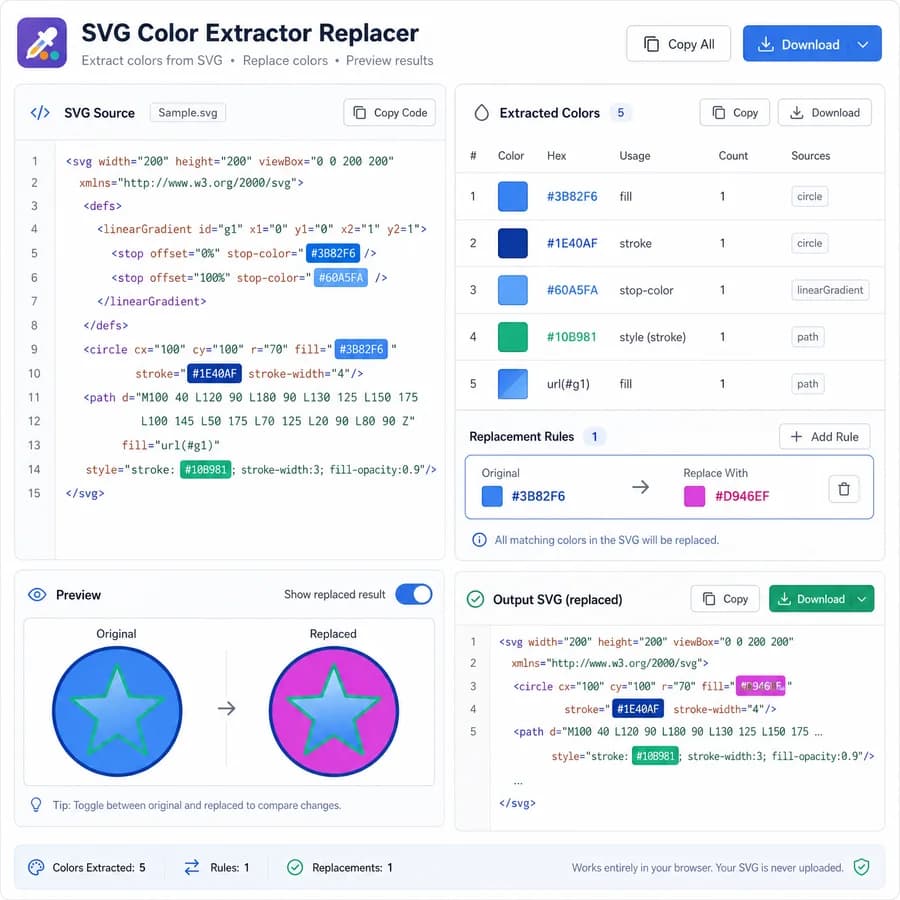
SVG Color Extractor Replacer finds color values in pasted SVG text or an uploaded .svg file directly in your browser.
Use it to extract colors from SVG, review an SVG color palette, replace SVG colors, and copy or download modified SVG text without using an SVG optimizer or metadata cleaner.
Upload an SVG
Select or drop one .svg file up to 2 MB. The SVG text is parsed and inspected locally in your browser.
Invalid SVG, unsupported files, locked previews, and valid SVGs with no supported color values do not consume a tool use.
Paste SVG code
SVG colors appear here
Paste SVG text or upload a .svg file to extract color tokens, inspect usage counts, and prepare replacement output.
This tool validates an SVG root and avoids injecting untrusted SVG markup into the page. It does not fully sanitize SVG, resolve external stylesheets, or compute every CSS variable and inherited paint value.
How To Extract And Replace SVG Colors
What this SVG color extractor reads
The tool validates pasted text or a selected .svg file as SVG/XML and requires an <svg> root before showing a palette. It inspects common SVG paint properties and practical inline CSS locations instead of treating the file as only a plain text search.
The extraction pass looks for presentation attributes, style attributes, and inline <style> declarations where color properties are visible in the SVG source. The SVG is kept as text output and is not injected into the page as trusted markup.
- Presentation attributes include fill, stroke, stop-color, flood-color, lighting-color, and color.
- Style attributes and practical inline CSS declarations are scanned for the same color properties.
- Special values such as none, transparent, currentColor, url(...), and var(...) are reported when found.
- Common color syntax such as hex, rgb, rgba, hsl, hsla, and practical named colors is normalized when possible.
Palette results and copy-all output
After a successful extraction, the green result card confirms that the SVG color result is ready and includes one copy icon for all visible result text. The palette below shows original tokens, normalized values when reliable, counts, properties, sources, and source context.
Grouping uses normalized colors when possible while preserving the original token for exact replacement. That helps when the same visual color appears as #f80 in one place and #ff8800 in another.
- Copy-all includes labeled lines for file name, color count, each palette entry, replacement rules, and modified SVG when present.
- Counts reflect discovered color-bearing declarations, not rendered pixels.
- Usage context helps distinguish attribute colors from style attributes and inline style rules.
- A valid SVG with no supported color values shows a normal empty state and does not consume a use.
Replacing SVG colors
The replacer uses explicit rules. Select an extracted original color token, enter a replacement with the color picker or text field, and add the rule. Multiple rules can be stacked before copying or downloading the modified SVG.
Replacement output is shown as SVG text so it can be reviewed before it is copied into code or saved as a .svg file. The tool preserves unrelated markup unless a selected token is matched by a replacement rule.
- Use the color picker for ordinary hex replacements.
- Use the text field for rgb(), hsl(), currentColor, CSS variables, or named color replacements.
- Reset rules returns the preview to the extracted source.
- Download .svg creates a local browser Blob file from the modified SVG text.
Privacy, success counting, and limits
SVG files can include private icon names, design-system classes, comments, visible text, links, and internal asset references. This tool reads the selected file locally in the browser and does not add a server route for SVG parsing or replacement.
The tool is not a full SVG sanitizer and does not compute the complete CSS cascade. External stylesheets, complex selectors, inherited values, and CSS variables may be reported as unresolved source tokens instead of final rendered colors.
- Unsupported uploads, empty input, invalid XML, and XML without an <svg> root do not consume a use.
- A successful use is recorded only after a valid SVG produces extracted color results.
- No-color SVGs are treated as a normal empty result.
- Use a dedicated sanitizer when the goal is to make unknown SVG safe for trusted embedding.