
SVG Metadata Remover
SVG Metadata Remover cleans pasted SVG text or an uploaded .svg file by removing comments, metadata blocks, XML declarations, doctypes, and safe editor-specific metadata in your browser.
Use this SVG comment remover to remove comments from SVG, clean SVG metadata, and get copy-ready cleaned SVG text with exact removal counts and byte-size changes.
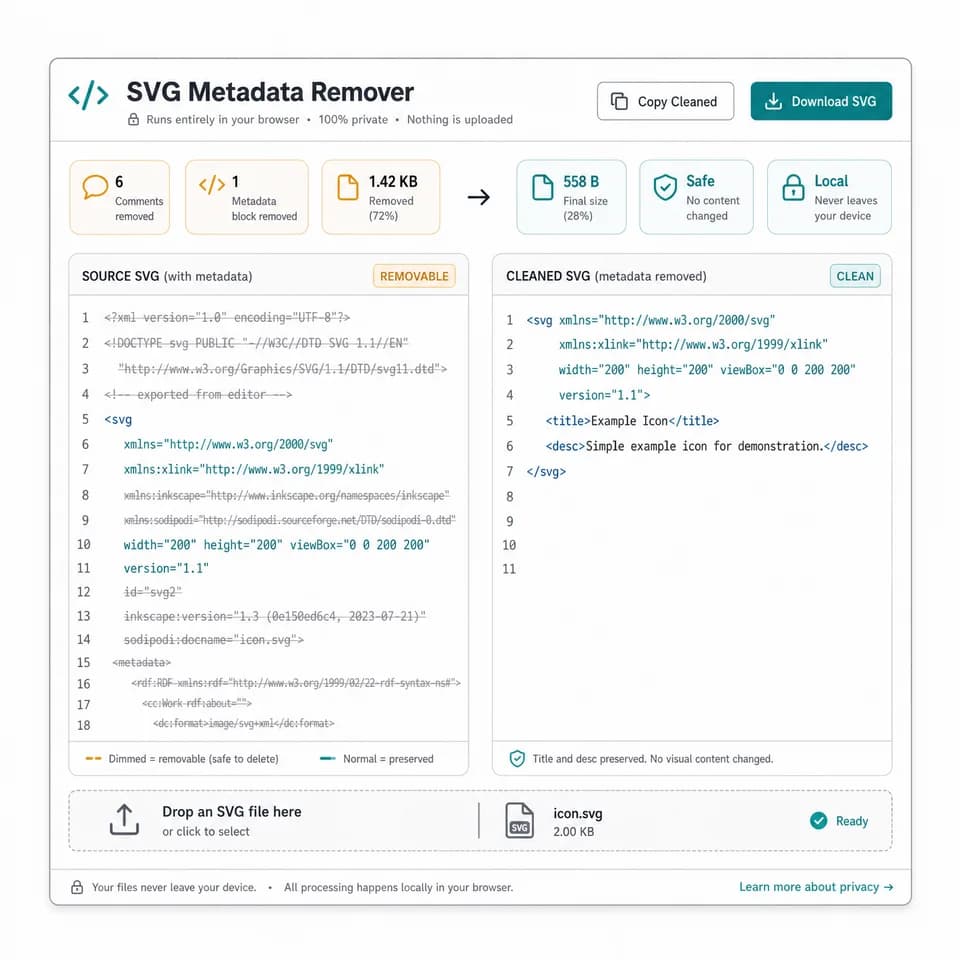
Upload an SVG
Select or drop one .svg file up to 2 MB. The file is read as text and cleaned locally in your browser.
Empty input, invalid XML, non-SVG roots, unsupported files, and locked previews do not consume a use. A use is recorded only after valid cleaned SVG output is produced.
Paste SVG code
Cleaned SVG appears here
Paste SVG text or upload a .svg file to remove metadata, comments, XML wrappers, and safe editor traces without minifying it.
This tool removes metadata-oriented SVG markup and avoids injecting untrusted SVG as inline HTML. It does not prove that an unknown SVG is safe to embed as trusted markup.
SVG Metadata Remover Help
What this SVG metadata cleaner removes
The tool removes metadata-oriented SVG markup while leaving drawing geometry, viewBox, paths, fills, gradients, masks, symbols, links, IDs, and ARIA attributes alone. It is cleanup for source handoff and review, not a minifier or compressor.
Default cleanup removes XML comments, <metadata> elements, XML declarations, doctypes, and common editor metadata elements or attributes when they are clearly namespaced as editor or metadata data.
- Comments removed is counted from XML comment nodes.
- Metadata elements removed is counted from <metadata> elements.
- Editor metadata counts include safe namespaced traces such as Inkscape or Sodipodi attributes.
- Original size, cleaned size, bytes removed, and percent removed use UTF-8 byte counts.
Paste or upload validation
Paste SVG text directly or choose a single .svg file. The browser parses the input as SVG/XML, rejects parser errors, and requires the document root to be an <svg> element before a cleaned output is produced.
Empty input, unsupported uploads, invalid XML, and XML without an SVG root do not count as successful tool uses. A use is recorded only after valid cleaned SVG output is ready.
- Supported upload: one .svg file up to 2 MB.
- The SVG contents are read locally in the browser.
- No server route is needed for the cleanup.
- Malformed SVG should be fixed in the source editor before retrying.
Accessibility-related title and desc
<title> and <desc> are not treated as ordinary editor metadata by default. They can provide accessible names and descriptions for meaningful SVG graphics, so the tool preserves both unless you deliberately uncheck those options.
If you remove <title> or <desc>, the result may be less understandable to assistive technology users. Use removal only for decorative SVGs or when the accessible name and description are supplied somewhere else.
- Preserve <title> is checked by default.
- Preserve <desc> is checked by default.
- Removed accessibility elements are counted separately from metadata elements.
- Review important icons and diagrams before shipping cleaned SVG.
Output and copy actions
After a successful cleanup, the green result card confirms that the cleaned SVG is ready and includes a copy icon for all visible result text. The full cleaned SVG remains below the card for review, direct copying, and download.
Copy-all includes labeled lines for file name, removed comments, removed metadata elements, editor metadata counts, accessibility removals, XML declaration and doctype removal, byte sizes, percent removed, and the cleaned SVG text.
- Use Copy SVG when you only need the cleaned markup.
- Use Download .svg to save a browser-created file.
- Byte savings are reported as a measurement, not as an optimization promise.
- The output is kept as text rather than injected as inline SVG markup.
Cleanup is not security sanitization
Removing SVG metadata and comments does not make an unknown SVG safe. SVG files can still contain links, external references, scripts, event attributes, animation, styles, embedded images, or visible text that require separate review.
Use a dedicated SVG sanitizer and a safe embedding policy when security is the goal. This page is for removing metadata, removing comments from SVG, and cleaning editor residue before code review, handoff, or sharing.
- The tool avoids inline preview injection of untrusted SVG.
- Metadata cleanup is different from sanitizing active content.
- License or attribution comments may be removed; keep required notices elsewhere.
- Use SVG Optimizer separately when you want minification or compression.