
Transparent Margin Trimmer vs Adobe Express Crop PNG
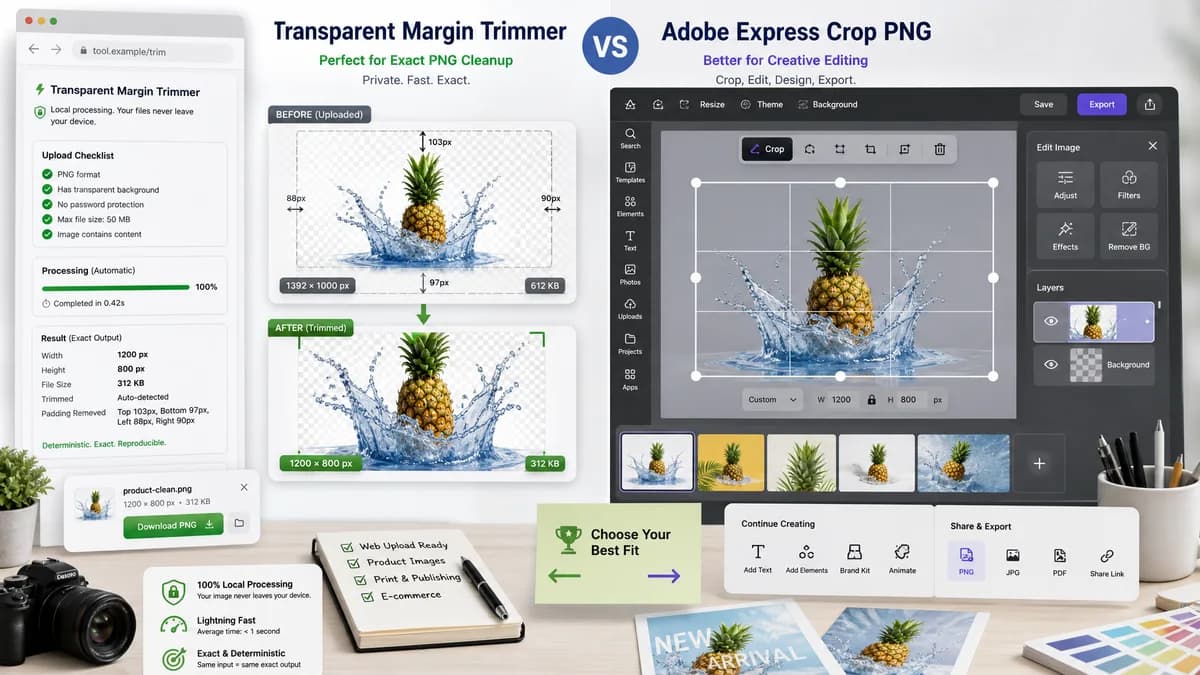
Transparent Margin Trimmer is the baseline in this comparison: Remove empty transparent space around logos, stickers, sprites, screenshots, and product cutouts without uploading the image.
Adobe Express offers a free PNG cropper where users upload a PNG, drag crop handles, and download or continue editing.
Quick verdict
Adobe Express is better for creative editing, while TextFaker should win for privacy, speed, and deterministic transparent-margin cleanup.
How Transparent Margin Trimmer fits
Transparent Margin Trimmer should be a narrow utility for automatic transparent-margin removal with local processing and exact numeric output, rather than a broad creative editor.
How Adobe Express Crop PNG fits
Adobe Express is a polished general-user design tool for manual crop and continued editing inside the Adobe Express ecosystem.
Side-by-side comparison
| Decision point | Transparent Margin Trimmer | Adobe Express Crop PNG | Takeaway |
|---|---|---|---|
| Workflow scope | Our workflowSingle-purpose transparent-margin detection and output. | Competitor workflowManual crop followed by optional continued editing. | TextFaker should stay utility-first. |
| Crop interaction | Our workflowNo manual crop handles required for the primary operation. | Competitor workflowUsers drag handles to create the desired crop. | Automatic trim is better for invisible transparent padding. |
| Privacy | Our workflowProcess supported files locally in the browser. | Competitor workflowAdobe Express is an online service workflow. | Local processing should be stated near upload. |
| Output report | Our workflowShows exact trim bounds, margins removed, output dimensions, and MIME. | Competitor workflowAdobe Express emphasizes quick crop and download, not a numeric trim report. | TextFaker can serve users who need evidence of what changed. |
| Mobile | Our workflowAutomatic operation works with minimal touch precision. | Competitor workflowAdobe Express is designed as a broad web editor, including mobile-friendly use cases across the platform. | TextFaker's simpler touch flow is easier to test and use. |
| User intent | Our workflowClean exported assets, logos, icons, stickers, product cutouts, and screenshots. | Competitor workflowCrop a PNG to improve framing or continue designing. | TextFaker should focus on asset cleanup rather than composition. |
Use Transparent Margin Trimmer when
- Automatic tight cropping of transparent PNG/WebP assets
- Users who do not want a full editor
- Local processing and measurable output
Use Adobe Express Crop PNG when
- Creative crop composition
- Users who want to keep editing after crop
- People already working in Adobe Express
Detailed comparison
Demand signal
Adobe's own community forums contain questions about transparent pixel trimming and exact canvas cleanup. That indicates Adobe users encounter this problem even when they have access to larger editors.
- Users ask for Photoshop-like trim commands.
- Users say manual crop is not as exact as trim.
- Users need help after background removal.
Competitive frame
Adobe Express is not a direct transparent-margin trimmer; it is a broad editor. The TextFaker page should avoid trying to look like a design suite and instead feel like a fast measurement and cleanup tool.
- No templates needed.
- No asset library needed.
- No account-dependent workflow needed.
Implementation guidance
Because TextFaker is local, the UI can promise that files stay in the browser. This is valuable for private brand assets, draft product images, and internal screenshots.
- Use client-side canvas only.
- Do not send file contents to analytics.
- Show local-processing copy in validation.
Testing guidance
Automated tests can cover the full happy path with a synthetic PNG file and can verify that the generated output dimensions match the reported dimensions.
- Upload fixture.
- Wait for success status.
- Compare UI dimensions to decoded output Blob dimensions.
Research notes
- Adobe Express is a major adjacent competitor for general users searching for PNG crop tools.
- Adobe Community threads provide direct demand evidence for transparent trim behavior that broad editors do not always make obvious.
- TextFaker should use the Adobe gap as positioning: exact transparent-margin cleanup, no full editor required.
Official source
The only outbound competitor link on this page is placed here for source checking after the comparison.
Official Adobe Express Crop PNG source