
Transparent Margin Trimmer vs Folge Trim Transparent Pixels
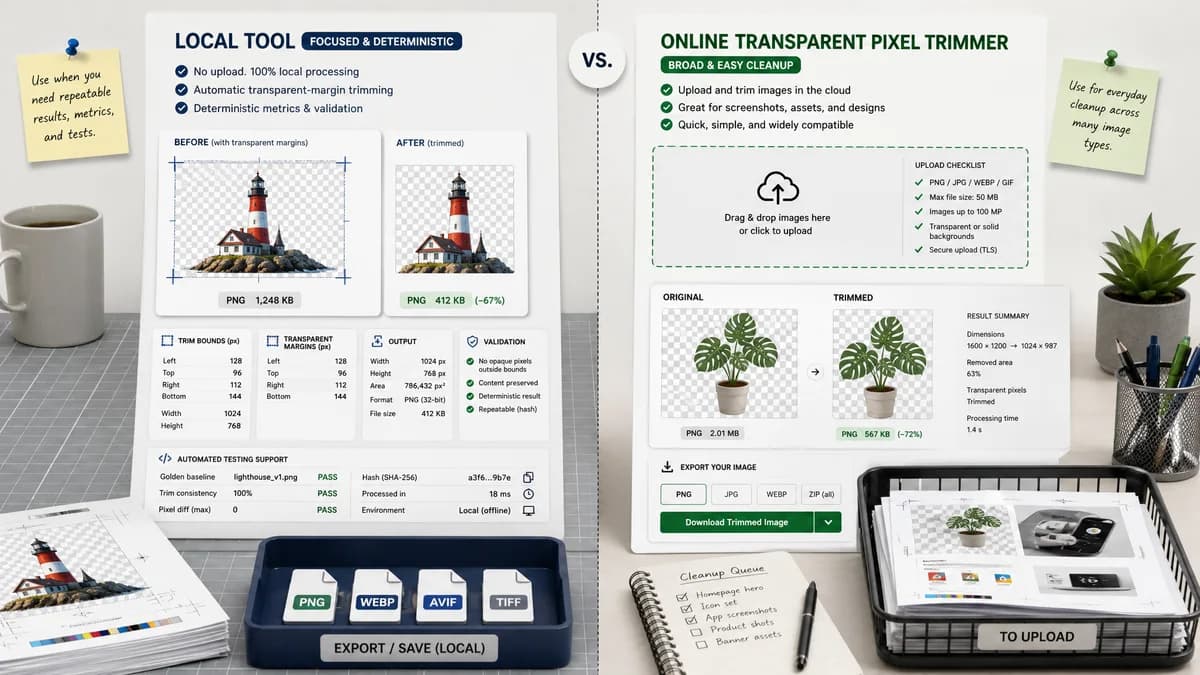
Transparent Margin Trimmer is the baseline in this comparison: Remove empty transparent space around logos, stickers, sprites, screenshots, and product cutouts without uploading the image.
Folge provides a transparent-pixel trimming tool for PNG and WebP files with side-by-side original and trimmed views.
Quick verdict
Folge validates the same general-user cleanup workflow. TextFaker should emphasize no-upload local processing, richer numeric output, and automated testing support.
How Transparent Margin Trimmer fits
Transparent Margin Trimmer should provide automatic local trimming plus deterministic metrics for trim bounds, transparent margins, output size, and validation outcomes.
How Folge Trim Transparent Pixels fits
Folge focuses on removing unnecessary transparent borders from screenshots, design assets, and images with transparent backgrounds.
Side-by-side comparison
| Decision point | Transparent Margin Trimmer | Folge Trim Transparent Pixels | Takeaway |
|---|---|---|---|
| Supported formats | Our workflowBrowser-decodable PNG and WebP initially, with clear unsupported-format validation. | Competitor workflowFolge lists PNG and WebP with transparency and a maximum file size. | TextFaker should be explicit about supported browser decoding and limits. |
| File size limits | Our workflowCan avoid server upload limits by processing locally, constrained mainly by browser memory. | Competitor workflowFolge lists a 5MB maximum file size. | Local processing can reduce artificial limits, while still showing browser memory guidance. |
| Preview | Our workflowShow preview plus numeric report; preview is secondary to deterministic values. | Competitor workflowFolge describes original and trimmed versions side by side. | TextFaker should not rely on visual comparison alone. |
| Output format | Our workflowOffer PNG default and optional browser-supported WebP export with MIME checks. | Competitor workflowFolge lets users choose an output format. | Both can support flexible output; TextFaker should verify generated files. |
| Use-case clarity | Our workflowLogos, icons, screenshots, stickers, product cutouts, and app assets. | Competitor workflowFolge names screenshots and design assets. | The overlap reinforces the general-user positioning. |
| Automation | Our workflowExpose a result object suitable for tests and copyable JSON-like summary. | Competitor workflowThe competitor appears built for manual use. | Testability is a TextFaker advantage. |
Use Transparent Margin Trimmer when
- Users who need exact trim diagnostics
- Privacy-conscious cleanup of design assets
- Mobile users who want automatic results without manual crop handles
Use Folge Trim Transparent Pixels when
- Users who want a simple demo and side-by-side preview
- Small PNG/WebP files with transparent borders
- Screenshot and design asset cleanup
Detailed comparison
Demand signal
Folge's page repeats a practical problem seen in community support: transparent borders make exported assets awkward in layouts. Public threads confirm users want one command rather than manual crop guessing.
- Transparent margins are common after background deletion.
- Screenshots and design assets often export with excess canvas.
- Exact output dimensions matter for placement.
UX notes
The main TextFaker workflow should be upload, inspect automatic result, download. Advanced settings can be limited to alpha threshold and optional keep-padding controls.
- Keep the first screen functional on mobile.
- Show validation status immediately after decoding.
- Make download disabled until a valid trimmed output exists.
Implementation guidance
Implement deterministic bounds by reading the alpha channel only. Do not infer from checkerboard previews or CSS background; those are display artifacts, not image data.
- Calculate left as first column with content.
- Calculate top as first row with content.
- Calculate right and bottom from the last content column and row.
Testing guidance
Use generated fixture images where the content rectangle is known. Tests should assert both the UI text and the generated image dimensions.
- Fixture: 10px transparent border around opaque square.
- Fixture: no transparent border.
- Fixture: fully transparent image.
Research notes
- Folge is a close direct competitor and confirms demand around screenshots and design assets.
- Adobe Community and Super User threads show users describing the same problem in desktop tools.
- TextFaker should use deterministic state labels so tests do not depend on screenshots.
Official source
The only outbound competitor link on this page is placed here for source checking after the comparison.
Official Folge Trim Transparent Pixels source