
Transparent Margin Trimmer vs iLoveIMG Crop PNG
Transparent Margin Trimmer is the baseline in this comparison: Remove empty transparent space around logos, stickers, sprites, screenshots, and product cutouts without uploading the image.
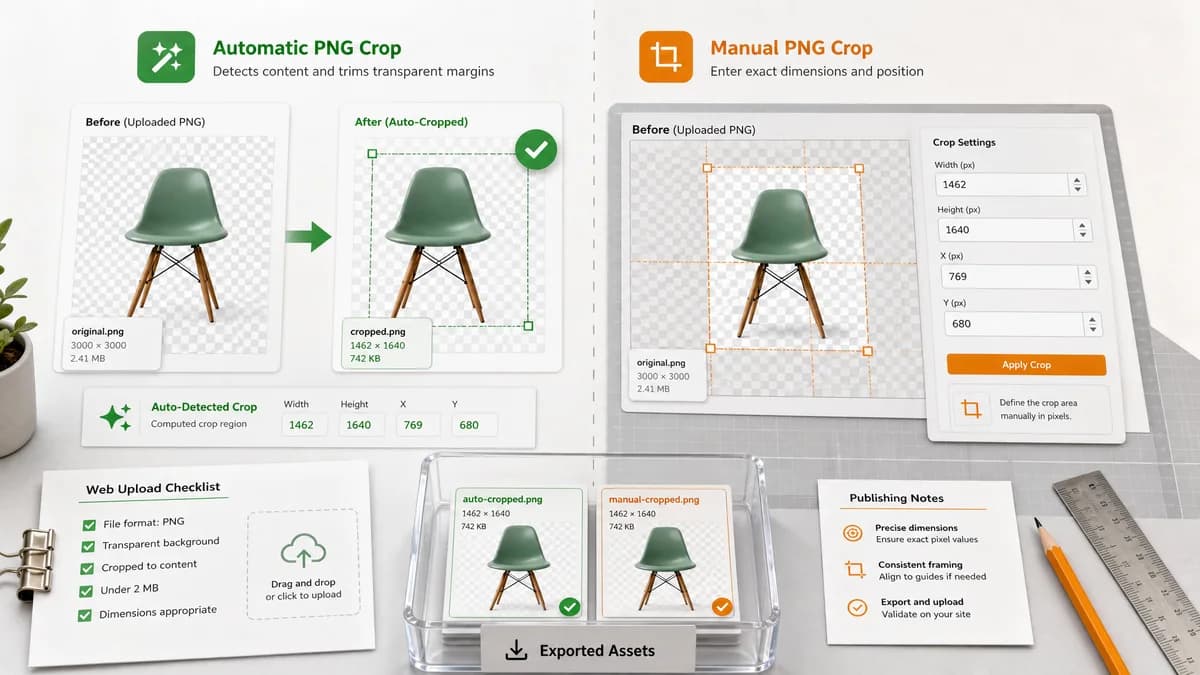
iLoveIMG provides a PNG cropper where users define a crop rectangle using width, height, X, and Y fields.
Quick verdict
iLoveIMG's numeric fields validate that users understand pixel crop data. TextFaker should compute those fields automatically for transparent margins.
How Transparent Margin Trimmer fits
Transparent Margin Trimmer should automatically calculate the crop rectangle from non-transparent pixels, then display the same kind of concrete numbers without requiring the user to enter them.
How iLoveIMG Crop PNG fits
iLoveIMG is a popular image utility workflow for manually cropping PNG images by defining pixel dimensions and position.
Side-by-side comparison
| Decision point | Transparent Margin Trimmer | iLoveIMG Crop PNG | Takeaway |
|---|---|---|---|
| Crop rectangle | Our workflowComputed automatically from alpha channel bounds. | Competitor workflowUser enters or adjusts width, height, X, and Y crop options. | TextFaker removes the need to calculate or guess coordinates. |
| Deterministic values | Our workflowReports computed x, y, width, height, margins, and final dimensions. | Competitor workflowExposes crop option fields that can be numeric. | TextFaker should preserve the benefit of numeric crop data. |
| Privacy | Our workflowRuns locally in the browser. | Competitor workflowThe page presents an upload-and-process web service flow with cloud import options. | Local processing is a meaningful differentiator. |
| Cloud integrations | Our workflowLocal file selection and browser download only for MVP. | Competitor workflowThe page includes computer, Google Drive, and Dropbox upload options. | iLoveIMG is broader; TextFaker should keep privacy and simplicity. |
| Transparency-specific behavior | Our workflowPurpose-built around transparent margins and alpha validation. | Competitor workflowPNG cropper, not specifically an automatic alpha-margin detector. | TextFaker fits the transparent-padding use case better. |
| Testing path | Our workflowKnown fixtures produce known computed crop fields. | Competitor workflowManual field input can be tested, but not automatic transparent-margin detection. | TextFaker should use computed crop data as its test contract. |
Use Transparent Margin Trimmer when
- Automatic transparent-margin removal
- Users who do not know the crop X/Y values
- Repeatable local output with exact metrics
Use iLoveIMG Crop PNG when
- Manual crop rectangles with explicit pixel fields
- Users already using iLoveIMG's broader image tools
- Cases requiring a deliberate crop rather than tight alpha bounds
Detailed comparison
Demand signal
iLoveIMG's crop interface confirms users need pixel-level crop controls. Community questions show a more specific need: automatically finding those pixel values when the surrounding area is transparent.
- Users may know they need a tight PNG but not the exact coordinates.
- Transparent areas can make manual cropping hard to judge.
- Pixel fields are useful once computed.
Product positioning
TextFaker should phrase the tool as an automatic transparent crop calculator and downloader. This makes it adjacent to crop tools but more precise for alpha-edge cleanup.
- Show the computed crop rectangle prominently.
- Allow copying the bounds.
- Download the trimmed PNG.
Implementation guidance
The bounds calculation can also power an optional 'copy crop data' feature for users who need to reproduce the crop in other tools.
- Copy x, y, width, height.
- Copy removed margins.
- Copy original and output dimensions.
QA guidance
Since iLoveIMG-like fields are numeric, TextFaker can make automated assertions easy by exposing all computed values as text and data attributes.
- Assert field text after upload.
- Assert download button enabled only after success.
- Assert no-trim status for already tight images.
Research notes
- iLoveIMG is adjacent because it exposes crop geometry, but users still need to set it manually.
- Community demand points to automatic transparent-pixel detection as the missing layer.
- TextFaker can combine automatic detection with explicit geometry reporting.
Official source
The only outbound competitor link on this page is placed here for source checking after the comparison.
Official iLoveIMG Crop PNG source