
Transparent Margin Trimmer vs Image Online Tools Trim Transparent Pixels
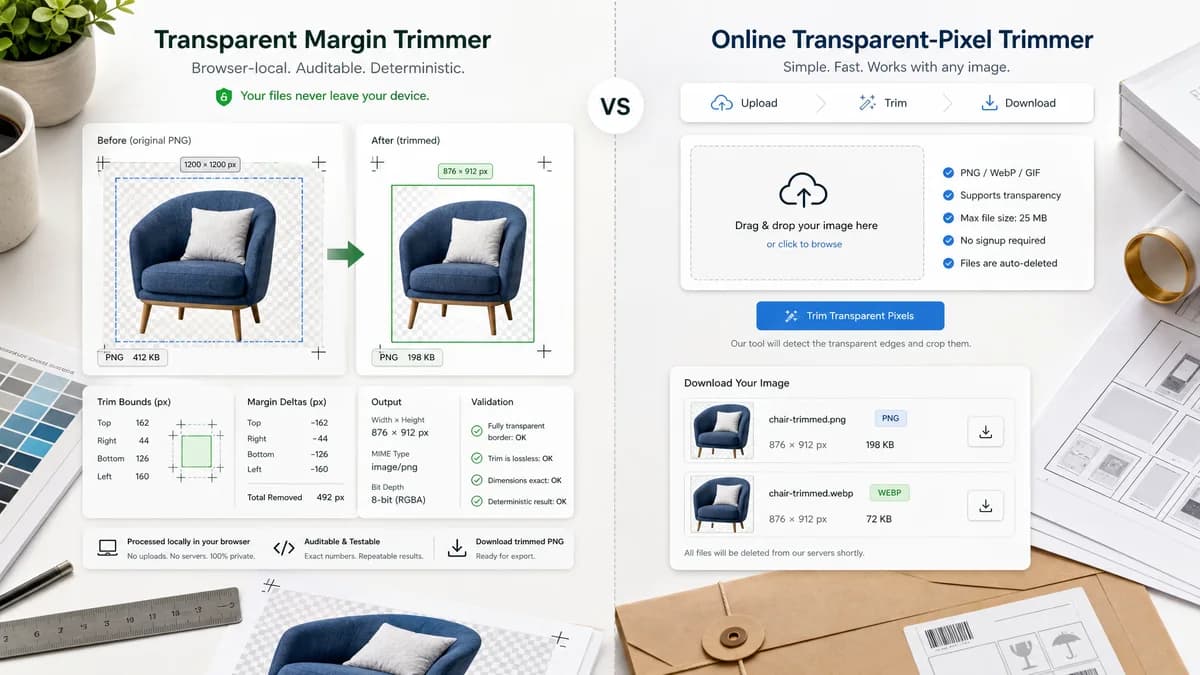
Transparent Margin Trimmer is the baseline in this comparison: Remove empty transparent space around logos, stickers, sprites, screenshots, and product cutouts without uploading the image.
Image Online Tools provides a focused page for trimming transparent space around images and downloading the trimmed result.
Quick verdict
TextFaker can compete by making the invisible operation auditable: show the exact pixel rectangle and margin deltas, preserve privacy through local processing, and provide mobile-friendly deterministic validation messages.
How Transparent Margin Trimmer fits
Transparent Margin Trimmer should run entirely in the browser and expose exact trim bounds, transparent margin sizes, output dimensions, MIME type, and downloadable output so tests can verify the result numerically.
How Image Online Tools Trim Transparent Pixels fits
Image Online Tools is a simple upload, trim, and download tool aimed at users who need to remove transparent borders quickly.
Side-by-side comparison
| Decision point | Transparent Margin Trimmer | Image Online Tools Trim Transparent Pixels | Takeaway |
|---|---|---|---|
| Processing model | Our workflowBrowser-local canvas processing with no upload required. | Competitor workflowThe page describes uploading an image into the tool and trimming it in the canvas. | TextFaker should make local processing explicit in UI and test copy. |
| Trim method | Our workflowScan alpha pixels using a configurable threshold and compute a precise bounding box. | Competitor workflowThe tool removes transparent space around images with a trim button. | A visible threshold and bounding-box report would make TextFaker more predictable. |
| Deterministic output | Our workflowReport left, top, right, bottom margins removed plus original and final dimensions. | Competitor workflowThe visible flow focuses on preview and download, not a detailed numeric audit. | Numeric output is a clear differentiation point. |
| Formats | Our workflowPrioritize browser-decodable PNG and WebP, with validation for missing alpha or unsupported formats. | Competitor workflowThe page describes trimming images but is positioned around transparent image cleanup. | TextFaker should provide explicit format and alpha validation messages. |
| Mobile friendliness | Our workflowUse large upload/drop controls, single-column reports, and direct file download names. | Competitor workflowThe tool appears simple, but the page does not emphasize mobile reporting details. | Mobile layout can be part of TextFaker's product promise. |
| Testing path | Our workflowUse generated fixture PNGs with known transparent margins and assert bounds and output dimensions. | Competitor workflowThe competitor workflow is visually verifiable but does not expose a testing contract. | TextFaker should be built around machine-checkable results. |
Use Transparent Margin Trimmer when
- Privacy-sensitive image cleanup where the file should not leave the browser
- Users who need exact trim bounds and output dimensions
- Automated QA around transparent PNG/WebP assets
Use Image Online Tools Trim Transparent Pixels when
- Fast one-off transparent-border trimming
- Users who want a very simple upload and download flow
- Desktop users who do not need a detailed numeric report
Detailed comparison
Demand signal
Public support threads show users repeatedly trying to remove transparent margins after background removal or layer export. The pain is that transparent padding is invisible until the asset is placed in another layout.
- Adobe Community users ask for exact trim behavior similar to Photoshop Image > Trim.
- Super User users ask how to throw away outside transparent pixels in GIMP.
- A Reddit side-project post positions local browser auto-trimming as useful enough to publish as a standalone tool.
Product gap
Image Online Tools solves the core task, but the opportunity for TextFaker is to turn the result into a transparent, copy-ready report rather than only a before/after visual operation.
- Show trim rectangle as x, y, width, and height.
- Show removed margins for each side.
- Show output dimensions before download.
Implementation guidance
Decode the image with browser APIs, draw to canvas, read RGBA data, scan rows and columns for alpha above threshold, and crop to the computed bounds. Handle all-transparent images with a deterministic validation state instead of producing an ambiguous output.
- Default threshold: alpha greater than 0 counts as content.
- Optional threshold: 1-255 for semi-transparent edge handling.
- Return validation messages for no alpha, all transparent, unsupported file, and no trim needed.
SEO angle
Use language around remove transparent margins, trim transparent pixels, crop transparent PNG, remove PNG padding, and clean up logo/icon transparent space. These match both competitor pages and user discussion phrasing.
- Target general users, designers, shop owners, and content creators.
- Emphasize local browser processing and no upload.
- Avoid developer-only framing.
Research notes
- Demand proof: Adobe Community users ask for a command to trim transparent pixels after deleting backgrounds and exporting PNGs.
- Demand proof: Super User users ask how to discard surrounding transparent pixels and get a tight canvas in GIMP.
- Demand proof: Reddit discussion frames a local browser auto-trim tool as useful because it preserves transparency and avoids upload limits.
- Competitor evidence: Image Online Tools has a dedicated transparent-pixel trimming page with upload, trim, and download steps.
Official source
The only outbound competitor link on this page is placed here for source checking after the comparison.
Official Image Online Tools Trim Transparent Pixels source