
Transparent Margin Trimmer vs ImageOnline.io Trim Transparent Pixels
Transparent Margin Trimmer is the baseline in this comparison: Remove empty transparent space around logos, stickers, sprites, screenshots, and product cutouts without uploading the image.
ImageOnline.io offers a PNG trim tool that scans an image and crops transparent pixels to the smallest possible size while preserving visible content.
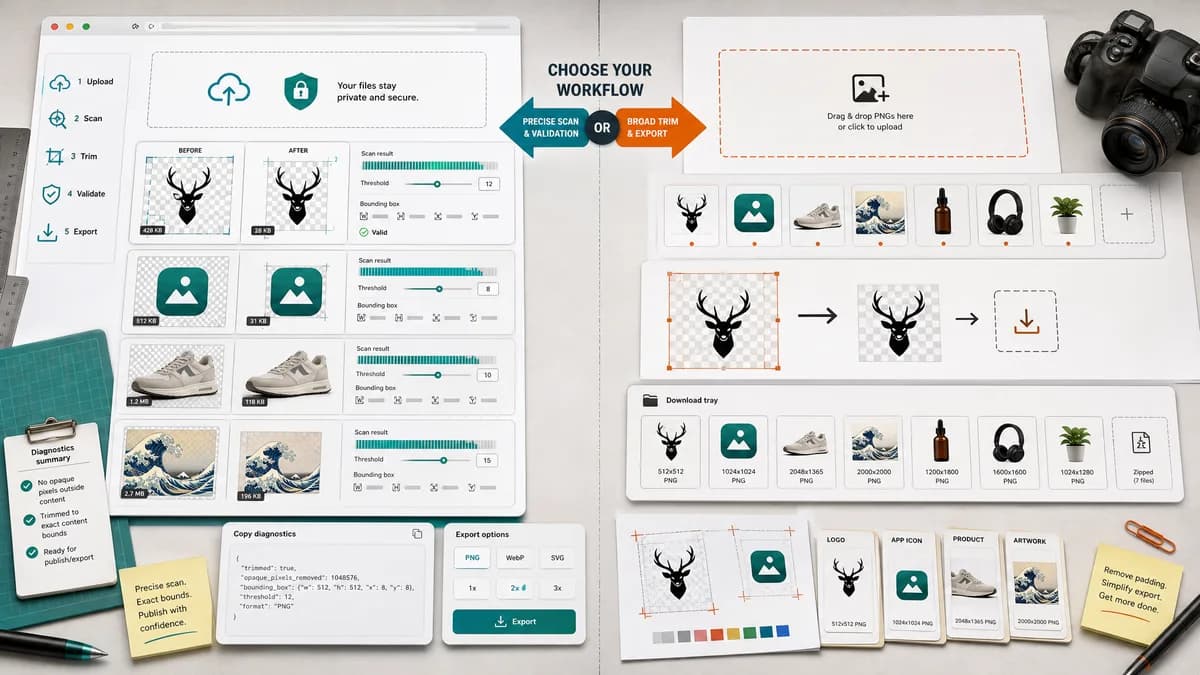
Quick verdict
TextFaker should mirror the practical use cases but add stronger local privacy, threshold control, and copy-ready diagnostics.
How Transparent Margin Trimmer fits
Transparent Margin Trimmer should provide the same automatic transparent-border removal while exposing exact alpha-scan results and validation messages that can be tested without human visual judgment.
How ImageOnline.io Trim Transparent Pixels fits
ImageOnline.io is positioned around removing padding from PNG files for logos, icons, app assets, product photos, and digital artwork.
Side-by-side comparison
| Decision point | Transparent Margin Trimmer | ImageOnline.io Trim Transparent Pixels | Takeaway |
|---|---|---|---|
| Task specificity | Our workflowDedicated transparent-margin trimmer, not a general cropper. | Competitor workflowDedicated transparent-pixel and PNG padding remover. | The competitor validates a focused page, not just a generic crop page. |
| Bounds reporting | Our workflowExpose the smallest non-transparent bounding rectangle. | Competitor workflowThe page explains that it crops to the smallest possible size but does not foreground a numeric bounds report. | TextFaker can make the algorithm visible. |
| Alpha threshold | Our workflowAllow deterministic threshold selection for semi-transparent edge pixels. | Competitor workflowThe page describes transparent pixels generally. | Threshold control addresses edge cases discussed in user forums. |
| Output formats | Our workflowExport PNG by default and optionally WebP when browser support is available, with explicit MIME verification. | Competitor workflowThe page mentions downloading optimized output in PNG or WebP format. | Both can support practical web formats; TextFaker should verify generated blobs. |
| Privacy | Our workflowLocal-only browser processing should be a core claim. | Competitor workflowThe page is an online upload workflow. | Privacy is a simple differentiator for TextFaker. |
| Validation messages | Our workflowReport no alpha, no transparent margin, all transparent, decode failure, and successful trim. | Competitor workflowThe competitor describes ideal successful use cases. | TextFaker should make failure states first-class. |
Use Transparent Margin Trimmer when
- Users needing exact trim math
- Browser-local cleanup of private logos or product cutouts
- QA workflows that compare dimensions and margin deltas
Use ImageOnline.io Trim Transparent Pixels when
- Users searching for remove PNG padding
- Quick PNG/WebP export after automatic trimming
- Common logo and icon cleanup workflows
Detailed comparison
Demand signal
ImageOnline.io's copy names real non-technical use cases: logos, icons, app assets, product photos, and digital artwork. These align with public community questions about exported assets containing extra transparent canvas.
- Users want visible content to fill the asset bounds.
- Users want exact dimensions when using images in layouts.
- Users want transparency preserved.
Differentiation
A TextFaker implementation should not merely trim and download. It should return a concise report that a user can trust and that automated tests can assert.
- Display original dimensions.
- Display removed transparent margins.
- Display final dimensions and file size.
Algorithm
Scan from each edge until any pixel meets the content condition. A pixel counts as content when alpha is greater than the selected threshold baseline. Crop using the inclusive min/max non-transparent coordinates.
- Use Uint8ClampedArray from canvas ImageData.
- Handle high-DPI display separately from pixel data.
- Do not use CSS preview size for calculations.
Content strategy
Use phrasing from the market: trim transparent pixels, remove space around PNG, remove padding from PNG, crop transparent edges, and clean exported logo or icon files.
- Keep the title plain and utility-focused.
- Use deterministic examples in FAQs.
- Mention local processing near the upload control.
Research notes
- ImageOnline.io gives strong market-language evidence for the tool page keywords and use cases.
- Adobe and GIMP user discussions show why automatic trimming is needed when manual cropping is too imprecise.
- The TextFaker implementation should treat the numeric trim report as the main value add.
Official source
The only outbound competitor link on this page is placed here for source checking after the comparison.
Official ImageOnline.io Trim Transparent Pixels source