
Transparent Margin Trimmer vs Online PNG Tools Crop PNG
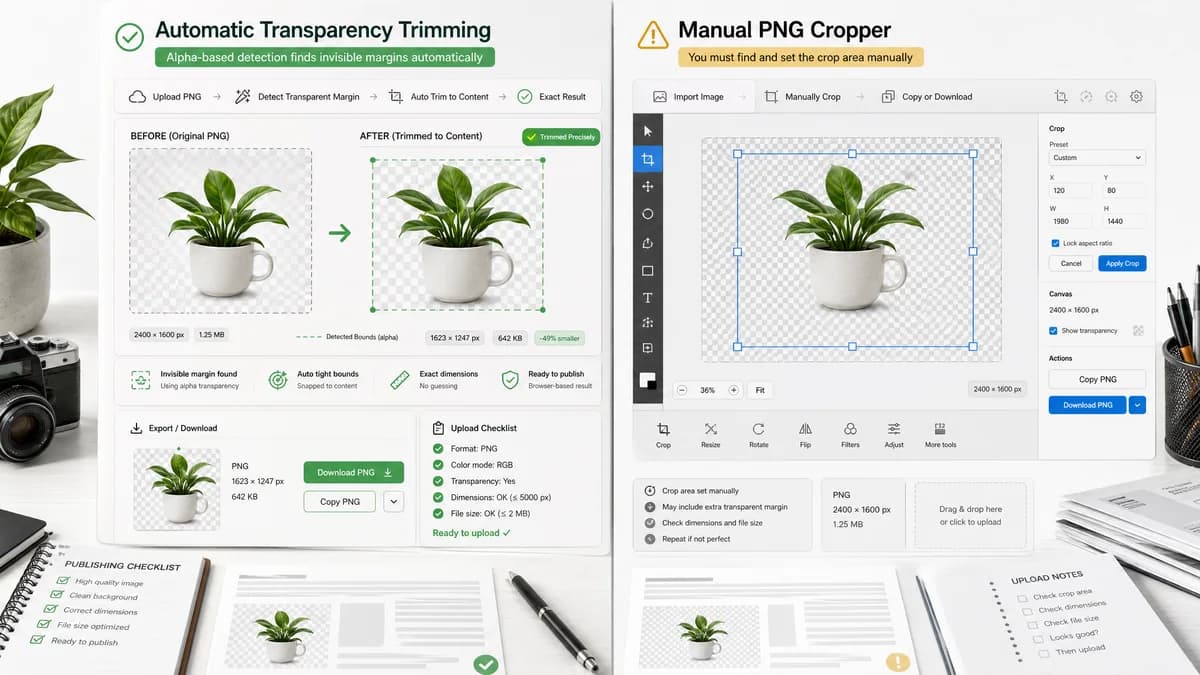
Transparent Margin Trimmer is the baseline in this comparison: Remove empty transparent space around logos, stickers, sprites, screenshots, and product cutouts without uploading the image.
Online PNG Tools offers a PNG cropper with import, crop, copy, and download functions in a browser-based utility interface.
Quick verdict
Manual PNG croppers are adjacent but less direct. TextFaker should target users who do not know the crop rectangle because the transparent area is invisible.
How Transparent Margin Trimmer fits
Transparent Margin Trimmer should be more automatic than a manual cropper, using alpha data to find the tight content bounds and reporting the exact result.
How Online PNG Tools Crop PNG fits
Online PNG Tools is a broad PNG utility site whose cropper lets users crop PNG images and export the result.
Side-by-side comparison
| Decision point | Transparent Margin Trimmer | Online PNG Tools Crop PNG | Takeaway |
|---|---|---|---|
| Crop selection | Our workflowAutomatically computes crop rectangle from alpha channel. | Competitor workflowProvides a manual PNG cropper workflow. | TextFaker is better for invisible transparent margins. |
| User effort | Our workflowOne upload plus optional threshold adjustment. | Competitor workflowUser must define or adjust the crop area. | Automatic trim reduces guesswork. |
| Transparency handling | Our workflowPreserves alpha in PNG output by default. | Competitor workflowThe tool is PNG-specific and outputs cropped PNG. | Both are suitable for PNG transparency, but TextFaker is more specialized. |
| Result metrics | Our workflowReports exact margins removed and output dimensions. | Competitor workflowThe interface includes output controls but public copy does not emphasize a trim report. | TextFaker's metrics support QA workflows. |
| Mobile suitability | Our workflowAvoids drag precision for the core operation. | Competitor workflowManual crop interfaces can be harder on small touch screens. | Automatic operation is a mobile advantage. |
| Validation path | Our workflowCan be tested with known alpha-bound fixtures. | Competitor workflowManual crop behavior depends on selected coordinates. | TextFaker is easier to test deterministically. |
Use Transparent Margin Trimmer when
- Automatic removal of invisible transparent padding
- Users who want bounds computed from alpha pixels
- Repeatable asset cleanup without manual crop coordinates
Use Online PNG Tools Crop PNG when
- Manual cropping to a chosen rectangle
- Users who need copy/download output in a PNG utility interface
- Cases where the desired crop is not simply the visible content bounds
Detailed comparison
Demand signal
The existence of many PNG croppers shows broad demand for browser image trimming, while community questions narrow the need to automatic removal of transparent outside pixels.
- Transparent margins are not always easy to see.
- Manual crop rectangles can be inaccurate.
- Users often want the tight bounding box, not a creative crop.
Differentiation
TextFaker should not compete as another general cropper. It should explicitly promise transparent-margin detection and exact dimensions.
- No drag handles required for primary workflow.
- Alpha threshold control is more relevant than aspect-ratio presets.
- The output report should be visible before download.
Implementation guidance
The crop rectangle should be based on image pixels, not user-selected UI coordinates. This avoids device scaling, zoom, and touch precision problems.
- Use natural image width and height.
- Scan alpha channel in source pixel space.
- Render cropped output from source coordinates.
Testing guidance
A deterministic trimmer can be covered by unit and integration tests more easily than a manual crop editor.
- Known input: 100x80 with content from x=10 to 79 and y=5 to 69.
- Expected bounds: x=10, y=5, width=70, height=65.
- Expected removed margins: left 10, top 5, right 20, bottom 10.
Research notes
- Online PNG Tools is an adjacent competitor because users may search for crop PNG when they actually need transparent margin removal.
- Super User and Adobe Community questions support positioning the tool as automatic and exact rather than manual.
- TextFaker should avoid adding broad crop-editor complexity unless it supports transparent trimming.
Official source
The only outbound competitor link on this page is placed here for source checking after the comparison.
Official Online PNG Tools Crop PNG source