
Transparent Margin Trimmer vs Triim
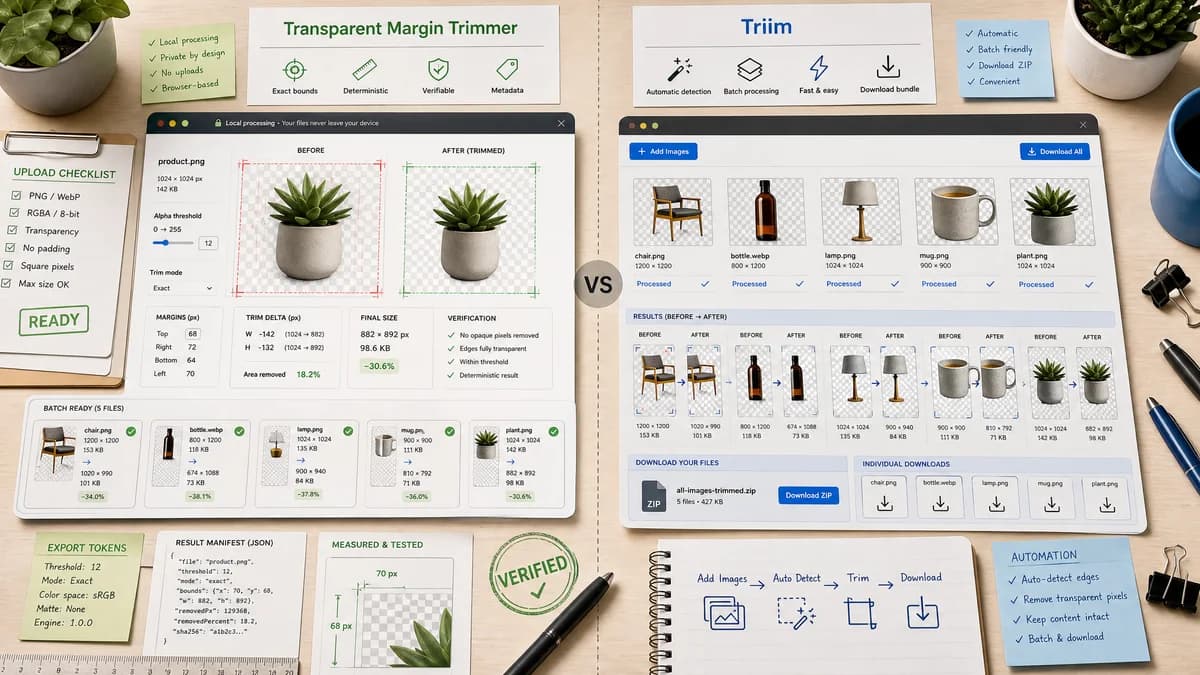
Transparent Margin Trimmer is the baseline in this comparison: Remove empty transparent space around logos, stickers, sprites, screenshots, and product cutouts without uploading the image.
Triim is a dedicated transparent-pixel trimmer for PNG and WebP images with batch processing and ZIP downloads.
Quick verdict
Triim is one of the closest competitors. TextFaker should differentiate with stronger verification: exact trim bounds, margin deltas, alpha threshold controls, and testable result metadata.
How Transparent Margin Trimmer fits
Transparent Margin Trimmer should offer local browser processing, transparent margin metrics, single-image and batch-ready architecture, and deterministic validation around every generated file.
How Triim fits
Triim focuses on automatically detecting transparent pixels at image edges and removing them, with support for multiple images and convenient downloads.
Side-by-side comparison
| Decision point | Transparent Margin Trimmer | Triim | Takeaway |
|---|---|---|---|
| Core task fit | Our workflowAutomatic transparent-margin trimming with detailed computed bounds. | Competitor workflowAutomatic transparent-pixel trimming from all edges. | Both match the core intent; TextFaker needs stronger reporting. |
| Batch handling | Our workflowCan start single-file but should design state and tests for multiple files later. | Competitor workflowTriim states that multiple PNG or WebP images can be processed and downloaded as a ZIP. | Batch support is a worthwhile future enhancement. |
| Output report | Our workflowExpose original size, output size, top/right/bottom/left removed margins, and trim rectangle. | Competitor workflowTriim emphasizes trimmed output, file size reduction, and download options. | TextFaker's report should be a primary feature, not a hidden detail. |
| Privacy positioning | Our workflowFiles are processed locally in the browser. | Competitor workflowTriim emphasizes no sign-up, no fees, and no watermarks; public copy does not need to be treated as a local-processing guarantee unless verified in implementation. | TextFaker should make local execution unambiguous. |
| Use cases | Our workflowLogos, icons, screenshots, product cutouts, stickers, web graphics, and QA fixtures. | Competitor workflowTriim names designers, web developers, e-commerce sellers, UI/UX designers, logos, icons, and graphics. | The market positioning overlaps strongly. |
| Validation behavior | Our workflowProvide deterministic errors for no transparent border, no alpha channel, or all-transparent input. | Competitor workflowThe page focuses on common successful trimming cases. | Clear edge-case handling helps support automated tests and user trust. |
Use Transparent Margin Trimmer when
- Users who need exact before/after dimensions
- Privacy-first browser-local trimming
- Automated checks for design asset cleanup
Use Triim when
- Batch trimming PNG/WebP files
- Users who want a dedicated no-sign-up transparent trim page
- Downloading many processed images together
Detailed comparison
Demand signal
Triim's existence as a dedicated tool, plus community posts asking for this exact operation, validates the task as more than a generic crop feature.
- Users want automatic trimming, not manual drag handles.
- Users care about transparency preservation.
- Users care about batch cleanup for exported assets.
Feature benchmark
Triim sets a high bar for convenience by offering batch processing and ZIP download. TextFaker can initially win on transparency of results and local deterministic behavior.
- Add one-click download for the trimmed file.
- Show a machine-readable result summary in the UI.
- Keep batch as an obvious extension path.
Implementation guidance
Use a typed result object for every file: status, inputDimensions, bounds, margins, outputDimensions, outputMime, outputBytes, and filename. This object can drive UI, copy buttons, downloads, and tests.
- Unit test opaque content at known coordinates.
- Unit test no-trim and all-transparent states.
- Unit test semi-transparent threshold behavior.
Mobile UX
The mobile version should not rely on precise drag gestures. A transparent-margin trimmer is well suited to mobile because the user can upload and receive deterministic automatic output.
- Use one primary action after file selection.
- Avoid tiny crop handles for the main workflow.
- Keep numeric results stacked and copyable.
Research notes
- Triim is a direct competitor because it claims automatic alpha-channel analysis and edge removal for PNG/WebP images.
- Community demand sources show users specifically asking for automatic transparent-pixel trimming instead of manual cropping.
- TextFaker should avoid competing only on preview quality and should lead with deterministic metadata.
Official source
The only outbound competitor link on this page is placed here for source checking after the comparison.
Official Triim source