
Open Source Alternatives to Adobe Photoshop
Transparent Margin Trimmer is a browser-based alternative for users who need this focused result without installing a proprietary desktop app or entering a larger hosted workflow.
This research compares that workflow with Adobe Photoshop while keeping the outbound source link at the bottom after the analysis.
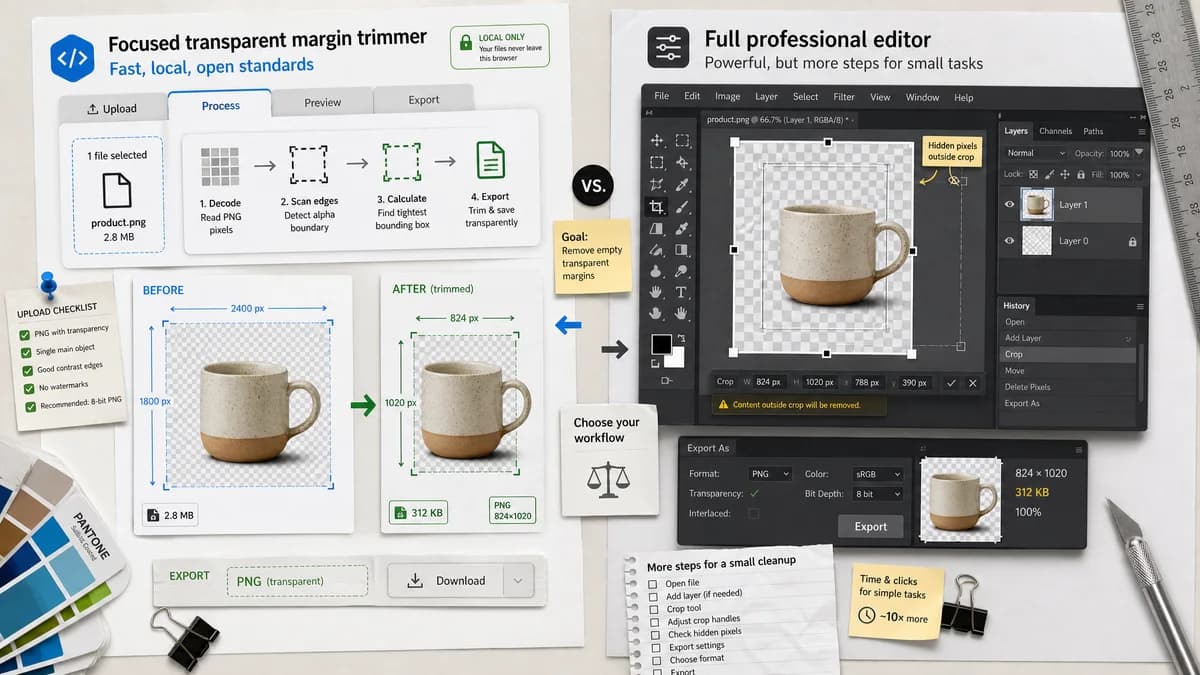
Why Transparent Margin Trimmer fits
Transparent Margin Trimmer should decode the image locally, scan alpha values at the edges, calculate the tight visible bounding box, and export a new file while reporting exact trim bounds and output dimensions.
What Adobe Photoshop offers
Adobe Photoshop is a full professional image editor with crop and trim workflows, but users discussing transparent-pixel trimming often cite extra setup, hidden pixels, or confusing crop behavior for this small cleanup task.
Open alternative signals
Processing model
Transparent Margin TrimmerRuns locally in the browser with no upload required for supported formats.
Adobe PhotoshopDesktop/web app in a subscription creative suite.
Scope
Transparent Margin TrimmerSingle-purpose transparent edge trimming with copy-ready measurements.
Adobe PhotoshopBroad professional editing environment.
Testable output
Transparent Margin TrimmerReports trim bounds, margin sizes, dimensions, file type, and validation messages.
Adobe PhotoshopPrimarily visual/editor-driven output unless scripted.
Mobile fit
Transparent Margin TrimmerCan be built as a responsive drop-zone and file-picker workflow.
Adobe PhotoshopMobile support depends on Adobe apps and account workflow.
Decision guide
Quick logo, sticker, icon, product-image, and web asset cleanup where deterministic edge trimming matters more than layered editing.
Complex retouching, compositing, layer work, color correction, and workflows already tied to Adobe Creative Cloud.
Side-by-side open source alternative comparison
| Decision point | Transparent Margin Trimmer | Adobe Photoshop | Takeaway |
|---|---|---|---|
| Transparent margin trimming | Our workflowAutomatically trims fully transparent or thresholded-alpha edge pixels and shows exact per-edge counts. | Proprietary workflowPhotoshop supports crop and trim-style workflows, but users may need menu choices, troubleshooting, or scripts. | TextFaker can win on speed and measurability for this narrow job. |
| Privacy | Our workflowImage stays in the browser for decoding, trimming, and download. | Proprietary workflowCreative Cloud workflows may involve cloud services depending on product and settings. | Local processing is a clear advantage for private client assets and logos. |
| Automation testing | Our workflowUse fixture PNGs to assert bounding box, output dimensions, and no-trim/all-transparent messages. | Proprietary workflowDesktop UI outcomes are harder to verify in a public web test suite. | The focused tool maps well to deterministic tests. |
| Learning curve | Our workflowUpload, review numeric margins, download. | Proprietary workflowFull editor interface with many unrelated tools. | General users get a smaller workflow. |
| Cost | Our workflowCan be free and browser-based. | Proprietary workflowPhotoshop is generally sold through Adobe plans. | A free focused page can attract users who do not need a full editor. |
| Batch potential | Our workflowCan expose a simple batch queue with per-file bounds and zip download. | Proprietary workflowPhotoshop batch actions are powerful but require setup knowledge. | Batch transparent-margin cleanup is a practical differentiator. |
Detailed research
Positioning
Position this page as a quick alternative for people who already know Photoshop can trim transparent pixels but do not want to open a full editor or troubleshoot hidden edge pixels.
- Stress browser-local processing and exact measurements.
- Avoid claiming TextFaker is open source; say open-source-powered where implementation libraries are open source.
Deterministic implementation
The core algorithm should scan alpha values from each edge until it finds a pixel above the selected opacity threshold, then crop to the resulting bounding rectangle.
- Expose trim box x, y, width, height.
- Expose removed top, right, bottom, and left margins.
- Validate no alpha channel, no visible pixels, and no transparent margin cases.
Demand evidence
Adobe Community posts show users asking for this exact transparent-pixel cleanup and reporting cases where trim behavior is confusing.
- Useful source language includes clunky transparent-pixel crop complaints.
- Hidden or stray pixels are a recurring reason users need numeric feedback.
SEO angle
The comparison can target users searching for Photoshop trim transparent pixels, remove transparent pixels around PNG, and crop transparent margins online.
- Lead with a simple upload-to-download workflow.
- Mention PNG and WebP transparency preservation.
Research notes
- Official Adobe crop documentation describes Photoshop's crop workflow for removing unwanted image areas.
- Adobe Community users report transparent pixels not trimming as expected and ask why removing all transparent pixels remains clunky.
- A browser-local tool can be easier to test than Photoshop because it can always display trimLeft, trimTop, trimRight, trimBottom, original size, output size, and alpha threshold.
Official source
The proprietary product link is included once here for source checking after the alternative analysis.
Official Adobe Photoshop source