
Open Source Alternatives to Affinity Photo
Transparent Margin Trimmer is a browser-based alternative for users who need this focused result without installing a proprietary desktop app or entering a larger hosted workflow.
This research compares that workflow with Affinity Photo while keeping the outbound source link at the bottom after the analysis.
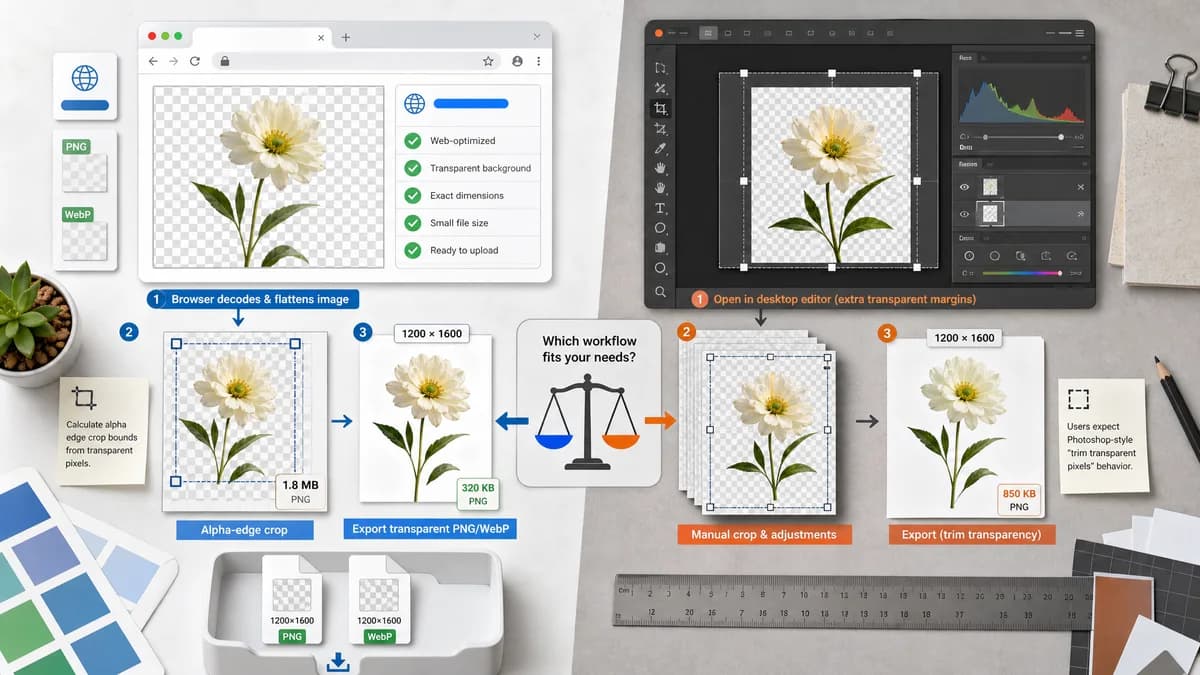
Why Transparent Margin Trimmer fits
The tool should calculate alpha-edge crop bounds from a flattened browser-decoded image and export a fresh transparent PNG/WebP with exact measurements.
What Affinity Photo offers
Affinity Photo is a professional image editor with cropping and canvas operations, but forum users ask for a Photoshop-style transparent trim command and compare it with Clip Canvas behavior.
Open alternative signals
Processing model
Transparent Margin TrimmerNo install, browser-local image processing.
Affinity PhotoInstalled professional editor on desktop/iPad.
Primary job
Transparent Margin TrimmerRemove transparent margins and return measurements.
Affinity PhotoFull professional photo editing.
User feedback signal
Transparent Margin TrimmerDesigned around forum pain points about trim equivalence.
Affinity PhotoUsers discuss Clip Canvas and workflow confusion.
Validation
Transparent Margin TrimmerAutomated fixtures can verify exact crop rectangle.
Affinity PhotoEditor command behavior is not exposed as structured web output.
Decision guide
Users who just need to remove empty transparent canvas around PNG/WebP artwork before upload, printing, or marketplace listing.
Professional retouching, compositing, RAW editing, live filters, and Affinity document workflows.
Side-by-side open source alternative comparison
| Decision point | Transparent Margin Trimmer | Affinity Photo | Takeaway |
|---|---|---|---|
| Photoshop-style trim expectation | Our workflowExplicitly named and designed for transparent margin trimming. | Proprietary workflowUsers ask how to get an equivalent workflow in Affinity Photo. | The tool can answer a known comparison search. |
| Cropping precision | Our workflowReports numeric bounds and per-edge transparent margins. | Proprietary workflowCrop and canvas commands are visual/editor operations. | Numeric output reduces ambiguity. |
| Workflow time | Our workflowUpload, trim, download. | Proprietary workflowOpen editor, manage layers/canvas state, export. | Simple web flow is better for one-off cleanup. |
| Advanced editing | Our workflowNot intended for editing pixels beyond trimming margins. | Proprietary workflowStrong advanced image-editing suite. | Position as complementary, not replacement for full editing. |
| Mobile use | Our workflowResponsive page can handle phone uploads. | Proprietary workflowiPad app exists but desktop-style workflows may still be heavier. | TextFaker can serve quick mobile cleanup. |
| Testing | Our workflowDeterministic JSON-like values can be asserted in tool tests. | Proprietary workflowNo public structured output for automated TextFaker tests. | The implementation aligns with the site's verification style. |
Detailed research
Positioning
The page should speak to people searching for an Affinity alternative to trim transparent pixels, especially those coming from Photoshop habits.
- Do not claim to replace Affinity Photo's professional feature set.
- Emphasize quick transparent border cleanup.
Deterministic implementation
Flatten to an RGBA bitmap as the browser decodes it, scan edges for pixels with alpha greater than threshold, and crop the canvas accordingly.
- Support edge-specific toggles when users only want top/bottom/left/right trimming.
- Return exact output width and height before download.
Demand evidence
Affinity forum and Reddit discussions show users comparing Affinity's behavior to Photoshop Trim and wanting a faster export-oriented path.
- Demand is from public user discussion, not developer-only sources.
Feature notes
A tolerance slider should be labeled carefully because semi-transparent antialiased edges may be meaningful content.
- Default to alpha equals 0 for lossless transparent-margin trimming.
- Warn when threshold would remove semi-transparent edge pixels.
Research notes
- Affinity's official help covers size, transform, and cropping workflows.
- Affinity forum users ask whether the app has a Photoshop Image > Trim > Transparent Pixels equivalent.
- A Reddit Affinity Photo discussion describes Photoshop's trim as simpler for open, trim, export workflows.
Official source
The proprietary product link is included once here for source checking after the alternative analysis.
Official Affinity Photo source