
Open Source Alternatives to Image Online Tools
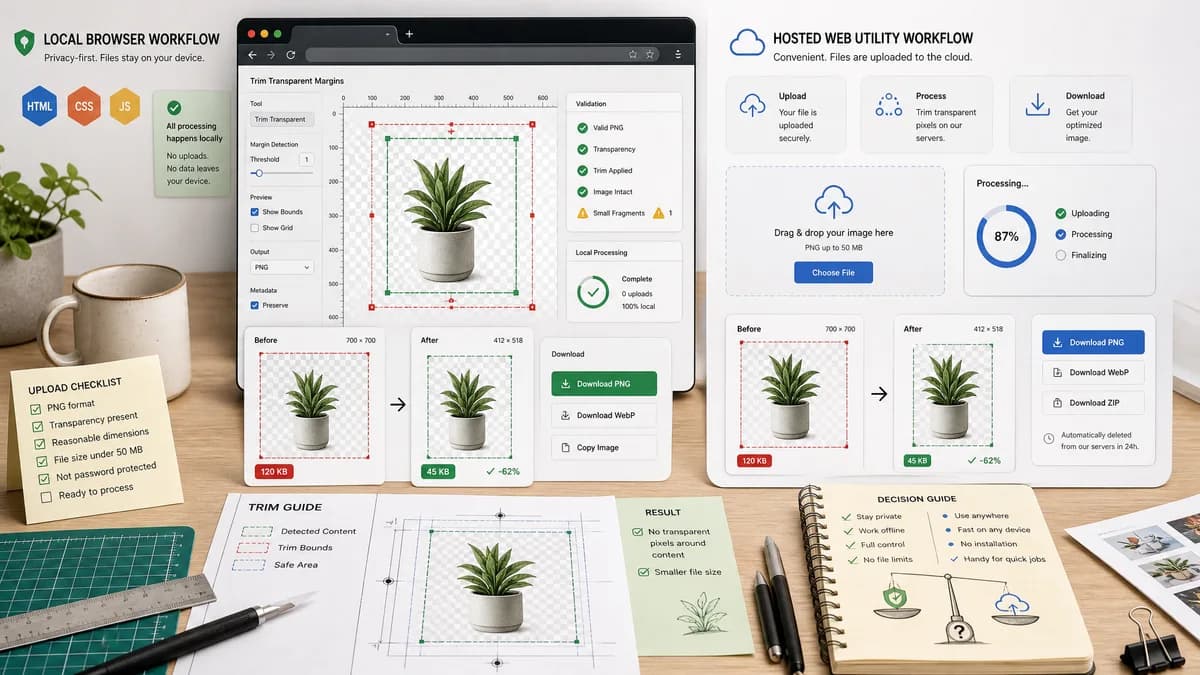
Transparent Margin Trimmer is a browser-based alternative for users who need this focused result without installing a proprietary desktop app or entering a larger hosted workflow.
This research compares that workflow with Image Online Tools while keeping the outbound source link at the bottom after the analysis.
Why Transparent Margin Trimmer fits
The TextFaker implementation should match the narrow trim-transparent-pixels intent while adding measurable trim bounds, validation states, and local browser processing.
What Image Online Tools offers
Image Online Tools offers a dedicated Trim Transparent Pixels page that removes transparent space and borders around images, validating the exact utility demand.
Open alternative signals
Processing model
Transparent Margin TrimmerLocal browser processing with no upload for supported files.
Image Online ToolsHosted online utility.
Feature match
Transparent Margin TrimmerTransparent pixel margin trimming.
Image Online ToolsTransparent pixel margin trimming.
Result reporting
Transparent Margin TrimmerStructured bounds, margins, dimensions, and validation messages.
Image Online ToolsSimple utility-focused result.
Testing fit
Transparent Margin TrimmerDesigned for deterministic automated checks.
Image Online ToolsExternal web tool not part of local test suite.
Decision guide
Users who want the same transparent border cleanup but with local processing and exact numeric output for QA.
Users already comfortable with simple hosted online image tools and who do not need structured results.
Side-by-side open source alternative comparison
| Decision point | Transparent Margin Trimmer | Image Online Tools | Takeaway |
|---|---|---|---|
| Core job | Our workflowRemove transparent borders and report exact margins. | Proprietary workflowRemove transparent space around images. | The product category is proven; TextFaker should add better data. |
| Privacy | Our workflowSource image stays on device. | Proprietary workflowHosted tool workflow may involve remote processing. | Local processing is the strongest differentiator. |
| Validation | Our workflowShows no-alpha, all-transparent, too-large, and no-margin states. | Proprietary workflowMay not expose detailed validation states publicly. | Structured errors improve trust and tests. |
| Output | Our workflowDownload PNG/WebP with generated MIME and dimension checks. | Proprietary workflowDownload trimmed result from the web tool. | TextFaker can make output guarantees visible. |
| Batch | Our workflowCan add a table for multiple files with per-file trim values. | Proprietary workflowFeature depth depends on the hosted tool. | Batch plus measurements would improve utility. |
| Mobile | Our workflowDesign can prioritize large upload button and compact metrics. | Proprietary workflowGeneric online tool layout. | A polished mobile layout can outrank simple utility pages. |
Detailed research
Positioning
This comparison can be direct: both tools address transparent pixels, but TextFaker should stress local, deterministic, and testable output.
- Use 'transparent margin trimmer' and 'trim transparent pixels' language.
- Avoid saying TextFaker is open source unless the site publishes source/license.
Deterministic implementation
Expose the crop rectangle as a first-class result, not just a preview.
- Add copy result summary button.
- Add downloadable JSON or CSV summary if batch is implemented.
- Keep preview secondary to measurements.
Demand evidence
The existence of a dedicated Image Online Tools page for transparent trimming confirms search and utility demand.
- Support that with community discussions from Adobe, Affinity, and Photopea.
Quality bar
Because this is a narrow tool, users will expect instant results and clear failure states.
- Handle large images with progress or size warning.
- Keep output deterministic for the same browser decode.
Research notes
- Image Online Tools' official page states that it removes transparent space and trims transparent borders around an image.
- Public discussions in Adobe, Affinity, Photopea, and Reddit show users ask for the same task across mainstream editors.
- TextFaker can differentiate by exposing transparent margin sizes and output dimensions rather than only a visual before/after.
Official source
The proprietary product link is included once here for source checking after the alternative analysis.
Official Image Online Tools source