
Open Source Alternatives to Kapwing
Transparent Margin Trimmer is a browser-based alternative for users who need this focused result without installing a proprietary desktop app or entering a larger hosted workflow.
This research compares that workflow with Kapwing while keeping the outbound source link at the bottom after the analysis.
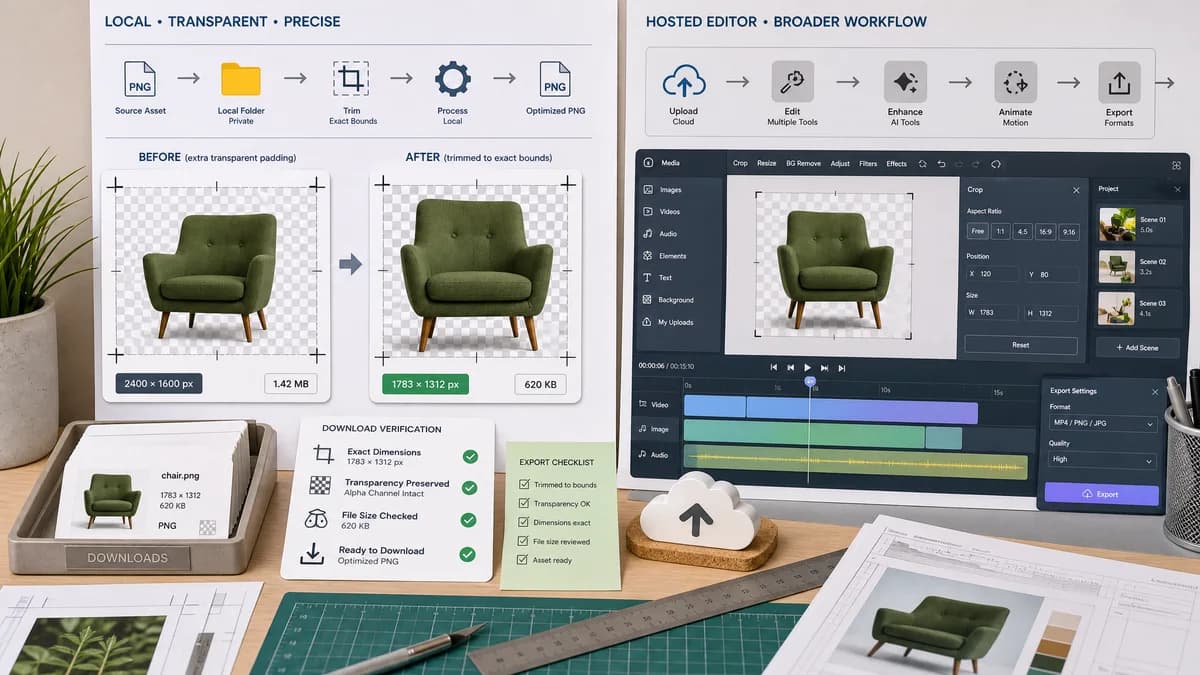
Why Transparent Margin Trimmer fits
The TextFaker workflow should trim edge transparency locally and produce exact dimensions and download checks, avoiding a full media studio for one asset cleanup step.
What Kapwing offers
Kapwing provides online image cropping, resizing, background removal, and broader media editing workflows, but it is a hosted editor rather than a deterministic local trim utility.
Open alternative signals
Processing model
Transparent Margin TrimmerBrowser-local static image processing.
KapwingHosted online editor.
Scope
Transparent Margin TrimmerTransparent margin trim only.
KapwingBroad media creation and editing platform.
Privacy
Transparent Margin TrimmerNo file upload for supported images.
KapwingUpload-based workflow.
Determinism
Transparent Margin TrimmerExact alpha threshold and crop bounds reported.
KapwingManual/preset crop editor.
Decision guide
Static image cleanup where users want no upload, no account, and numeric verification.
Collaborative video/image editing, social presets, AI background removal, captions, and studio workflows.
Side-by-side open source alternative comparison
| Decision point | Transparent Margin Trimmer | Kapwing | Takeaway |
|---|---|---|---|
| Cropping mode | Our workflowAutomatic alpha-edge crop based on transparent pixels. | Proprietary workflowKapwing cropper focuses on manual and preset cropping. | TextFaker handles a different crop intent. |
| Upload | Our workflowKeeps supported source images in the browser. | Proprietary workflowRequires upload into Kapwing's online workflow. | Local is better for sensitive graphics. |
| Output metrics | Our workflowReports removed margins and dimensions before download. | Proprietary workflowPrimarily editor preview and export. | TextFaker is easier to validate. |
| Media breadth | Our workflowStatic image utility. | Proprietary workflowImage, video, background removal, and social media suite. | Kapwing remains better for full media projects. |
| Mobile | Our workflowCan be designed around one-column controls and touch downloads. | Proprietary workflowKapwing supports browser/mobile workflows. | The difference is simplicity, not device availability. |
| Testing | Our workflowFixture-based image tests can assert exact values. | Proprietary workflowHosted editor behavior is outside local project tests. | TextFaker aligns with deterministic tool-page requirements. |
Detailed research
Positioning
Kapwing is a good comparison for creators who know online crop tools but only need transparent-border autocrop without a studio.
- Mention no-upload processing.
- Avoid competing claims about video or AI editing.
Deterministic implementation
The result panel should be useful even before preview inspection: original width/height, crop rectangle, margins removed, output width/height, and generated file size.
- Tests can upload a fixture and compare the result fields.
- Download button should remain disabled until validation passes.
Demand evidence
Kapwing's product pages establish a creator-oriented online image-editing audience; broader public discussions around transparent trimming show the exact cleanup need.
Feature boundaries
Do not add background removal to this tool. It should trim already-transparent margins, which is deterministic and testable.
- Link to related TextFaker transparency tools when available.
- Warn if the image has no transparent edges.
Research notes
- Kapwing's official image cropper says users can upload an image, crop online, choose preset dimensions, and download.
- Kapwing's image editor page describes background transparency and product-photo use cases.
- A TextFaker implementation can differentiate by not uploading supported files and by exposing exact transparent margin sizes.
Official source
The proprietary product link is included once here for source checking after the alternative analysis.
Official Kapwing source