
Open Source Alternatives to Photoshop Elements
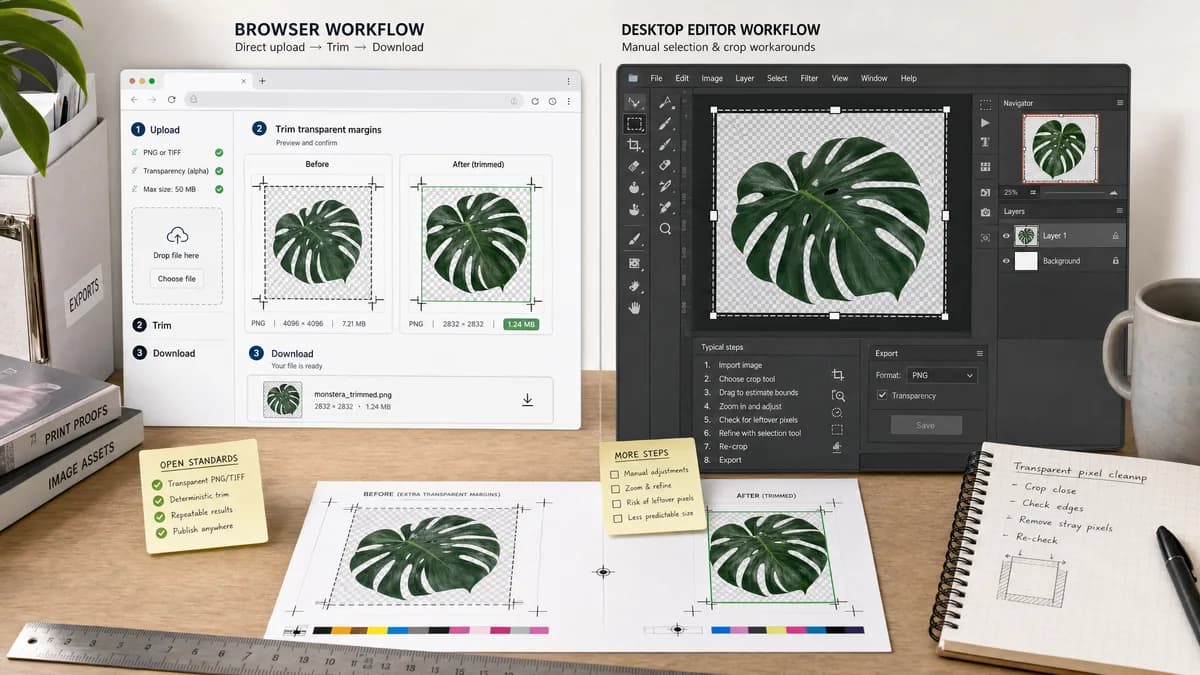
Transparent Margin Trimmer is a browser-based alternative for users who need this focused result without installing a proprietary desktop app or entering a larger hosted workflow.
This research compares that workflow with Photoshop Elements while keeping the outbound source link at the bottom after the analysis.
Why Transparent Margin Trimmer fits
Transparent Margin Trimmer should give non-expert users a direct upload, trim, and download path with deterministic alpha-based results.
What Photoshop Elements offers
Photoshop Elements has standard crop tools for photo cleanup, but an Adobe Community discussion notes that Photoshop's direct Trim option is not present and suggests manual selection/crop workarounds.
Open alternative signals
Processing model
Transparent Margin TrimmerLocal browser file processing.
Photoshop ElementsInstalled consumer photo editor.
Workflow size
Transparent Margin TrimmerOne task: transparent margin removal.
Photoshop ElementsGeneral editing workspace with many features.
Output evidence
Transparent Margin TrimmerShows dimensions, margins, and downloadable output Blob data.
Photoshop ElementsCropping result is mainly visual.
User skill
Transparent Margin TrimmerDesigned for general users and mobile file pickers.
Photoshop ElementsRequires knowing selection and crop workarounds for this task.
Decision guide
Users with PNG logos, overlays, stickers, and cutouts who only need empty transparent space removed.
Casual photo editing, guided edits, organizing images, and Adobe-style editing workflows.
Side-by-side open source alternative comparison
| Decision point | Transparent Margin Trimmer | Photoshop Elements | Takeaway |
|---|---|---|---|
| Feature fit | Our workflowDirectly built for transparent margins. | Proprietary workflowPhotoshop Elements users may use selection/crop workarounds. | A narrow web tool removes the workaround. |
| Validation | Our workflowCan say 'no transparent edge margin found' or 'image has no alpha channel'. | Proprietary workflowThe editor does not center this as a structured report. | Validation messages make support and testing clearer. |
| Device access | Our workflowWorks from a browser on desktop or mobile. | Proprietary workflowPrimarily an installed desktop application. | TextFaker is easier for quick device-to-device cleanup. |
| Download format | Our workflowExports PNG/WebP while preserving alpha when supported. | Proprietary workflowExport settings require normal editor choices. | The tool can make the safe output obvious. |
| Privacy messaging | Our workflowCan state the image stays on the device. | Proprietary workflowLocal desktop processing is possible, but not framed as a web privacy feature. | Browser-local privacy copy matters for personal images and business logos. |
| Repeatability | Our workflowSame threshold and same source pixels produce the same trim box. | Proprietary workflowManual selections can vary by user. | Repeatability is a product promise. |
Detailed research
Positioning
Frame the tool as a missing shortcut for people who do not need a full photo editor just to crop transparent padding.
- Use plain labels like Transparent margin, Output size, and Download PNG.
- Include a visible no-upload privacy note.
Deterministic implementation
Use the browser canvas or ImageBitmap pipeline to inspect RGBA data, then create a cropped canvas based on the alpha threshold.
- Test a 10 x 10 fixture with 2-pixel transparent borders.
- Assert output width and height are 6 x 6.
- Assert all-transparent images produce a clear validation state.
Demand evidence
The Adobe Elements support thread shows real users looking for a Trim Transparent Pixels workflow and being directed to manual alternatives.
- This is a general-user support source, not a developer-only source.
Content strategy
Compare against Photoshop Elements on speed and directness, not as a full photo-editing replacement.
- Mention Elements in comparison pages only where relevant.
- Avoid overclaiming compatibility with PSD or layered files.
Research notes
- Official Photoshop Elements documentation explains crop as removing areas surrounding a selection.
- Adobe Community support says several workarounds exist for trimming transparent pixels and notes the full Photoshop Trim feature is not available in Elements.
- This gap supports a dedicated browser-local utility with exact trim measurements.
Official source
The proprietary product link is included once here for source checking after the alternative analysis.
Official Photoshop Elements source