
Open Source Alternatives to Pixelmator Pro
Transparent Margin Trimmer is a browser-based alternative for users who need this focused result without installing a proprietary desktop app or entering a larger hosted workflow.
This research compares that workflow with Pixelmator Pro while keeping the outbound source link at the bottom after the analysis.
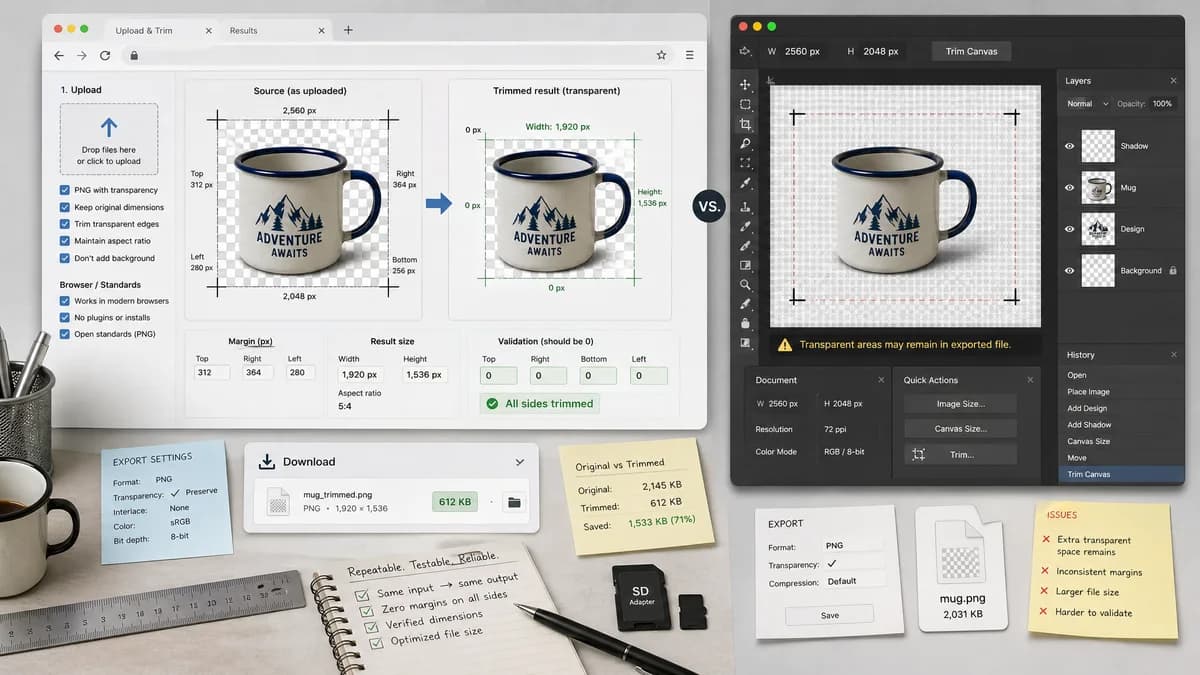
Why Transparent Margin Trimmer fits
Transparent Margin Trimmer should offer Pixelmator-like transparent edge trimming in a simple web page, while exposing exact margins and dimensions for repeatable validation.
What Pixelmator Pro offers
Pixelmator Pro officially documents Trim Canvas with a Transparent Pixels option, but users still ask about cropping layers without retaining transparent space.
Open alternative signals
Platform
Transparent Margin TrimmerBrowser-based across desktop and mobile browsers.
Pixelmator ProMac and iPad focused product.
Transparent trim support
Transparent Margin TrimmerDedicated workflow with alpha threshold and exact bounds.
Pixelmator ProTrim Canvas includes a Transparent Pixels mode.
Structured results
Transparent Margin TrimmerDisplays trim rectangle, margin counts, output dimensions, and validation state.
Pixelmator ProNative editor command result is visual.
Use case scope
Transparent Margin TrimmerFocused on exported transparent assets.
Pixelmator ProFull image editing and design application.
Decision guide
Cross-platform transparent PNG/WebP cleanup from any modern browser, including Windows, Android, ChromeOS, and shared computers.
Mac/iPad users who want a polished full editor with Pixelmator's native tools and ecosystem.
Side-by-side open source alternative comparison
| Decision point | Transparent Margin Trimmer | Pixelmator Pro | Takeaway |
|---|---|---|---|
| Access | Our workflowWorks anywhere the browser can decode the image. | Proprietary workflowPixelmator Pro is tied to Apple platforms. | TextFaker is better for mixed-device teams. |
| Transparency task | Our workflowBuilt entirely around trimming transparent margins. | Proprietary workflowPixelmator Pro supports Trim Canvas among many editing features. | Pixelmator is strong, but a web utility can be faster for one job. |
| Measurements | Our workflowAlways reports how many pixels were removed from each side. | Proprietary workflowThe documented operation trims, but measurement reporting is not the focus. | TextFaker can satisfy QA and automated test needs. |
| Privacy | Our workflowNo upload for local browser processing. | Proprietary workflowNative app local workflows are private but require installation. | Both can be privacy-friendly, with TextFaker removing install friction. |
| Mobile | Our workflowResponsive web UI with file picker and download state. | Proprietary workflowiPad app supports mobile tablet workflows. | TextFaker can cover phones as well as tablets. |
| All-transparent input | Our workflowCan return a deterministic validation message instead of creating a zero-size image. | Proprietary workflowNative app behavior is editor-defined. | Explicit edge cases make the utility safer. |
Detailed research
Positioning
For Pixelmator comparisons, emphasize cross-platform accessibility and exact reporting rather than claiming a broader editing replacement.
- Use terms like transparent edge trim and canvas padding removal.
- Mention Mac users may still prefer Pixelmator for editing.
Deterministic implementation
The tool should define visible content as any pixel whose alpha is greater than the configured threshold.
- Return visible bounding box x1, y1, x2, y2.
- Return original area and output area in pixels.
- Return percent area removed.
Demand evidence
Pixelmator documentation proves the workflow exists as a recognized product feature, while Reddit shows users still run into transparent-space layer questions.
- This supports demand beyond developer tooling.
Test guidance
Use fixtures with transparent margins on asymmetric edges so tests prove the algorithm is not merely center-cropping.
- Assert left margin differs from right margin.
- Assert output pixels preserve alpha values.
Research notes
- Apple's Pixelmator Pro documentation says Trim Canvas removes transparent areas at the image edges.
- A Pixelmator subreddit user asks how to crop a layer and avoid leaving transparent space or retaining the original aspect ratio.
- TextFaker can differentiate with cross-platform access and explicit output measurements.
Official source
The proprietary product link is included once here for source checking after the alternative analysis.
Official Pixelmator Pro source