
Open Source Alternatives to Pixlr
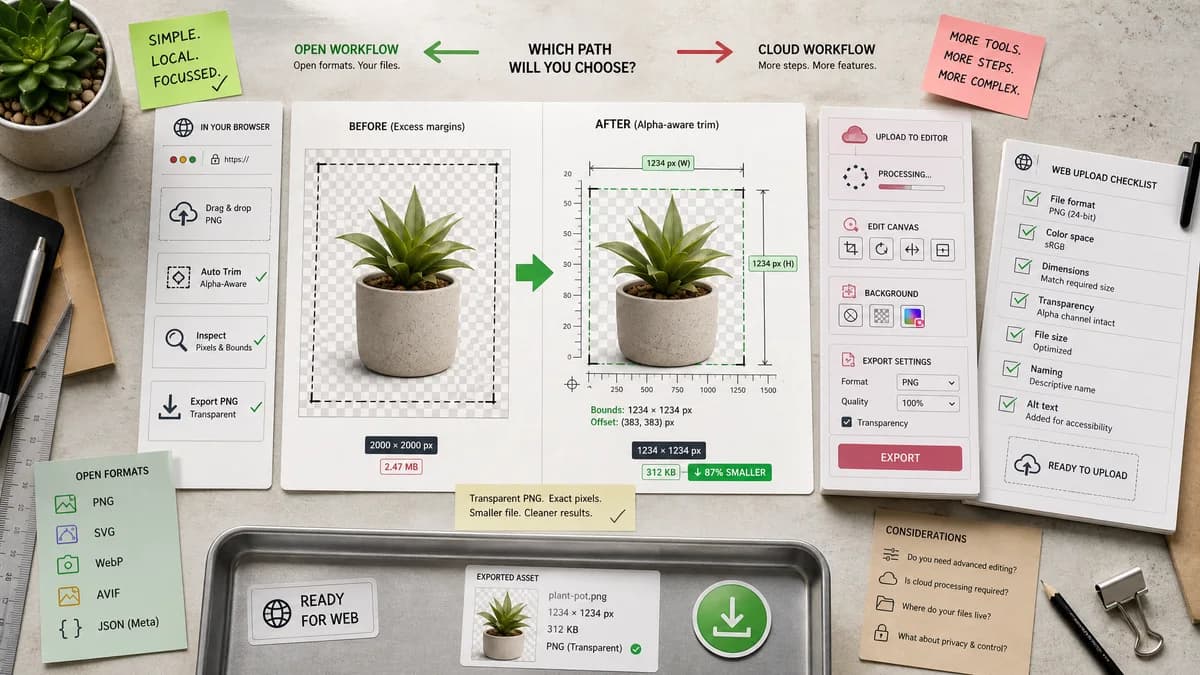
Transparent Margin Trimmer is a browser-based alternative for users who need this focused result without installing a proprietary desktop app or entering a larger hosted workflow.
This research compares that workflow with Pixlr while keeping the outbound source link at the bottom after the analysis.
Why Transparent Margin Trimmer fits
The tool should avoid full-editor complexity and return a transparent-margin cleanup result with exact alpha-aware measurements.
What Pixlr offers
Pixlr provides online crop, rotate, flip, background removal, and editor features, while public Pixlr users ask how to crop PNGs with transparent backgrounds without losing transparency.
Open alternative signals
Processing model
Transparent Margin TrimmerLocal browser image decode and canvas export.
PixlrCloud-based online editor.
Transparency preservation
Transparent Margin TrimmerExplicit output checks for alpha-preserving PNG/WebP.
PixlrTransparency depends on editor export choices.
Result data
Transparent Margin TrimmerNumeric trim bounds and validation messages.
PixlrVisual crop workflow.
Complexity
Transparent Margin TrimmerFocused cleanup interface.
PixlrFull editor and AI feature set.
Decision guide
One-step transparent PNG/WebP border trimming with privacy-first local processing.
General online image editing, AI effects, background removal, and creative adjustments.
Side-by-side open source alternative comparison
| Decision point | Transparent Margin Trimmer | Pixlr | Takeaway |
|---|---|---|---|
| Transparent PNG crop | Our workflowDesigned to preserve alpha and remove only transparent edge pixels. | Proprietary workflowUsers discuss selection/crop/export steps to keep transparency in Pixlr. | TextFaker can reduce mistakes around transparency. |
| Editor overhead | Our workflowNo layers, effects, or project canvas to manage. | Proprietary workflowPixlr is a broader editor. | Simpler is better for this narrow task. |
| Output verification | Our workflowShows output MIME, file extension, dimensions, and margin removal. | Proprietary workflowExport settings are user-selected in the editor. | The tool can make correct output explicit. |
| Privacy | Our workflowRuns without upload for supported files. | Proprietary workflowHosted editor workflow. | TextFaker can appeal to privacy-conscious users. |
| Mobile | Our workflowCan optimize for native file input and large tap targets. | Proprietary workflowPixlr has mobile-friendly tools and app messaging. | Mobile is competitive if the UI stays compact. |
| Advanced edits | Our workflowNo retouching or AI editing. | Proprietary workflowPixlr offers many advanced features. | Comparison should stay scoped. |
Detailed research
Positioning
Pixlr comparisons should focus on transparency preservation and exact output checks, not on replacing Pixlr's editing features.
- Use 'crop transparent PNG without losing transparency' language.
- Report alpha-support status immediately after upload.
Deterministic implementation
Preserve original transparent pixels inside the visible bounding box and only remove outer rows/columns that meet the transparent threshold.
- Add a checkerboard preview as optional visual aid, but tests should rely on numbers.
- Expose threshold value in result summary.
Demand evidence
A public Pixlr subreddit question directly asks about cropping a transparent-background PNG without losing transparency.
- This is relevant general-user demand for transparent image cleanup.
Edge cases
Users may upload JPG files after removing backgrounds elsewhere. The tool should explain that JPG cannot contain transparency and suggest PNG/WebP input.
- Reject unsupported files with deterministic messages.
- Do not silently flatten transparency.
Research notes
- Pixlr's official crop page describes online and mobile cropping, rotating, flipping, ratios, and image quality.
- Pixlr's official editor page describes advanced image editing and transparent-image workflows.
- A Pixlr subreddit user asks how to crop a PNG with transparent background without losing the transparency.
Official source
The proprietary product link is included once here for source checking after the alternative analysis.
Official Pixlr source