
Average Color Finder vs 10015 Tools Image Average Color Finder
Average Color Finder is the baseline in this comparison: Find the average color of an image locally in your browser and copy HEX, RGB, HSL, and alpha-aware results.
10015 Tools calculates an image's average color and offers multiple algorithm choices, including simple, square-root, and dominant modes.
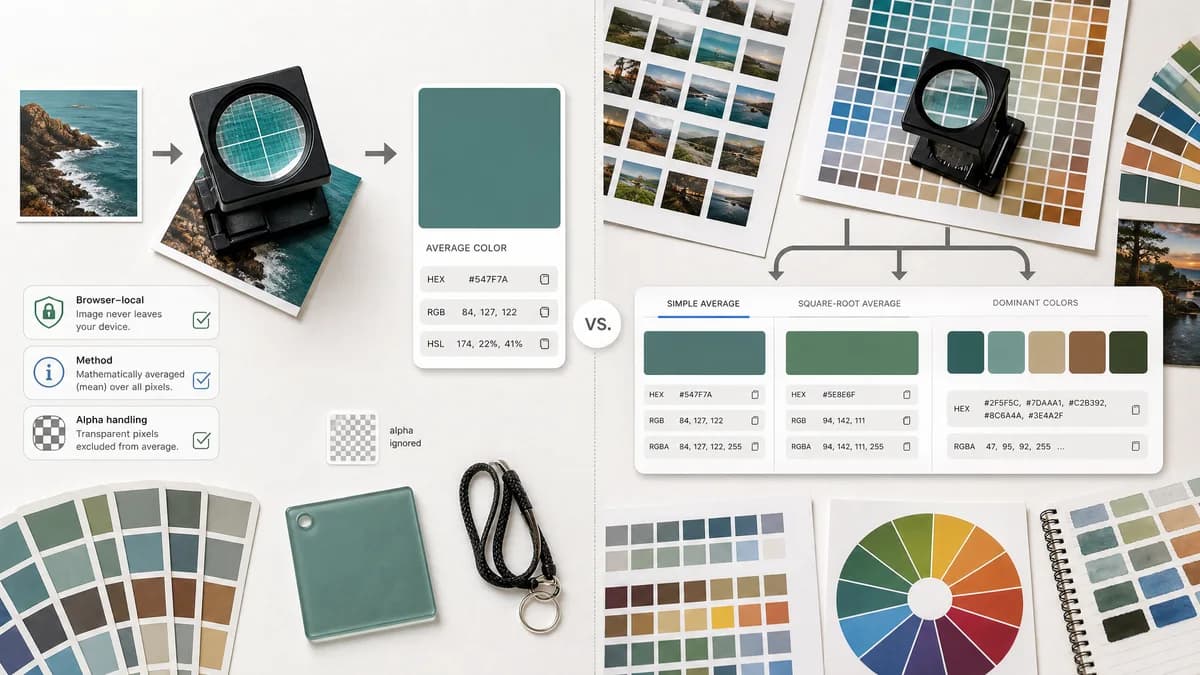
Quick verdict
TextFaker can compete by being more explicit about privacy, alpha handling, and the meaning of the returned color while keeping the main workflow faster for users who only need one average swatch.
How Average Color Finder fits
Average Color Finder focuses on a clear single-color result, browser-local processing, transparent method notes, and copy-ready color formats without making users choose an algorithm before they understand the difference.
How 10015 Tools Image Average Color Finder fits
10015 Tools is a direct average color tool with useful algorithm choice and HEX/RGBA output. Its strength is flexibility, but dominant color mode overlaps with palette-style analysis rather than pure mathematical average color.
Side-by-side comparison
| Decision point | Average Color Finder | 10015 Tools Image Average Color Finder | Takeaway |
|---|---|---|---|
| Primary result | Our workflowOne representative average color with supporting formats and explanation. | Competitor workflowAverage color with selectable simple, square-root, and dominant algorithms. | 10015 exposes more methods; Average Color Finder makes the default method easier to trust. |
| Color formats | Our workflowOutput includes HEX, RGB, HSL, RGBA when relevant, and copy buttons. | Competitor workflowPage states HEX and RGBA output. | TextFaker can cover more routine design formats. |
| Algorithm clarity | Our workflowShould define whether averaging is sRGB, linearized, alpha-aware, or sampled. | Competitor workflowDescribes simple and square-root approaches at a high level. | Both can educate users, but TextFaker can make edge cases more concrete. |
| Dominant color overlap | Our workflowShould stay distinct from TextFaker's palette and dominant color tools. | Competitor workflowIncludes a dominant mode in the same tool. | TextFaker can avoid confusing average color with dominant color. |
| Privacy positioning | Our workflowShould state browser-local processing prominently. | Competitor workflowSearch result did not surface a clear local-processing privacy promise on the tool page. | Privacy can be a differentiator for local image utilities. |
| Best workflow | Our workflowUpload image, inspect average, copy preferred format, optionally compare transparency treatment. | Competitor workflowUpload image, choose or view algorithm result, copy HEX or RGBA. | TextFaker can reduce decisions while still documenting advanced behavior. |
Use Average Color Finder when
- Users who want a straightforward average color result
- Designers who need copy-ready HEX, RGB, HSL, and CSS values
- Privacy-sensitive image checks that stays in the browser
Use 10015 Tools Image Average Color Finder when
- Users who want to compare multiple average-color algorithms
- People who need HEX and RGBA only
- Quick experiments with average versus dominant color
Detailed comparison
Positioning
This is the closest direct comparison because both tools center on the average color of an image rather than full palette extraction. 10015's algorithm picker is useful for exploration, but it can blur the difference between average color and dominant color.
Feature Gap
Average Color Finder includes practical output formats beyond HEX/RGBA and makes the copy actions obvious. A small note explaining alpha and transparent pixels addresses a common source of disagreement between average-color tools.
- Include HEX, RGB, HSL, and RGBA when alpha is present.
- Label the calculation method in plain language.
- Keep dominant color as a separate related tool rather than a mode.
SEO Angle
A comparison page can target users searching for a simpler alternative to a multi-algorithm average color calculator. The content explains when a mathematical average is more appropriate than a dominant palette.
Product Notes
The page does not over-promise exact perceptual color. Average color depends on color space, sampling, alpha handling, and browser decoding. A short methodology panel makes the tool feel more reliable.
- Show image dimensions and sampled pixel count.
- Explain whether transparent pixels are ignored or composited.
- Offer a small average swatch preview on light and dark backgrounds.
Research notes
- 10015 Tools states that it offers three methods: simple, square-root, and dominant.
- The page says results are shown in HEX and RGBA formats.
- The dominant method is described as finding the most used color, not a strict average.
Official source
The only outbound competitor link on this page is placed here for source checking after the comparison.
Official 10015 Tools Image Average Color Finder source