
Average Color Finder vs ImageNurse Average Color Calculator
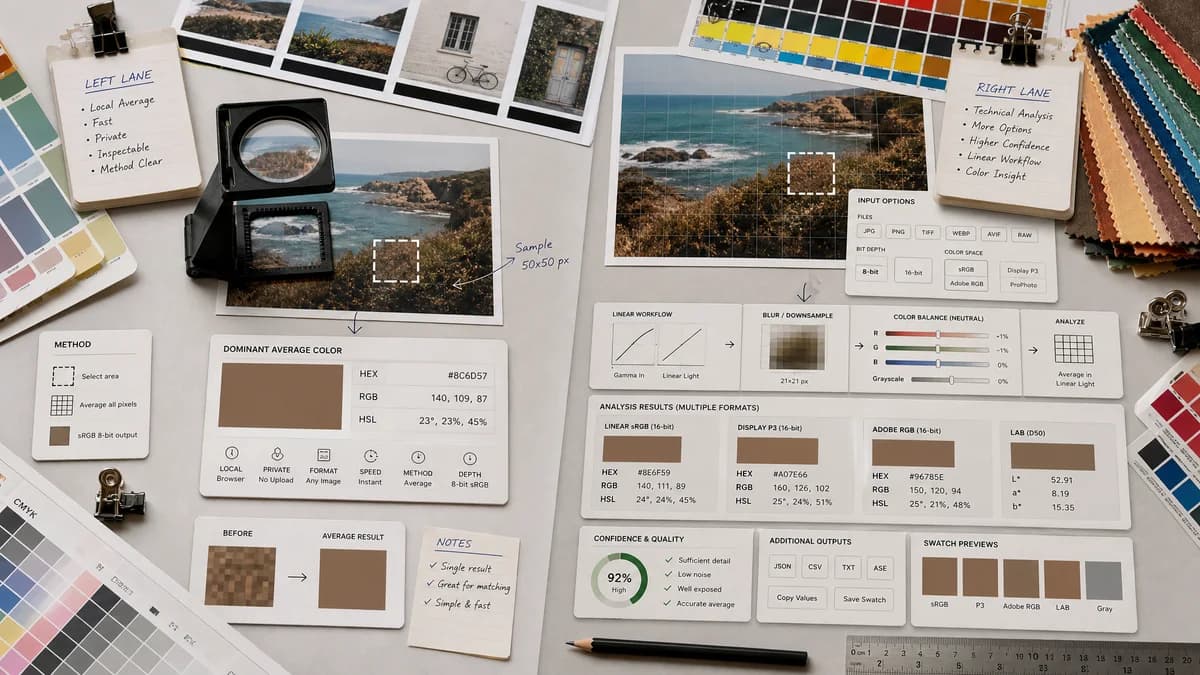
Average Color Finder is the baseline in this comparison: Find the average color of an image locally in your browser and copy HEX, RGB, HSL, and alpha-aware results.
ImageNurse calculates the average color of an image locally and highlights gamma-corrected linear color-space averaging for mathematical accuracy.
Quick verdict
TextFaker can compete if it pairs similar privacy and method clarity with a more compact workflow, better copy controls, and integration with nearby TextFaker color tools.
How Average Color Finder fits
Average Color Finder matches the local-processing expectation and present method details in a concise, inspectable way for designers and developers who care about why two tools may return different colors.
How ImageNurse Average Color Calculator fits
ImageNurse is a strong direct competitor for users who want technical confidence. It supports several image formats and explains the value of linear color-space averaging, placeholders, blur effects, and color-balance analysis.
Side-by-side comparison
| Decision point | Average Color Finder | ImageNurse Average Color Calculator | Takeaway |
|---|---|---|---|
| Accuracy framing | Our workflowShould clearly label the calculation mode and expose any simplifications. | Competitor workflowHighlights linear color-space averaging to avoid naive averaging artifacts. | ImageNurse sets a high bar for method transparency. |
| Privacy | Our workflowShould process image data locally in the browser. | Competitor workflowPage states images never leave the device. | TextFaker needs equally visible local-processing language. |
| Supported formats | Our workflowShould support browser-decodable formats such as JPG, PNG, WebP, GIF, AVIF, BMP, and SVG where feasible. | Competitor workflowPage lists PNG, JPG, WebP, HEIC, SVG, and GIF with a 50MB maximum. | Format coverage is a meaningful competitive point. |
| Result formats | Our workflowShould provide HEX, RGB, HSL, and CSS-ready copy actions. | Competitor workflowPage states HEX, RGB, and HSL results. | TextFaker can match and add workflow-oriented copy options. |
| Use cases | Our workflowShould emphasize placeholders, UI theming, background matching, and quick color QA. | Competitor workflowPage mentions placeholders, blur effects, loading states, and color balance. | Use-case overlap is high; differentiation comes from workflow and ecosystem. |
| Complexity | Our workflowShould keep the interface focused and concise. | Competitor workflowProvides a more technical explanatory page around the calculator. | TextFaker can be the simpler option for repeat use. |
Use Average Color Finder when
- Users who want one fast result with minimal explanatory text
- Developers copying colors into CSS or design tokens
- Users moving between average color, palette, and image picker tools
Use ImageNurse Average Color Calculator when
- Users who want a detailed explanation of linear color-space averaging
- People who value explicit local-processing language
- Users checking overall tonal character of an image
Detailed comparison
Positioning
ImageNurse is a quality benchmark for this tool because it explains average color as distinct from dominant extraction and addresses gamma-corrected averaging. Average Color Finder avoids vague claims like true average unless the implementation backs them up.
Feature Gap
If TextFaker implements both naive sRGB averaging and linear-light averaging, the UI does not overwhelm casual users. A default result plus an expandable method note is enough.
- Consider a method label such as sRGB average or linear average.
- Show transparency behavior.
- Provide copy actions beside every value.
SEO Angle
The comparison can answer why average color tools disagree. That topic naturally supports content about gamma correction, sampling, color profiles, and alpha compositing without needing to criticize the competitor.
Product Notes
ImageNurse's format list includes HEIC and SVG, which may be difficult depending on browser support and project constraints. Average Color Finder only claim formats it can reliably decode in the browser.
- Test large images for memory behavior.
- Handle animated GIFs by documenting first-frame or all-frame behavior.
- Avoid implying ICC-managed precision unless color management is implemented.
Research notes
- ImageNurse states that images never leave the device.
- The page describes linear color-space averaging as a way to avoid subtle darkening from naive averaging.
- The page lists HEX, RGB, and HSL result formats.
Official source
The only outbound competitor link on this page is placed here for source checking after the comparison.
Official ImageNurse Average Color Calculator source