
Average Color Finder vs ImageOnline.co Image Average Color Finder
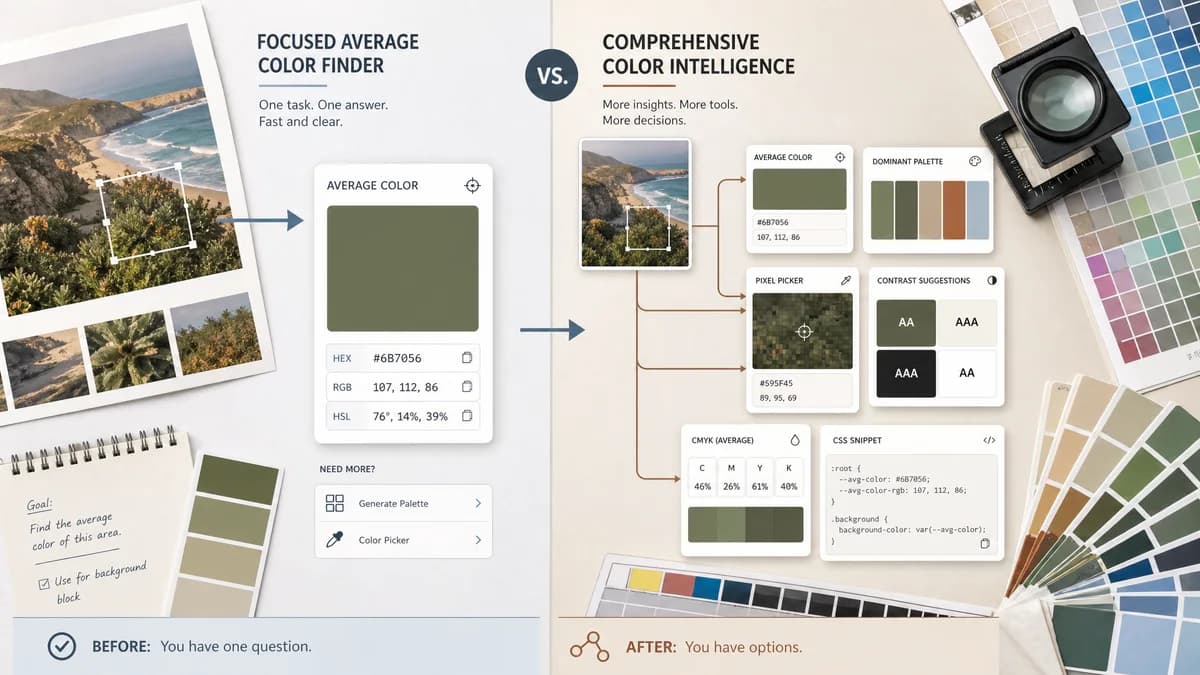
Average Color Finder is the baseline in this comparison: Find the average color of an image locally in your browser and copy HEX, RGB, HSL, and alpha-aware results.
ImageOnline.co combines average color detection with palette generation, an eyedropper, CMYK output, contrast guidance, and CSS export options.
Quick verdict
TextFaker can win with clarity and task focus, while ImageOnline.co is stronger for users who want several color-analysis tasks bundled together.
How Average Color Finder fits
Average Color Finder is more focused: calculate an average color, display it clearly, and connect users to separate palette and picker tools only when needed.
How ImageOnline.co Image Average Color Finder fits
ImageOnline.co is a broad color intelligence page. It is useful when a user wants average, dominant palette, picked pixel colors, contrast suggestions, and CSS snippets in one interface.
Side-by-side comparison
| Decision point | Average Color Finder | ImageOnline.co Image Average Color Finder | Takeaway |
|---|---|---|---|
| Tool scope | Our workflowSingle-purpose average color finder with related-tool links. | Competitor workflowAverage finder, palette generator, and eyedropper in one tool. | Competitor is broader; TextFaker can be faster for one job. |
| Average color | Our workflowShould make average color the central output. | Competitor workflowLists average color detection as one of several key features. | TextFaker can make the primary result more prominent. |
| Palette support | Our workflowHandled by existing TextFaker palette and dominant-color tools, not the core average tool. | Competitor workflowExtracts a dominant palette in the same interface. | TextFaker can avoid duplicate feature surfaces. |
| Color formats | Our workflowShould include HEX, RGB, HSL, and alpha-aware values where applicable. | Competitor workflowShows HEX, RGB, HSL, and CMYK fields. | Competitor has CMYK display; TextFaker can decide whether approximate CMYK helps or distracts. |
| Accessibility hints | Our workflowCould show readable black or white text preview over the average swatch. | Competitor workflowPage says it suggests black or white text for contrast. | A lightweight contrast preview closes a useful gap. |
| Privacy | Our workflowShould process files locally in the browser. | Competitor workflowPage claims client-side processing and no server upload. | Privacy positioning is table stakes in this category. |
Use Average Color Finder when
- Users who only need a representative average color
- People who prefer a low-distraction utility
- Workflows where palette extraction and eyedropper actions are separate tasks
Use ImageOnline.co Image Average Color Finder when
- Users who want average color plus palette extraction
- Designers who need CMYK and contrast hints in the same page
- People who want to click image pixels after upload
Detailed comparison
Positioning
ImageOnline.co targets users who want a complete color workstation around one image. Average Color Finder not try to merge all existing color tools into this future page because the registry already includes image picker, palette, and dominant color tools.
Feature Gap
A compact contrast preview could be valuable without turning the tool into an accessibility checker. CMYK is treated carefully because browser RGB images do not necessarily map to print CMYK without a profile and conversion intent.
- Add black and white text previews on the average swatch.
- Link to adjacent palette and picker tools.
- Avoid overemphasizing approximate CMYK unless clearly labeled.
SEO Angle
The comparison frames TextFaker as the cleaner average-color alternative for users who do not need an eyedropper or palette generator on the same page.
Product Notes
The tool preserves TextFaker's shared registry style by keeping outputs structured and easy to verify in tests. Feature creep is the main product risk for this page.
- Primary CTA is upload or drop image.
- Secondary actions is copy and reset.
- Related color tools appear after the result, not before it.
Research notes
- ImageOnline.co lists average color detection, palette generation, an eyedropper, multiple color formats, contrast checks, and client-side privacy.
- The page says it supports JPG, PNG, and WebP.
- The page says users can copy HEX codes and CSS variables.
Official source
The only outbound competitor link on this page is placed here for source checking after the comparison.
Official ImageOnline.co Image Average Color Finder source