
Average Color Finder vs ImageTool.org Color Picker
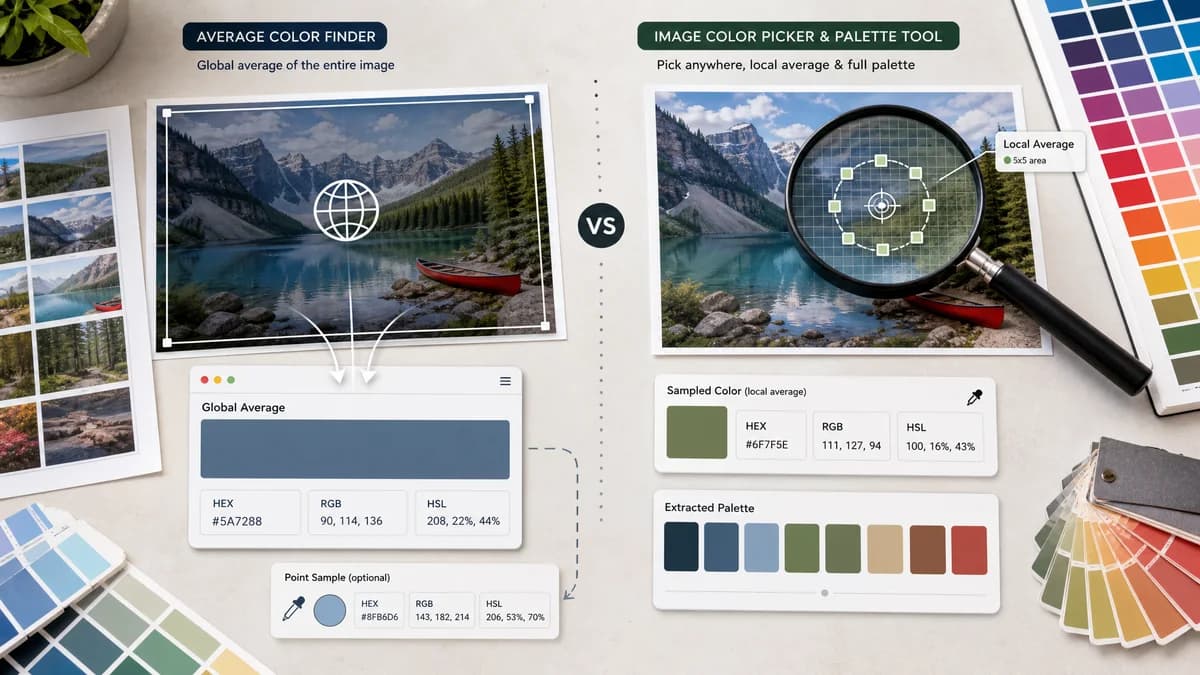
Average Color Finder is the baseline in this comparison: Find the average color of an image locally in your browser and copy HEX, RGB, HSL, and alpha-aware results.
ImageTool.org lets users pick colors from an image, generate dominant palettes, and choose single-pixel or averaged sampling modes.
Quick verdict
TextFaker can compete by making the global average color the first-class result, whereas ImageTool.org is stronger for manual pixel selection and local sample averaging.
How Average Color Finder fits
TextFaker Average Color Finder does not replace an eyedropper. It solves the global-image average use case and link to TextFaker Image Color Picker for point sampling.
How ImageTool.org Color Picker fits
ImageTool.org is a broader image color picker. Its averaged sampling modes are useful around a clicked point, while its palette extraction helps designers find multiple colors.
Side-by-side comparison
| Decision point | Average Color Finder | ImageTool.org Color Picker | Takeaway |
|---|---|---|---|
| Average scope | Our workflowGlobal average across the image or documented sample set. | Competitor workflowOffers single pixel, 3x3 average, and 5x5 average sampling modes for picked colors. | ImageTool.org's average is local sampling; Average Color Finder emphasize whole-image average. |
| Interaction model | Our workflowUpload image and immediately see average result. | Competitor workflowUpload image, analyze, and click image to pick colors. | TextFaker can be faster when no point selection is needed. |
| Palette output | Our workflowShould keep palette extraction in related tools. | Competitor workflowGenerates dominant color palettes. | ImageTool.org is more multifunctional. |
| Color formats | Our workflowShould return HEX, RGB, HSL, and optional RGBA. | Competitor workflowPage advertises HEX, RGB, and HSL extraction. | Core web color formats overlap. |
| Sampling education | Our workflowShould explain whole-image averaging and transparency handling. | Competitor workflowExplains selectable sampling mode around a clicked color. | Different average definitions is made explicit. |
| Best workflow | Our workflowRepresentative image color for CSS backgrounds and placeholders. | Competitor workflowPrecise color picking and palette generation from an image. | Average Color Finder cross-link to its picker rather than combine workflows. |
Use Average Color Finder when
- Users who need the whole image's average color
- People creating single-color placeholders
- Users who do not want to click a specific point in the image
Use ImageTool.org Color Picker when
- Users who need an eyedropper
- People sampling local 3x3 or 5x5 color averages
- Designers who want a dominant palette as well
Detailed comparison
Positioning
ImageTool.org is important because it uses the word average in the context of local sample sizes. TextFaker needs copy that distinguishes whole-image average from eyedropper sample averaging.
Feature Gap
A global average tool does not need click-to-pick behavior. If users need a 3x3 or 5x5 sample, the existing TextFaker Image Color Picker is the better surface.
- Define global average in the intro copy.
- Add related link to Image Color Picker.
- Avoid local sample controls unless the scope changes.
SEO Angle
The comparison captures users who search for average color but actually need an image color picker. It can help them choose based on whether they want the whole image or one area.
Product Notes
Tests confirm that the returned color changes when the entire image changes, not based on cursor position or preview scaling. Canvas preview scaling does not affect the calculation unless downsampling is intentionally used and disclosed.
- Analyze source pixels or a documented resized buffer.
- Keep visual preview separate from calculation rules.
- Use stable rounding for color channels.
Research notes
- ImageTool.org advertises extraction of HEX, RGB, and HSL colors from images.
- The page lists single pixel, 3x3 average, and 5x5 average color sampling modes.
- The page also generates dominant color palettes.
Official source
The only outbound competitor link on this page is placed here for source checking after the comparison.
Official ImageTool.org Color Picker source