
Open Source Alternatives to Adobe Color
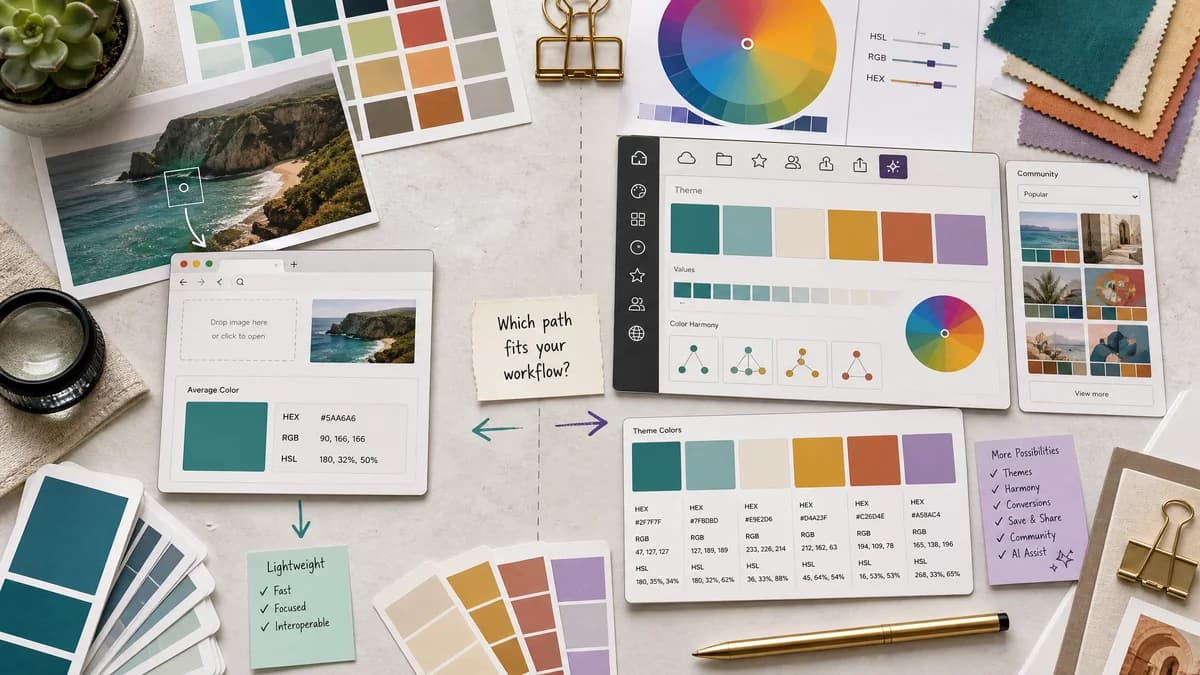
Average Color Finder is a browser-based alternative for users who need this focused result without installing a proprietary desktop app or entering a larger hosted workflow.
This research compares that workflow with Adobe Color while keeping the outbound source link at the bottom after the analysis.
Why Average Color Finder fits
TextFaker Average Color Finder is a lightweight, browser-based alternative for users who only need one representative color from an image, not a full creative theme system.
What Adobe Color offers
Adobe Color is a web app and creative community for creating, editing, extracting, saving, and sharing color themes, with Creative Cloud Libraries integration, Adobe Stock and Behance discovery, color conversion, and Adobe Sensei support.
Open alternative signals
Scope
Average Color FinderSingle average color from one image.
Adobe ColorColor themes, image extraction, trend galleries, conversion, and Creative Cloud integration.
Account ecosystem
Average Color FinderShould work without account creation for the core result.
Adobe ColorDesigned around Adobe web app, community, and Creative Cloud Libraries.
Output model
Average Color FinderOne representative color in copyable formats.
Adobe ColorMulti-color themes and palettes with save and reuse workflows.
Best user
Average Color FinderDevelopers and creators needing one image-derived color quickly.
Adobe ColorDesigners invested in Adobe's creative ecosystem.
Decision guide
Use TextFaker for quick average image color extraction, local processing, and copyable values outside a design-suite account flow.
Use Adobe Color when a designer needs image-derived palettes, Creative Cloud Libraries, Adobe Express or desktop app handoff, trend discovery, and theme management.
Side-by-side open source alternative comparison
| Decision point | Average Color Finder | Adobe Color | Takeaway |
|---|---|---|---|
| Average color | Our workflowCalculates a single mean color from pixel data. | Proprietary workflowFocuses on extracting and editing color themes from images, not a single average color. | TextFaker is narrower and faster for average-color intent. |
| Design workflow | Our workflowCopy values into any editor, CSS file, or design tool. | Proprietary workflowSaves themes to Creative Cloud Libraries and Adobe apps. | Adobe is stronger for managed creative workflows. |
| Formats | Our workflowExposes HEX, RGB, HSL, and CSS snippets. | Proprietary workflowOfficial copy mentions HEX, RGB, LAB, CMYK, HSV, Pantone, CSS, XML, and LESS in different Adobe Color contexts. | Adobe offers broader format conversion; Average Color Finder focuses on practical web outputs. |
| Privacy and locality | Our workflowProcesses local files in browser if implemented without uploads. | Proprietary workflowAdobe's image extraction is part of an online Adobe service. | TextFaker can appeal to privacy-sensitive quick tasks. |
| Complexity | Our workflowMinimal controls and immediate result. | Proprietary workflowTheme creation, refinement, saving, trends, libraries, and AI assistance. | The better tool depends on whether the user needs a result or a managed palette workflow. |
| Cost and access | Our workflowCore average-color calculation is free and accountless. | Proprietary workflowAdobe offers free access paths, but some related application features and automatic application workflows may require paid plans. | Avoid overgeneralizing Adobe pricing; compare the specific task. |
Detailed research
Opportunity
Adobe Color is not a direct average color calculator, but it owns adjacent image-to-palette search intent. A TextFaker comparison explains that average color is a different, simpler operation.
- Position TextFaker as the quick answer for one color.
- Position Adobe Color as the broader theme ecosystem.
- Mention that designers may use both in different stages.
Messaging
The key contrast is not open source versus Adobe alone; it is a browser-based, open-source-powered utility versus a proprietary creative suite workflow.
- Use open web APIs and local processing as trust signals.
- Do not claim TextFaker is a Creative Cloud replacement.
- Avoid stating Adobe uploads or stores images unless a source explicitly confirms it.
Feature Notes
For users coming from Adobe Color, output polish matters. The TextFaker result looks design-ready even though the workflow is simple.
- Show a large swatch with accessible foreground text.
- Provide CSS custom property output.
- Offer a small downloadable PNG swatch if useful.
SEO Fit
The page can capture users searching for lighter alternatives to Adobe Color when their actual need is a value, not a managed color theme.
- Use phrases like Adobe Color alternative for average image color.
- Explain that Adobe Color extracts palettes while TextFaker finds average color.
- Cross-link to palette tools for users who need multi-color extraction.
Research notes
- Official Adobe Color page says users can create and edit themes with up to ten colors or extract themes from images.
- Official page says themes can be saved to Adobe Creative Cloud Libraries for use in desktop and mobile Adobe apps.
- Official image generator page says users can upload a photo, refine swatches, download HEX or RGB values, and use the palette in Adobe Express; automatic application to designs may require a paid plan.
- Adobe Color is proprietary software and is compared as a suite, not as a direct average-only calculator.
Official source
The proprietary product link is included once here for source checking after the alternative analysis.
Official Adobe Color source