
Open Source Alternatives to Canva Color Palette Generator
Average Color Finder is a browser-based alternative for users who need this focused result without installing a proprietary desktop app or entering a larger hosted workflow.
This research compares that workflow with Canva Color Palette Generator while keeping the outbound source link at the bottom after the analysis.
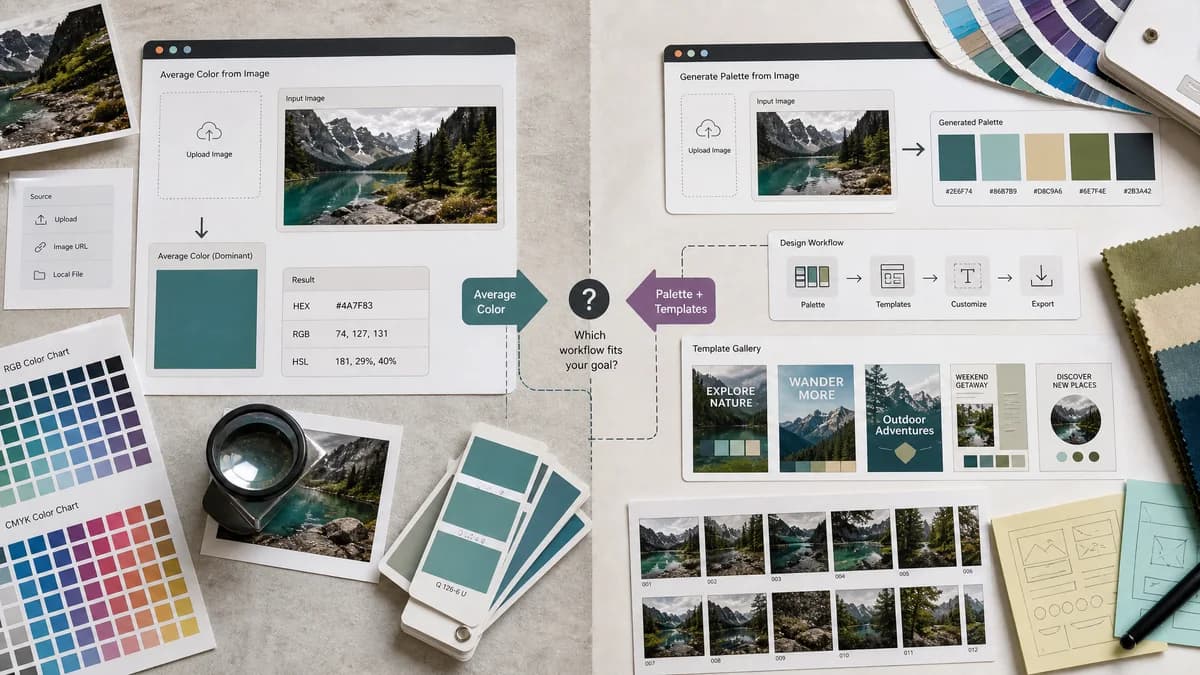
Why Average Color Finder fits
TextFaker Average Color Finder is useful when a user wants the average color of an image rather than a design-ready palette inside Canva's template ecosystem.
What Canva Color Palette Generator offers
Canva's Color Palette Generator creates a palette from a photo after upload and connects the result to Canva templates and design workflows.
Open alternative signals
Primary result
Average Color FinderOne average color value.
Canva Color Palette GeneratorA multi-color palette from a photo.
Workflow destination
Average Color FinderCopy values for any code or design environment.
Canva Color Palette GeneratorContinue into Canva templates and Canva design workflows.
Complexity
Average Color FinderSmall standalone utility.
Canva Color Palette GeneratorPart of a broad online design platform.
Account expectation
Average Color FinderNo account is required for the core average calculation.
Canva Color Palette GeneratorCanva's broader design workflow often leads into its platform experience.
Decision guide
Use TextFaker for a fast, neutral, accountless calculation of one representative image color for CSS, placeholders, or visual analysis.
Use Canva when the goal is to turn a photo-derived palette into Canva templates, social graphics, presentations, or brand materials.
Side-by-side open source alternative comparison
| Decision point | Average Color Finder | Canva Color Palette Generator | Takeaway |
|---|---|---|---|
| Average versus palette | Our workflowComputes the mean image color as a single representative swatch. | Proprietary workflowGenerates a palette of several colors from the uploaded image. | TextFaker answers a narrower mathematical question. |
| Use case | Our workflowPlaceholders, page backgrounds, quick image tone checks, and CSS variables. | Proprietary workflowDesigning graphics and choosing template colors inside Canva. | Canva is stronger for content creation; TextFaker is stronger for utility extraction. |
| Output | Our workflowShould provide HEX, RGB, HSL, and CSS snippets. | Proprietary workflowShows named swatches and HEX values. | TextFaker can be more developer-oriented. |
| Privacy | Our workflowProcesses files locally in the browser if implemented as planned. | Proprietary workflowThe researched page does not make a local-processing claim in the crawled content. | Only TextFaker's own privacy behavior is asserted. |
| Learning curve | Our workflowImmediate drag, drop, and copy workflow. | Proprietary workflowSimple upload, then broader Canva calls to action. | TextFaker can reduce distractions for one-off technical tasks. |
| Best fit | Our workflowUsers needing average HEX from an image. | Proprietary workflowUsers creating visual assets from a palette. | The comparison is framed by output need. |
Detailed research
Opportunity
Canva's generator is a major comparison target because many users search for image-to-color workflows through Canva. Average Color Finder clarifies that it finds the average color, not a palette for a finished design.
- Use a side-by-side explanation of average color and palette extraction.
- Mention CSS and web placeholder use cases.
- Cross-link to TextFaker's palette generator for users who need multiple colors.
Content Notes
Canva's page is polished and beginner-friendly. Average Color Finder avoids sounding too technical in the main UI while still exposing technical details below the result.
- Main result: swatch and copy buttons.
- Details panel: dimensions, pixel count, alpha behavior.
- FAQ: why the average color may look muted compared with dominant colors.
Differentiation
The strongest distinction is workflow independence. Users can take a TextFaker value anywhere without committing to a design suite.
- No template handoff required.
- No brand kit setup required.
- No managed project space required for a one-off value.
SEO Fit
The alternative page can target users looking for Canva-like color extraction but needing a direct average color answer.
- Use Canva comparison terms in meta copy.
- Be explicit that Canva produces palettes.
- Lead with average color from image as the search intent.
Research notes
- Official Canva page says the generator creates a color palette from a photo in seconds and starts with an image upload.
- Official page presents copied palette swatches and links the palette to Canva design templates.
- Canva is proprietary software; the comparison does not imply TextFaker replaces the full Canva design platform.
Official source
The proprietary product link is included once here for source checking after the alternative analysis.
Official Canva Color Palette Generator source