
Open Source Alternatives to Pixelied Image Color Picker
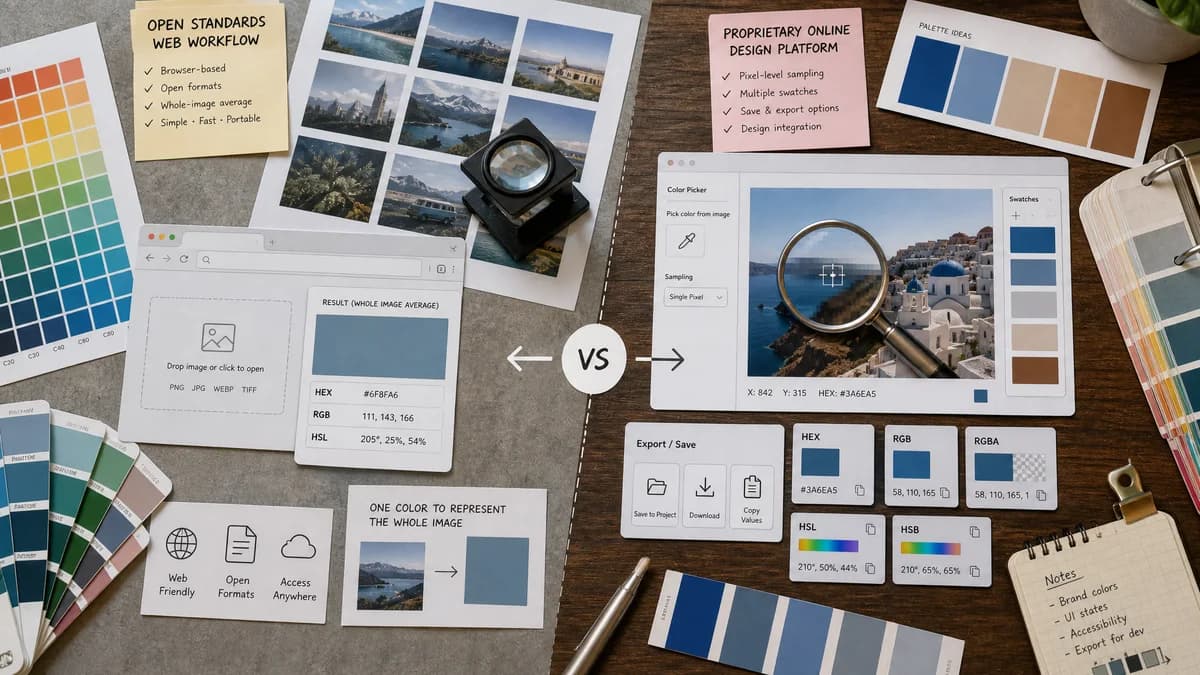
Average Color Finder is a browser-based alternative for users who need this focused result without installing a proprietary desktop app or entering a larger hosted workflow.
This research compares that workflow with Pixelied Image Color Picker while keeping the outbound source link at the bottom after the analysis.
Why Average Color Finder fits
TextFaker Average Color Finder is positioned for users who want a whole-image average color rather than clicking a pixel or exporting a palette from a design-platform tool.
What Pixelied Image Color Picker offers
Pixelied's Image Color Picker lets users upload an image, pick colors with a magnifying tool, view color formats such as HEX, RGB, RGBA, HSL, and HSB, generate palettes, save colors, and export palettes in multiple formats.
Open alternative signals
Sampling model
Average Color FinderWhole-image average calculation.
Pixelied Image Color PickerPixel or area picking plus palette generation.
Output formats
Average Color FinderHEX, RGB, HSL, and CSS-oriented output for the average color.
Pixelied Image Color PickerHEX, RGB, RGBA, HSL, HSB and palette exports.
Storage
Average Color FinderNo save account needed for the average value.
Pixelied Image Color PickerOfficial page describes saving colors and palette collections.
Best workflow
Average Color FinderFast extraction of one representative value.
Pixelied Image Color PickerSelecting, saving, and exporting multiple colors for design work.
Decision guide
Use TextFaker for image-wide average color, predictable calculation rules, and a direct copy workflow.
Use Pixelied when users need pixel picking, palette saving, stock photos, exports, and broader design-tool integration.
Side-by-side open source alternative comparison
| Decision point | Average Color Finder | Pixelied Image Color Picker | Takeaway |
|---|---|---|---|
| Average color | Our workflowImage-wide mean color is the core feature. | Proprietary workflowColor picker primarily selects a pixel or area and also generates palettes. | Users choose based on whether they need the image average or a selected color. |
| Precision | Our workflowPrecise for the chosen average algorithm over the image pixels. | Proprietary workflowPrecise for selected pixel or magnified area color. | Both can be precise, but they measure different things. |
| Exports | Our workflowSingle-color copy and CSS snippets are sufficient for most average-color uses. | Proprietary workflowPalette exports include PDF, SVG, CSS, and PNG. | Pixelied is broader for palette documentation. |
| Design ecosystem | Our workflowStandalone utility integrated with TextFaker tools. | Proprietary workflowPart of Pixelied's design platform and stock-photo workflow. | TextFaker can be lighter for technical one-offs. |
| Privacy | Our workflowProcesses local files in browser without storing uploads. | Proprietary workflowOfficial FAQ says uploaded images are not stored on Pixelied servers. | Both can speak to privacy, but wording follows each official claim. |
| Best fit | Our workflowAverage color for placeholders, background matching, and quick image tone checks. | Proprietary workflowSampling exact colors and building saved palettes. | The comparison prevents users from confusing average with eyedropper selection. |
Detailed research
Opportunity
Pixelied's color picker is feature-rich, which creates a clear opening for a narrower TextFaker utility. The TextFaker page quickly answers: what is the average color of this image?
- Avoid putting a magnifier at the center of the average-color page.
- Use the existing Image Color Picker for exact pixel selection.
- Make the whole-image calculation visible and auditable.
Feature Notes
Because Pixelied supports RGBA and palette exports, Average Color Finder should consider alpha reporting for transparent PNG and WebP files.
- Show average alpha when transparency exists.
- Let users composite transparent pixels against white, black, or custom background.
- Explain that a transparent average may not match visual appearance on every background.
Content Notes
The page includes a short distinction between three operations: average color, selected pixel color, and dominant color palette.
- Average color: blend of all included pixels.
- Selected color: sampled point or area.
- Dominant colors: clustered common colors.
SEO Fit
Users searching for Pixelied alternatives may need image color picking generally. The TextFaker comparison routes exact picker users to the existing Image Color Picker while keeping the average-color page focused.
- Mention Pixelied Image Color Picker as a related comparison.
- Use average color finder as the primary tool label.
- Add internal links to complementary TextFaker color tools.
Research notes
- Official Pixelied page describes uploading an image, picking colors with a magnifying tool, and exporting color codes in HEX, RGB, RGBA, HSL, and HSB.
- Official FAQ says the tool analyzes pixels, identifies dominant and secondary colors, supports palette saving, and can export palettes as PDF, SVG, CSS, and PNG.
- Pixelied is proprietary software for this comparison unless a public source license is established.
Official source
The proprietary product link is included once here for source checking after the alternative analysis.
Official Pixelied Image Color Picker source