
Color Palette Generator from Image vs Adobe Color
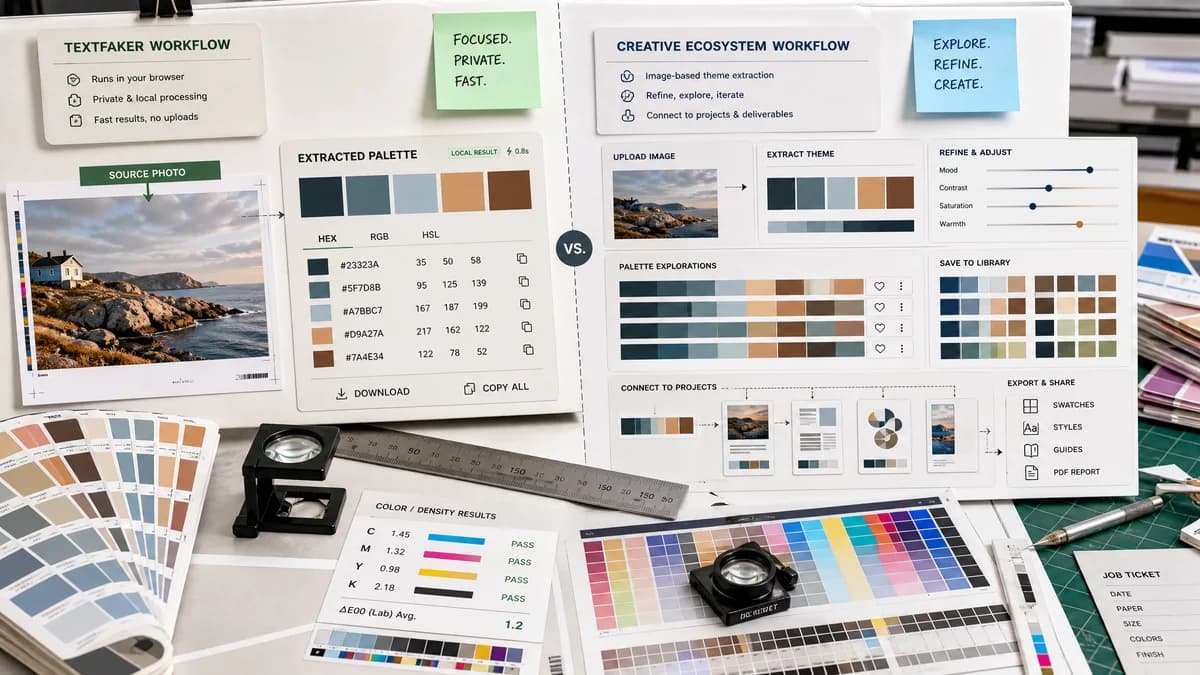
Color Palette Generator from Image is the baseline in this comparison: Upload a photo or graphic and generate a browser-local color palette with dominant swatches, HEX, RGB, HSL values, and copy/download controls.
Compare TextFaker's local image palette generator with Adobe Color's image-based theme extraction.
Quick verdict
TextFaker is better for fast private extraction and portable values. Adobe Color is better for Adobe users who want editable themes inside a creative ecosystem.
How Color Palette Generator from Image fits
TextFaker offers a simple browser-local path to harmonious swatches, HEX/RGB/HSL values, copy controls, and downloads for people who do not need Adobe library integration.
How Adobe Color fits
Adobe Color extracts themes from uploaded photos, lets users refine colors and mood, and connects palettes to Adobe Express and creative projects.
Side-by-side comparison
| Decision point | Color Palette Generator from Image | Adobe Color | Takeaway |
|---|---|---|---|
| Image handling | Our workflowLocal browser analysis with no upload. | Competitor workflowAdobe's page is built around uploading a photo to extract a palette. | TextFaker can lead on privacy-sensitive workflows. |
| Palette editing | Our workflowProvides harmonious swatches and practical copy/download output. | Competitor workflowAdobe supports mood adjustment and handle-based refinement on the image. | Adobe is stronger for creative refinement; TextFaker can be stronger for quick export. |
| Formats | Our workflowHEX, RGB, and HSL for each swatch. | Competitor workflowAdobe mentions HEX or RGB download and other digital formats generally. | Visible HSL support can be a TextFaker differentiator. |
| Ecosystem | Our workflowStandalone web utility in the TextFaker tools registry. | Competitor workflowIntegrated with Adobe Express and creative project storage. | Adobe fits suite users; TextFaker fits independent extraction. |
| Output ownership | Our workflowDownload and copy options are self-contained. | Competitor workflowAdobe promotes saving and using palettes in Adobe projects. | TextFaker makes export obvious and independent. |
| Learning curve | Our workflowA compact utility can be understood immediately. | Competitor workflowAdobe offers more creative controls and library behavior. | TextFaker can win with lower cognitive load. |
Use Color Palette Generator from Image when
- No-upload image palette generation
- Fast extraction without creative suite context
- Portable values for CSS, brand notes, and documentation
- Simple copy and download workflows
Use Adobe Color when
- Adobe Express and Creative Cloud users
- Mood-based theme refinement
- Saving palettes into Adobe workflows
- Creative projects that continue inside Adobe tools
Detailed comparison
Market Role
Adobe Color is one of the most credible competitors because it combines image extraction with professional color workflows. Its feature depth is strongest for users already in Adobe tools.
TextFaker Opportunity
A TextFaker page can make privacy and raw color values the center of the experience. The page does not bury HEX, RGB, and HSL behind account or library actions.
- Show extracted colors immediately after image selection.
- Allow one-click copy for each format.
- Provide a downloadable palette file or swatch image.
Content Strategy
Comparison copy acknowledge Adobe's creative refinement while explaining that TextFaker is meant for fast local extraction, CSS handoff, and lightweight palette downloads.
Risks
Adobe is a trusted design brand, so TextFaker avoids overclaiming algorithmic superiority unless measured. The safer claim is workflow difference: local, focused, and portable.
Research notes
- Adobe's official page says users upload a photo to extract colors and generate a custom color palette.
- Adobe describes automatic dominant and accent color detection plus handle-based refinement.
- Adobe mentions downloading HEX or RGB values and saving palettes for creative projects.
- Adobe notes automatic application to designs may require a paid plan.
Official source
The only outbound competitor link on this page is placed here for source checking after the comparison.
Official Adobe Color source