
Color Palette Generator from Image vs Canva Color Palette Generator
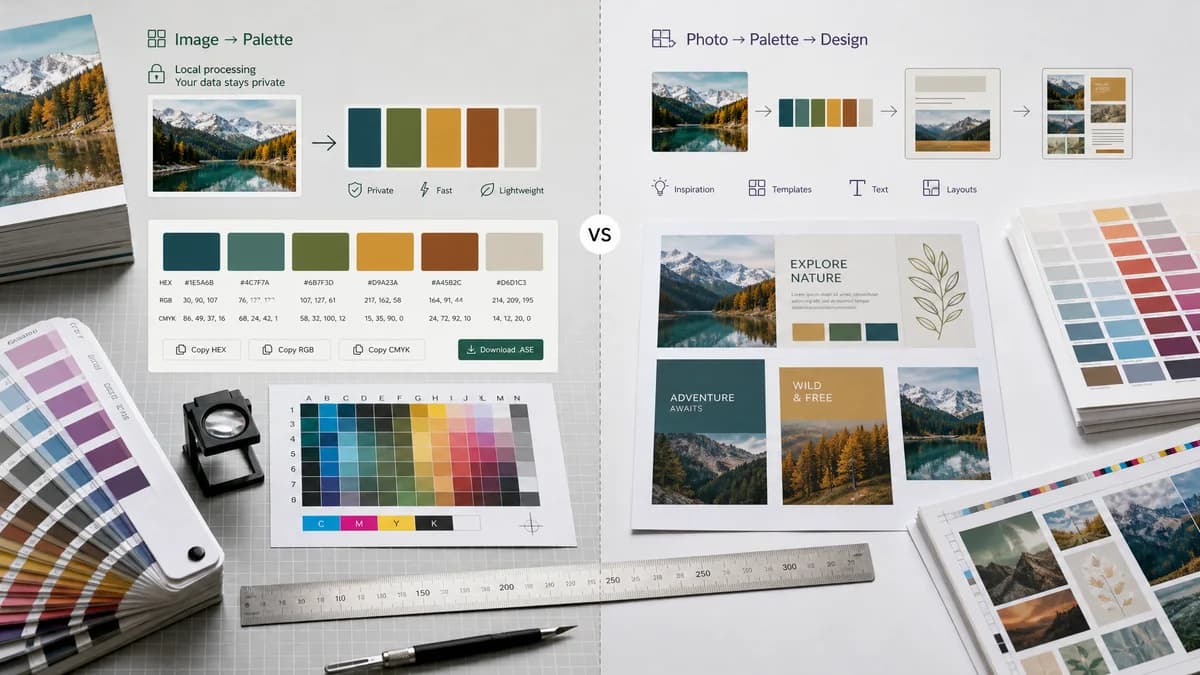
Color Palette Generator from Image is the baseline in this comparison: Upload a photo or graphic and generate a browser-local color palette with dominant swatches, HEX, RGB, HSL values, and copy/download controls.
Compare a browser-local TextFaker color palette generator with Canva's photo-based palette tool for quick design inspiration.
Quick verdict
TextFaker is the better fit for private, utility-first palette extraction. Canva is better when palette generation is only the first step in a Canva design workflow.
How Color Palette Generator from Image fits
TextFaker focuses on local image processing, precise color formats, copy/download controls, and a lightweight workflow for users who want palette data without entering a full design suite.
How Canva Color Palette Generator fits
Canva provides an easy photo-to-palette experience and connects the generated palette to templates and design creation. It is strongest for users already planning to design inside Canva.
Side-by-side comparison
| Decision point | Color Palette Generator from Image | Canva Color Palette Generator | Takeaway |
|---|---|---|---|
| Primary workflow | Our workflowUpload or drop an image, generate harmonious swatches, copy or download values. | Competitor workflowUpload an image and use the generated palette inside Canva's design ecosystem. | TextFaker can be more direct for color extraction; Canva is more design-suite oriented. |
| Privacy posture | Our workflowBrowser-local processing with no image upload. | Competitor workflowThe page prompts users to upload an image to Canva's tool. | A no-upload promise is a clear TextFaker differentiator. |
| Color formats | Our workflowHEX, RGB, and HSL display for every swatch. | Competitor workflowThe visible palette emphasizes named colors and hex codes. | TextFaker is stronger for developer-ready format coverage. |
| Export options | Our workflowCopy individual values and download palette data or visual swatches. | Competitor workflowCanva directs users toward using the palette in templates and Canva designs. | TextFaker emphasizes portable output over template usage. |
| Account dependency | Our workflowBest positioned as no-account utility access. | Competitor workflowCanva's broader design workflows often connect to Canva accounts and projects. | TextFaker can reduce friction for one-off extraction. |
| Best audience | Our workflowDevelopers, designers, marketers, and SEO searchers needing fast color codes. | Competitor workflowCreators who want to continue designing in Canva. | The tools overlap at extraction but serve different next steps. |
Use Color Palette Generator from Image when
- Extracting palette values without account friction
- Keeping image processing browser-local
- Copying HEX, RGB, and HSL for CSS or design docs
- Downloading a simple palette artifact
Use Canva Color Palette Generator when
- Building Canva graphics from the extracted palette
- Using generated colors with Canva templates
- Casual social graphics and presentation design
- Users already working in Canva
Detailed comparison
Positioning
Canva is a strong broad-market reference because it ranks around the common phrase color palette generator and makes the image workflow simple. Its advantage is not color data depth but the ability to move directly into Canva templates.
Feature Gap
TextFaker can compete by making the generated palette easier to inspect and reuse outside a design suite. HEX, RGB, HSL, copy buttons, and downloads are visible without forcing a template workflow.
- Make every swatch copyable in all three formats.
- Offer a downloadable palette image and structured data export.
- State browser-local processing near the upload control.
SEO Angle
Canva is likely to dominate broad consumer searches, so TextFaker targets practical modifiers such as from image, no upload, browser local, HEX RGB HSL, copy colors, and download palette.
User Fit
Users who already know they want Canva designs may choose Canva. Users who need exact color values for a website, brand note, moodboard, or CSS file are better served by a focused utility page.
Research notes
- Canva's official page says the user uploads an image to create a palette from a photo.
- Canva displays palette color names and hex values in the page experience.
- Canva's page emphasizes using the palette with templates and designs.
- TextFaker avoids competing on template design and instead compete on privacy, formats, and portability.
Official source
The only outbound competitor link on this page is placed here for source checking after the comparison.
Official Canva Color Palette Generator source