
Color Palette Generator from Image vs ColorKit Color Palette from Image
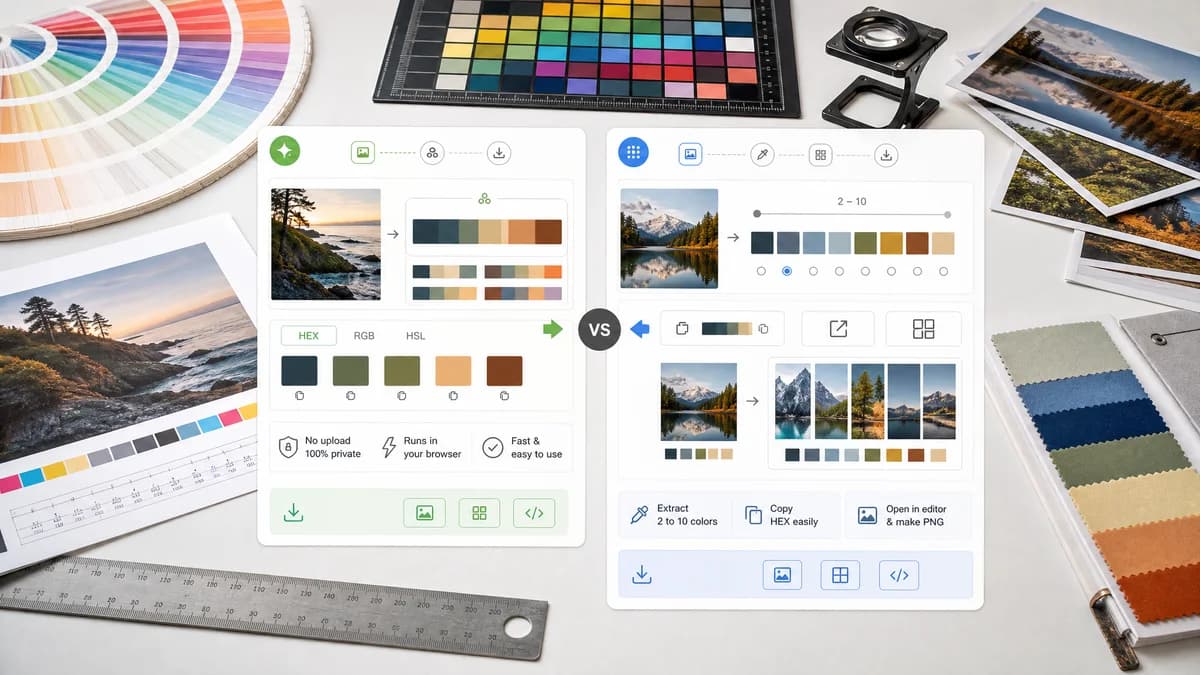
Color Palette Generator from Image is the baseline in this comparison: Upload a photo or graphic and generate a browser-local color palette with dominant swatches, HEX, RGB, HSL values, and copy/download controls.
Compare TextFaker with ColorKit's image-to-palette tool for extracting dominant colors from photos.
Quick verdict
ColorKit is one of the closest direct competitors. TextFaker needs parity on privacy and ease of use, plus stronger multi-format output if it wants a clear edge.
How Color Palette Generator from Image fits
TextFaker provides a similarly lightweight utility while emphasizing harmonious palette generation, HEX/RGB/HSL display, no-upload processing, and straightforward downloads.
How ColorKit Color Palette from Image fits
ColorKit extracts 2 to 10 colors from an image, copies hex values, can open palettes in an editor, and can create a collage PNG. Its page states that images are not uploaded and that it uses Color Thief.
Side-by-side comparison
| Decision point | Color Palette Generator from Image | ColorKit Color Palette from Image | Takeaway |
|---|---|---|---|
| Privacy | Our workflowno-upload browser-local processing. | Competitor workflowColorKit states the image is never uploaded to its server. | Both can compete strongly on privacy. |
| Extraction method | Our workflowDescribes the method only if implemented and verified. | Competitor workflowColorKit states it uses Color Thief to extract dominant colors. | ColorKit is transparent about its extraction library. |
| Palette size | Our workflowAllows a practical palette size selection such as 4, 6, 8, or 10 colors. | Competitor workflowColorKit supports changing extracted colors from 2 to 10. | TextFaker needs palette-size control for parity. |
| Color formats | Our workflowHEX, RGB, and HSL. | Competitor workflowColorKit's page emphasizes copying hex color values. | TextFaker can differentiate with broader visible formats. |
| Editing | Our workflowFocused extraction and export. | Competitor workflowColorKit can open the palette in an editor and save it later to an account. | ColorKit is stronger for continued editing. |
| Download | Our workflowcopy and download options for swatches and values. | Competitor workflowColorKit can create a collage with the palette on top of the image and export PNG. | TextFaker offers both visual and structured downloads. |
Use Color Palette Generator from Image when
- Users needing HEX, RGB, and HSL together
- Palette downloads beyond a collage image
- A TextFaker-integrated tool collection experience
- SEO searches for no-upload image palette extraction
Use ColorKit Color Palette from Image when
- Simple hex palette extraction
- Users who want ColorKit's editor
- Collage image creation from photo and palette
- Users comfortable with ColorKit's broader color tools
Detailed comparison
Direct Rival
ColorKit closely matches the TextFaker privacy angle. It already claims no server upload and simple image-to-palette extraction.
Differentiators
The best TextFaker differentiator is format depth and handoff clarity. ColorKit emphasizes hex and collage output, while TextFaker can make HEX, RGB, and HSL equally first-class.
- Add visible RGB and HSL rows below each color.
- Include copy buttons for each representation.
- Offer a copy-all format switch.
Trust Content
Because ColorKit names Color Thief, TextFaker is careful to document its actual extraction approach once implemented. If it uses canvas sampling or clustering, state that accurately.
Feature Baseline
A comparison against ColorKit suggests minimum viable features: local processing, palette-size selection, click-to-copy, and a downloadable palette preview.
Research notes
- ColorKit says its tool extracts colors from any image with Color Thief.
- ColorKit supports changing the number of extracted colors from 2 to 10.
- ColorKit says images are never uploaded to its server.
- ColorKit allows opening the palette in an editor and creating a PNG collage.
Official source
The only outbound competitor link on this page is placed here for source checking after the comparison.
Official ColorKit Color Palette from Image source