
Color Palette Generator from Image vs Coolors Image Picker
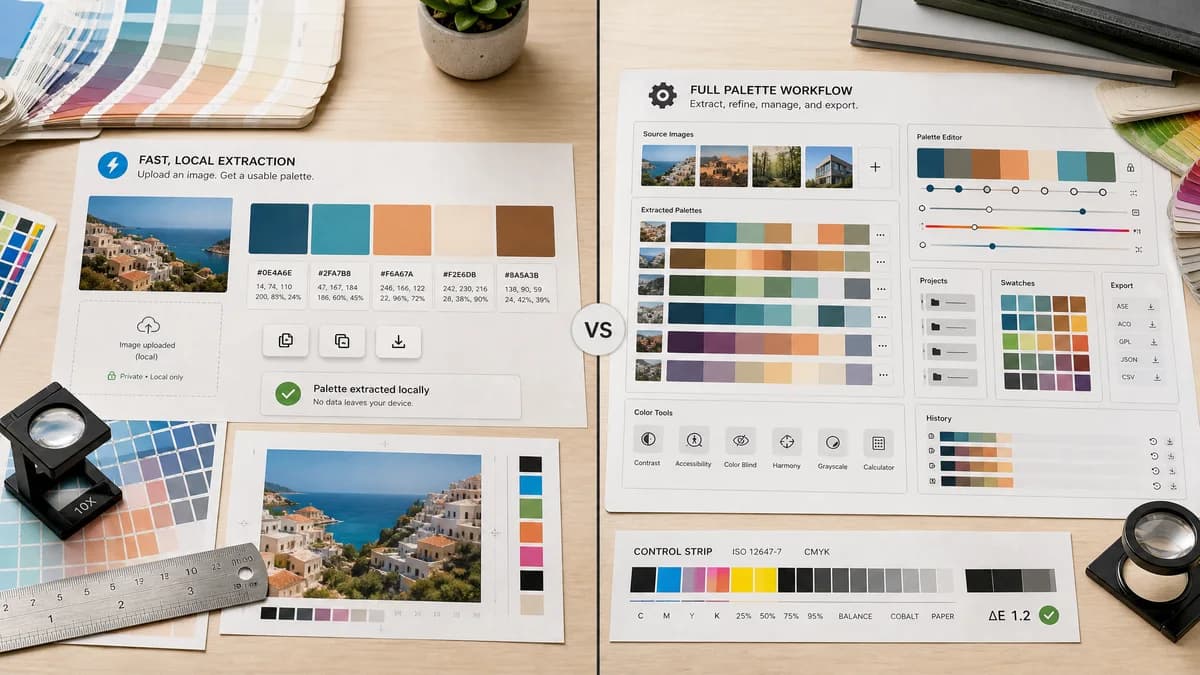
Color Palette Generator from Image is the baseline in this comparison: Upload a photo or graphic and generate a browser-local color palette with dominant swatches, HEX, RGB, HSL values, and copy/download controls.
Compare TextFaker's image palette generator with Coolors Image Picker for designers who need extracted palettes.
Quick verdict
TextFaker is stronger for no-friction private extraction. Coolors is stronger for users who want a full color platform with saved palettes, projects, and advanced palette workflows.
How Color Palette Generator from Image fits
TextFaker is a streamlined, browser-local utility focused on upload, harmonious swatches, HEX/RGB/HSL, copy, and download rather than palette collection management.
How Coolors Image Picker fits
Coolors Image Picker extracts palettes from photos and supports choosing inputs, adjusting palettes, opening them in the generator, saving, exporting, and using Pro features.
Side-by-side comparison
| Decision point | Color Palette Generator from Image | Coolors Image Picker | Takeaway |
|---|---|---|---|
| Workflow scope | Our workflowSingle-purpose extraction from image to swatches and values. | Competitor workflowImage picker plus generator, saved palettes, collections, and Pro features. | TextFaker can feel lighter for a quick job. |
| Input options | Our workflowimage upload or drag-and-drop in browser. | Competitor workflowCoolors documents upload, webcam, stock photo, and URL-oriented input flows. | Coolors may offer broader input sources. |
| Manual refinement | Our workflowPrioritizes harmonious automatic palette output and simple controls. | Competitor workflowCoolors help documents sliders, manual picker dragging, add/remove, and rearranging. | Coolors is stronger for interactive refinement. |
| Privacy | Our workflowno-upload browser-local processing. | Competitor workflowCoolors focuses on extraction features; privacy is not the main positioning on the cited pages. | TextFaker makes privacy prominent. |
| Exports | Our workflowCopy HEX/RGB/HSL and download palette output. | Competitor workflowCoolors supports saving and exporting palettes, with some advanced features tied to Pro. | TextFaker keep core exports free and obvious. |
| Audience | Our workflowUsers needing quick palette values for CSS, documentation, or brand notes. | Competitor workflowDesigners who maintain palettes over time in a color platform. | Both are valid, but the product intent differs. |
Use Color Palette Generator from Image when
- One-off palette extraction
- Users who do not want project or collection features
- Local file handling with no upload emphasis
- Simple developer and designer handoff
Use Coolors Image Picker when
- Saving and organizing many palettes
- Using a mature color generator ecosystem
- Manual picker adjustment and rearranging
- Users who value Pro platform features
Detailed comparison
Competitive Strength
Coolors is a direct and mature competitor. Its official tool and help page show robust image-to-palette workflows, including manual controls and export paths.
Differentiation
TextFaker does not try to out-platform Coolors. A better angle is fast local extraction without sign-in, project management, or upgrade distractions.
- Keep the upload area and results on one page.
- Show color values under every swatch.
- Avoid hiding basic export behind an account.
Comparison Messaging
A fair comparison positions Coolors as more powerful for palette management and TextFaker as cleaner for quick extraction and private local analysis.
Implementation Notes
Because Coolors supports manual tuning, TextFaker at least let users choose palette size and copy all colors. That will cover most practical search intent without building a full color workspace.
Research notes
- Coolors' official tool page states it extracts palettes from photos.
- Coolors help documents upload, webcam, stock photo input, generated palette slider, manual color picking, adding or removing colors, rearranging, saving, and exporting.
- Coolors advertises Pro features such as saved palettes, projects, contrast checking, variations, and advanced exports.
- TextFaker can differentiate through a narrower, no-upload utility workflow.
Official source
The only outbound competitor link on this page is placed here for source checking after the comparison.
Official Coolors Image Picker source