
Color Palette Generator from Image vs Figma Color Picker
Color Palette Generator from Image is the baseline in this comparison: Upload a photo or graphic and generate a browser-local color palette with dominant swatches, HEX, RGB, HSL values, and copy/download controls.
Compare TextFaker's browser-local image palette generator with Figma's color picker and palette workflow.
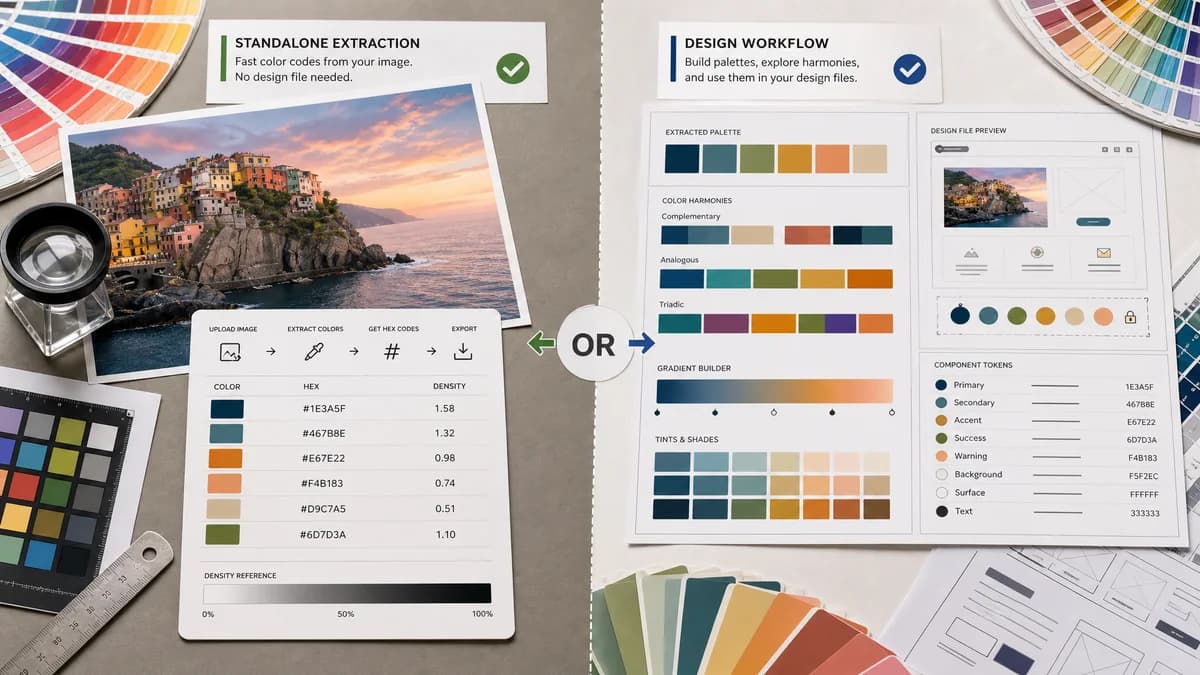
Quick verdict
TextFaker is better for standalone color-code extraction. Figma is better for designers who want to use the palette directly in interface design files.
How Color Palette Generator from Image fits
TextFaker focuses on extracting palette values from an image without requiring users to move into a design editor or collaborative workspace.
How Figma Color Picker fits
Figma's color picker can generate palettes from uploaded images and encourages opening palettes in Figma to create gradients, maintain harmony, and build schemes.
Side-by-side comparison
| Decision point | Color Palette Generator from Image | Figma Color Picker | Takeaway |
|---|---|---|---|
| Product context | Our workflowStandalone utility page in a tool library. | Competitor workflowPart of Figma's broader design platform and acquisition flow. | TextFaker is more direct for non-Figma users. |
| Output focus | Our workflowColor values and downloadable palette assets. | Competitor workflowPalette generation with a path into Figma design work. | Figma is better for design continuation; TextFaker is better for portable values. |
| Formats | Our workflowHEX, RGB, and HSL visible for each swatch. | Competitor workflowFigma is centered on design use and palette creation rather than a format table. | TextFaker can serve developers more directly. |
| Privacy message | Our workflowNo-upload, browser-local positioning. | Competitor workflowThe official page describes uploading an image for palette generation. | Privacy can be a TextFaker advantage. |
| Collaboration | Our workflowNo collaboration layer; just extraction and export. | Competitor workflowFigma is strong for team design collaboration. | Figma wins for teams; TextFaker wins for simple utility use. |
| Friction | Our workflowDesigned for quick use from search. | Competitor workflowMost valuable when the user is willing to enter the Figma ecosystem. | TextFaker can capture users who only need the colors. |
Use Color Palette Generator from Image when
- Getting color codes without opening a design file
- Browser-local image processing and no-upload positioning
- Copying HEX, RGB, and HSL outside a design platform
- Quick SEO-driven utility use
Use Figma Color Picker when
- Figma users building UI designs
- Collaborative design teams
- Turning extracted palettes into gradients or design systems inside Figma
- Design work that continues in a Figma file
Detailed comparison
Adjacent Competitor
Figma is not only a palette extractor; it is a design platform. That makes it an adjacent competitor for users whose next step is designing a UI or brand system.
TextFaker Advantage
TextFaker can avoid the platform handoff. A user who only wants values from a screenshot, logo, product photo, or moodboard can finish the job in one page.
- Put copy controls beside swatches.
- Offer a copy-all palette button.
- Include HSL for designers adjusting hue, saturation, and lightness.
SEO Fit
Figma may rank for color picker terms, while TextFaker can target exact extraction phrases and privacy modifiers. The comparison avoids implying Figma is only a utility.
User Decision
Choose Figma when the palette needs to become a design file. Choose TextFaker when the palette needs to become portable color codes.
Research notes
- Figma's official page says users can upload any image and automatically generate palettes.
- Figma promotes opening palettes in Figma for gradients, color harmony, and custom schemes.
- Figma is a broader design platform, not a narrow extraction-only tool.
- TextFaker highlight standalone use and portable color formats.
Official source
The only outbound competitor link on this page is placed here for source checking after the comparison.
Official Figma Color Picker source