
Color Palette Generator from Image vs HexPickr
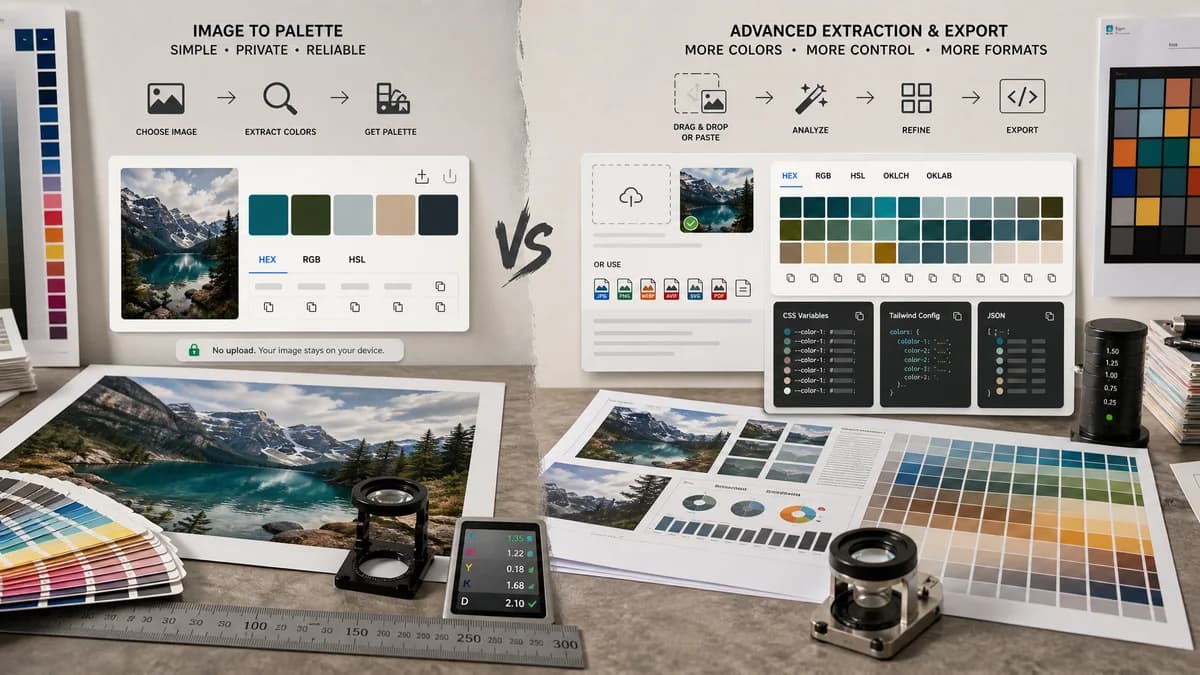
Color Palette Generator from Image is the baseline in this comparison: Upload a photo or graphic and generate a browser-local color palette with dominant swatches, HEX, RGB, HSL values, and copy/download controls.
Compare TextFaker's image palette generator with HexPickr's developer-ready extraction and export workflow.
Quick verdict
HexPickr is stronger for frontend developers who want modern color spaces and code exports. TextFaker can compete by being simpler, privacy-forward, and focused on the mainstream HEX/RGB/HSL job.
How Color Palette Generator from Image fits
TextFaker offers a simpler no-upload palette generator with HEX, RGB, HSL, copy, and download controls for users who need reliable swatches without advanced token workflows.
How HexPickr fits
HexPickr supports drag-and-drop, file selection, clipboard paste, multiple image formats, up to 24 dominant colors, HEX/RGB/HSL, OKLCH/OKLAB, and exports such as CSS variables, Tailwind config, and JSON.
Side-by-side comparison
| Decision point | Color Palette Generator from Image | HexPickr | Takeaway |
|---|---|---|---|
| Developer exports | Our workflowcopy and download options, likely simpler at launch. | Competitor workflowHexPickr advertises CSS variables, Tailwind config, and JSON exports. | HexPickr is stronger for code handoff unless TextFaker adds similar exports. |
| Color formats | Our workflowHEX, RGB, and HSL. | Competitor workflowHexPickr includes HEX, RGB, HSL, OKLCH, and OKLAB. | TextFaker covers mainstream formats; HexPickr covers advanced formats. |
| Input methods | Our workflowUpload or drag-and-drop image workflow. | Competitor workflowHexPickr supports drag-and-drop, click selection, and clipboard paste. | Clipboard paste would be a useful TextFaker enhancement. |
| Palette size | Our workflowExposes a practical swatch count control. | Competitor workflowHexPickr detects up to 24 dominant colors. | HexPickr is better for dense extraction. |
| File support | Our workflowSupports common browser image formats. | Competitor workflowHexPickr lists PNG, JPG, WebP, AVIF, and SVG with a 5 MB limit. | TextFaker document supported formats and limits clearly. |
| Simplicity | Our workflowFocused on harmonious swatches, copy, and download. | Competitor workflowMore production-export oriented, with Pro and ad-free messaging. | TextFaker can be cleaner for users who do not need developer exports. |
Use Color Palette Generator from Image when
- Mainstream palette extraction without advanced color-space complexity
- Users who want a clean no-upload utility
- Simple downloads and copy controls
- TextFaker users moving between image tools
Use HexPickr when
- Frontend developers needing Tailwind or CSS variable exports
- Users who want OKLCH or OKLAB values
- Larger extracted palettes up to 24 colors
- Clipboard paste workflows
Detailed comparison
Developer Benchmark
HexPickr sets a high bar for developer-ready output. It goes beyond basic palette extraction with modern color spaces and code-oriented exports.
MVP Scope
TextFaker does not need to match every export on day one. It makes the mainstream formats extremely easy to copy and download, then consider CSS variable or JSON export later.
- Launch with HEX, RGB, HSL.
- Add copy-all as plain text and JSON if feasible.
- Consider CSS variables as a follow-up.
SEO Differentiation
HexPickr's messaging targets developer-ready tokens. TextFaker can target broader image palette searches and privacy searches while still serving developers with basic formats.
Product Risk
If TextFaker only shows HEX values, it will look weaker than HexPickr. HSL must be prominent to support the stated tool promise.
Research notes
- HexPickr lists PNG, JPG, WebP, AVIF, and SVG support with a 5 MB max size.
- HexPickr says it detects up to 24 dominant colors.
- HexPickr advertises HEX, RGB, HSL, OKLCH, and OKLAB support.
- HexPickr offers CSS variables, Tailwind config, and JSON exports.
Official source
The only outbound competitor link on this page is placed here for source checking after the comparison.
Official HexPickr source