
Color Palette Generator from Image vs ImgColors
Color Palette Generator from Image is the baseline in this comparison: Upload a photo or graphic and generate a browser-local color palette with dominant swatches, HEX, RGB, HSL values, and copy/download controls.
Compare TextFaker with ImgColors for private, no-upload image palette extraction.
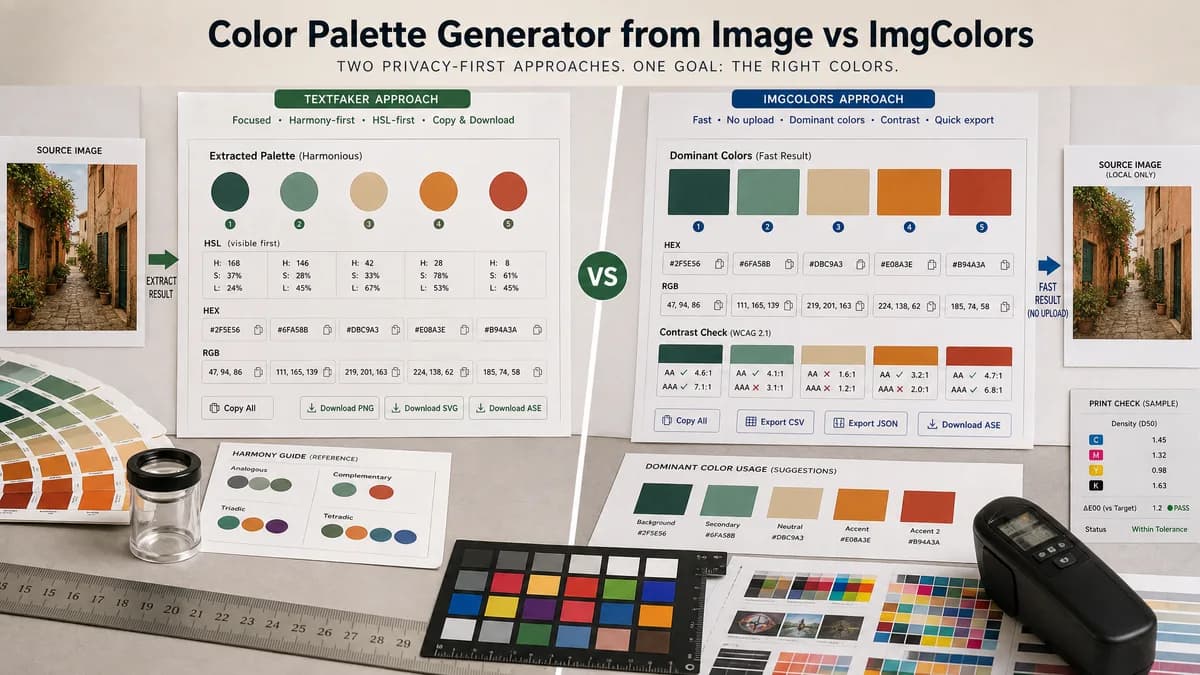
Quick verdict
ImgColors is a very close privacy-first competitor. TextFaker can differentiate with HSL-first visibility, harmonious palette framing, and strong download options.
How Color Palette Generator from Image fits
TextFaker match the privacy-first workflow while offering harmonious swatches, HEX/RGB/HSL, copy actions, and downloads in a compact utility interface.
How ImgColors fits
ImgColors positions itself as fast, private, and no upload. It extracts dominant colors from images, provides HEX and RGB values, offers contrast guidance, and supports quick exports.
Side-by-side comparison
| Decision point | Color Palette Generator from Image | ImgColors | Takeaway |
|---|---|---|---|
| Privacy | Our workflowBrowser-local processing with no upload. | Competitor workflowImgColors explicitly says images are processed locally and not uploaded. | Privacy messaging is table stakes in this segment. |
| Color formats | Our workflowHEX, RGB, and HSL for each swatch. | Competitor workflowImgColors page highlights HEX and RGB values. | TextFaker foreground HSL as an advantage. |
| Contrast help | Our workflowOptional future contrast notes could improve palette usefulness. | Competitor workflowImgColors mentions contrast guidance. | ImgColors may be stronger for accessibility-aware selection unless TextFaker adds contrast checks. |
| Exports | Our workflowcopy and download options. | Competitor workflowImgColors mentions quick exports. | TextFaker specify export types in the product page. |
| Supported input | Our workflowSupports any image the browser can decode when technically feasible. | Competitor workflowImgColors says if the browser can display the image, it will likely work. | Broad browser-decoded format support is a good benchmark. |
| Positioning | Our workflowPart of a broader suite of browser-local image and metadata tools. | Competitor workflowSingle-purpose privacy-first palette site. | TextFaker can cross-link from related image tools for discovery. |
Use Color Palette Generator from Image when
- Users who want HEX, RGB, and HSL together
- Harmonious palette swatches from a local image
- Simple downloads and copy controls
- Existing TextFaker users working with image utilities
Use ImgColors when
- Privacy-first users needing HEX and RGB quickly
- Users who want contrast guidance during extraction
- Moodboards, screenshots, logos, and product photos
- Mobile users uploading images for quick palettes
Detailed comparison
Close Match
ImgColors already owns much of the intended privacy-first language. TextFaker does not treat privacy as enough by itself; it needs visible format and export advantages.
Potential Edge
HSL is useful for adjusting related shades and CSS variables. Making HSL as prominent as HEX and RGB creates a concrete reason to choose TextFaker.
- Show HEX, RGB, and HSL in each swatch card.
- Add copy all as CSS variables.
- Include a downloadable swatch strip.
Content Angle
Comparison content focus on practical workflow differences: color formats, downloads, contrast support, and whether the user wants the surrounding TextFaker image-tool ecosystem.
Future Feature
Contrast guidance would reduce ImgColors' advantage for accessibility-minded users. Even a simple foreground/background contrast checker for selected swatches would be valuable.
Research notes
- ImgColors states it is fast, private, and no upload.
- ImgColors says images are processed locally in the browser and are not uploaded to a server.
- ImgColors highlights HEX and RGB values, contrast guidance, and quick exports.
- ImgColors supports common use cases such as screenshots, photos, logos, and moodboards.
Official source
The only outbound competitor link on this page is placed here for source checking after the comparison.
Official ImgColors source