
Color Palette Generator from Image vs Paletify
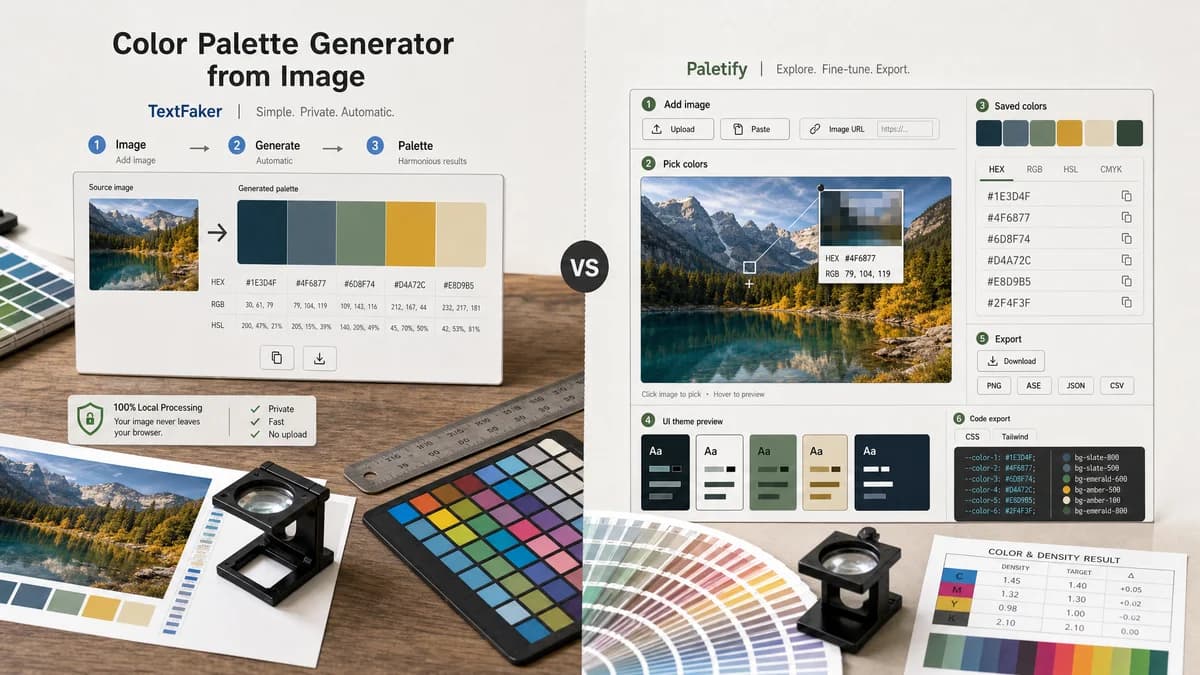
Color Palette Generator from Image is the baseline in this comparison: Upload a photo or graphic and generate a browser-local color palette with dominant swatches, HEX, RGB, HSL values, and copy/download controls.
Compare TextFaker's image palette generator with Paletify's upload, paste, URL, preview, and export workflow.
Quick verdict
Paletify is better for interactive picking and UI preview. TextFaker is better positioned as a simpler private automatic palette generator if it keeps local processing and exports clear.
How Color Palette Generator from Image fits
TextFaker focuses on automatic harmonious palette generation, local handling, and clear HEX/RGB/HSL copy and download controls rather than a broader interactive preview workflow.
How Paletify fits
Paletify supports upload, paste, and image URL input, pixel hover preview, saved colors, HEX/RGB/HSL values, UI theme previews, CSS/Tailwind exports, and palette downloads.
Side-by-side comparison
| Decision point | Color Palette Generator from Image | Paletify | Takeaway |
|---|---|---|---|
| Input sources | Our workflowLocal image upload or drag-and-drop. | Competitor workflowPaletify supports upload, paste, and image URL input. | Paletify offers more input flexibility. |
| Manual picking | Our workflowPrimarily automatic harmonious swatches. | Competitor workflowPaletify lets users hover over the canvas and click to save colors. | Paletify is stronger for exact pixel picking. |
| Color formats | Our workflowHEX, RGB, and HSL. | Competitor workflowPaletify also lists HEX, RGB, and HSL values. | Format parity means TextFaker needs privacy or simplicity to stand out. |
| Exports | Our workflowcopy and download options. | Competitor workflowPaletify advertises CSS/Tailwind configs and downloads. | Paletify may be stronger for developer exports. |
| Privacy | Our workflowno-upload local processing. | Competitor workflowPaletify supports image URL input, which implies a broader input model than local-only processing. | TextFaker can be clearer for private local files. |
| Use case | Our workflowCreate a harmonious palette quickly from an image. | Competitor workflowPick colors, preview themes, and export configs. | TextFaker is simpler; Paletify is richer. |
Use Color Palette Generator from Image when
- Automatic palette generation from a local file
- Privacy-sensitive image use
- Users who want values quickly without UI theme preview
- Clean download and copy workflows
Use Paletify when
- Manual pixel picking from an image
- Using image URLs or clipboard paste
- Previewing colors in UI themes
- CSS and Tailwind export workflows
Detailed comparison
Interaction Model
Paletify combines automatic extraction with an eyedropper-like picker and preview workflow. It is more interactive than a pure palette generator.
TextFaker Focus
TextFaker lean into fast automatic results and local file safety. Exact pixel picking is useful but not required for the core color palette generator from image search intent.
- Generate a default palette automatically.
- Let users choose palette size.
- Make copy and download controls visible.
Competitive Gap
Paletify's CSS and Tailwind exports are attractive for developers. TextFaker can start with basic downloads, but JSON and CSS variable export would make the comparison stronger.
Messaging
A neutral comparison says Paletify is better for interactive picking and previews, while TextFaker is better for a focused private extraction workflow.
Research notes
- Paletify's official page supports upload, image URL, and paste input.
- Paletify says users can hover over the canvas to preview a pixel and click to save a color.
- Paletify lists HEX, RGB, and HSL values.
- Paletify advertises CSS and Tailwind config export plus palette downloads.
Official source
The only outbound competitor link on this page is placed here for source checking after the comparison.
Official Paletify source