
Color Palette Generator from Image vs Picsart Palette from Image
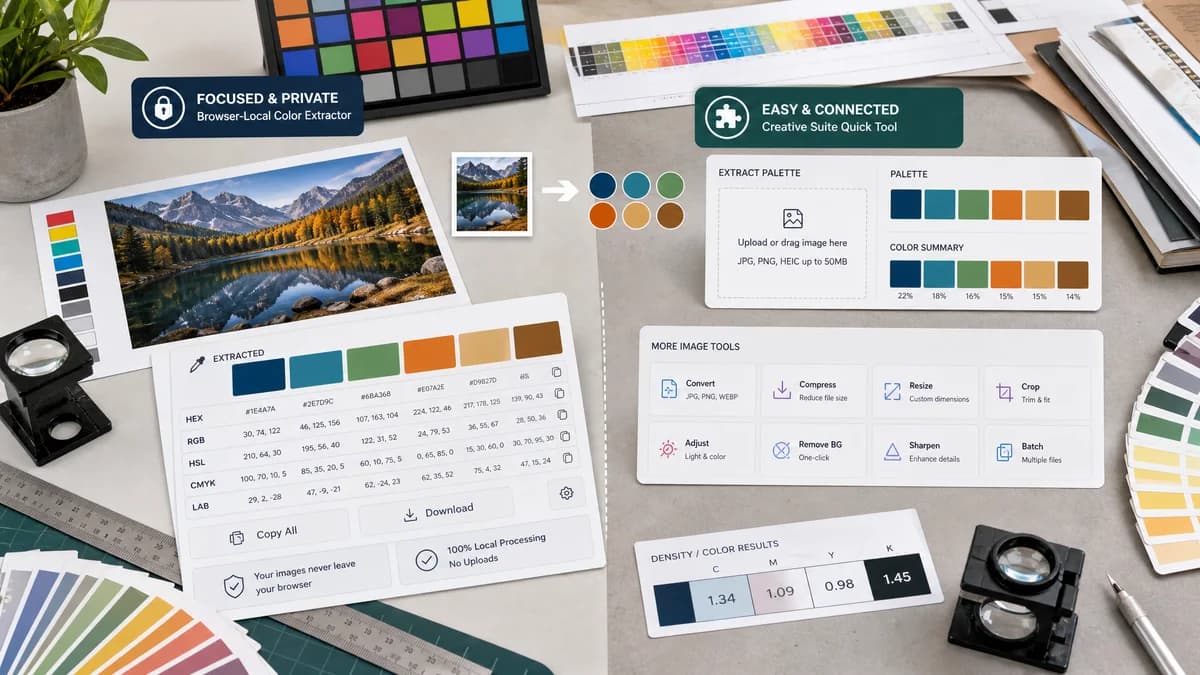
Color Palette Generator from Image is the baseline in this comparison: Upload a photo or graphic and generate a browser-local color palette with dominant swatches, HEX, RGB, HSL values, and copy/download controls.
Compare TextFaker's no-upload color palette generator with Picsart's online palette-from-image tool.
Quick verdict
TextFaker can compete well if its no-upload privacy claim is explicit and its color formats are richer. Picsart is better for users already interested in Picsart's wider image tooling.
How Color Palette Generator from Image fits
TextFaker prioritize transparent browser-local operation, visible HEX/RGB/HSL values, copy controls, and download options for users who want extracted colors rather than a broader image editing suite.
How Picsart Palette from Image fits
Picsart offers a free, no-registration image palette tool that supports JPG, PNG, and HEIC. Its page emphasizes ease of use, privacy, and connection to more Picsart image tools.
Side-by-side comparison
| Decision point | Color Palette Generator from Image | Picsart Palette from Image | Takeaway |
|---|---|---|---|
| Privacy wording | Our workflowno-upload browser-local processing. | Competitor workflowPicsart says the process happens in the browser, while its FAQ also mentions temporary saving and deletion shortly after use. | TextFaker use unambiguous local-only language if true. |
| Supported formats | Our workflowSupports common browser image formats such as JPG, PNG, WebP, AVIF, and BMP where feasible. | Competitor workflowPicsart page asks users to upload JPG, PNG, or HEIC files. | TextFaker can differentiate with WebP and AVIF if implemented. |
| Registration | Our workflowRequires no account for extraction. | Competitor workflowPicsart says no registration is required. | Both can meet low-friction expectations. |
| Color data | Our workflowHEX, RGB, and HSL per swatch. | Competitor workflowPicsart's official page focuses more on palette extraction than detailed format claims in the visible copy. | TextFaker can be more explicit for technical users. |
| Tool ecosystem | Our workflowPart of TextFaker's browser-local image and metadata utility set. | Competitor workflowPart of Picsart's broader creative and image editing tool catalog. | Each ecosystem attracts different adjacent jobs. |
| Downloads | Our workflowcopy and download options. | Competitor workflowPicsart emphasizes generating the palette with little effort, but the researched page does not foreground structured export formats. | TextFaker makes export a visible advantage. |
Use Color Palette Generator from Image when
- Private local extraction without file retention concerns
- Using HSL as well as HEX and RGB
- Downloading palette assets for external use
- Fast utility use inside a broader TextFaker tool set
Use Picsart Palette from Image when
- Users who want Picsart's image tools nearby
- JPG, PNG, and HEIC palette extraction
- Free no-registration creative workflows
- Casual creators familiar with Picsart
Detailed comparison
Privacy Nuance
Picsart is competitive because it says no registration is needed and highlights privacy. However, the official copy has mixed signals around browser processing and temporary file handling, so TextFaker can win by being precise.
Format Strategy
TextFaker makes color values the product. The page does not simply show a pretty palette; it makes each value easy to copy as HEX, RGB, or HSL.
- Expose values without hovering.
- Support copy-all in multiple formats.
- Download a clean palette image.
Audience
Picsart appeals to creators who may continue with image editing. TextFaker targets users who need a fast conversion from image inspiration to usable color data.
Comparison Tone
A neutral comparison credits Picsart for free access and no registration while explaining TextFaker's narrower focus on local extraction and developer-ready output.
Research notes
- Picsart's official page says the tool is free and no registration is required.
- Picsart's upload message references JPG, PNG, and HEIC files.
- Picsart states the process happens in the browser in one section and says files are saved briefly then deleted in the FAQ.
- Picsart promotes the tool as part of a larger set of image tools.
Official source
The only outbound competitor link on this page is placed here for source checking after the comparison.
Official Picsart Palette from Image source