
Open Source Alternatives to Adobe Color
Color Palette Generator from Image is a browser-based alternative for users who need this focused result without installing a proprietary desktop app or entering a larger hosted workflow.
This research compares that workflow with Adobe Color while keeping the outbound source link at the bottom after the analysis.
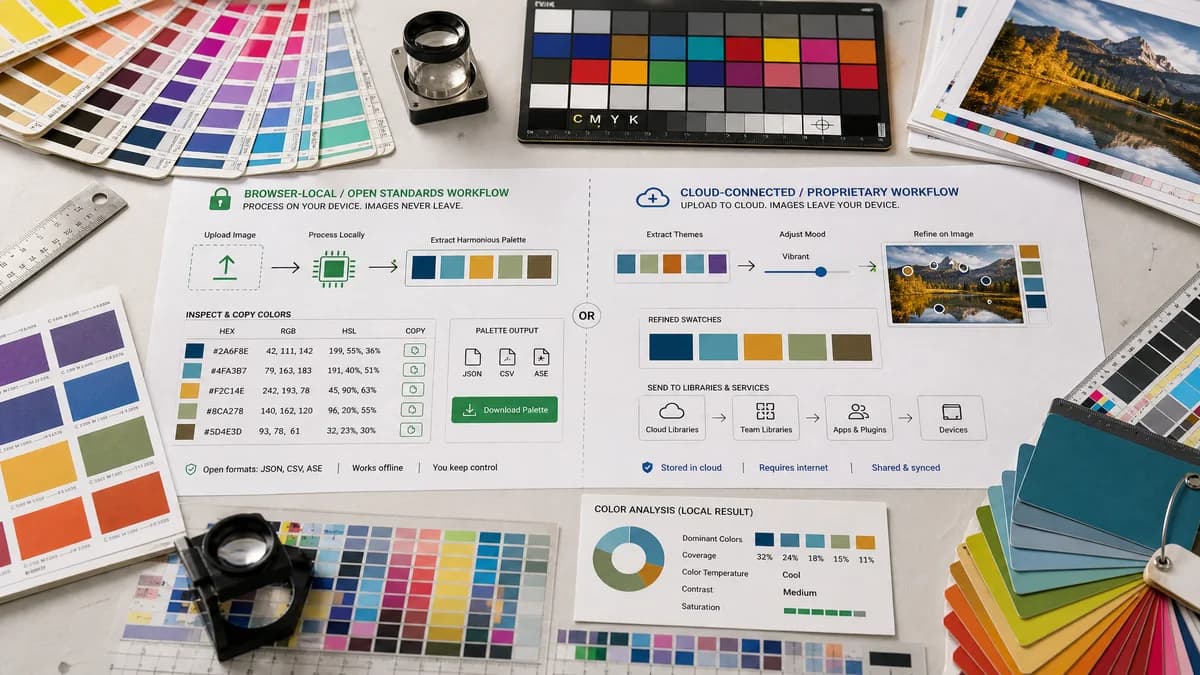
Why Color Palette Generator from Image fits
TextFaker can focus on a direct upload-to-browser workflow: choose an image, extract harmonious swatches locally, inspect HEX/RGB/HSL values, copy individual colors, and download palette output without requiring an account for the first free use.
What Adobe Color offers
Adobe Color is a polished Creative Cloud color tool that extracts themes from images, supports mood adjustment, lets users refine swatches on the image, and connects palettes to Adobe Express and creative libraries.
Open alternative signals
Processing model
Color Palette Generator from ImageDesigned around local browser processing and no-upload messaging.
Adobe ColorImage upload and Adobe account ecosystem features are part of the experience.
Color formats
Color Palette Generator from ImageExposes HEX, RGB, and HSL together for web and CSS use.
Adobe ColorOfficial page highlights HEX and RGB values.
Workflow scope
Color Palette Generator from ImageSingle-purpose extraction, copy, and download.
Adobe ColorPalette extraction plus Adobe Express and Creative Cloud handoff.
Account dependency
Color Palette Generator from ImageUses no-account core extraction.
Adobe ColorSaving into Adobe creative projects benefits from Adobe account integration.
Decision guide
Best for privacy-sensitive, fast, single-purpose extraction where the user wants reusable web color values from an image without joining a broader design platform.
Best for designers already working in Adobe apps who want palettes saved into Adobe workflows and adjusted with Adobe's theme controls.
Side-by-side open source alternative comparison
| Decision point | Color Palette Generator from Image | Adobe Color | Takeaway |
|---|---|---|---|
| Privacy posture | Our workflowImage can be decoded and sampled in the browser. | Proprietary workflowAdobe's value is tied to cloud-connected creative workflows. | TextFaker leads with no-upload palette extraction for users handling private brand assets or client photos. |
| Output formats | Our workflowHEX, RGB, HSL, plus palette download options are natural for web developers. | Proprietary workflowAdobe highlights HEX/RGB and library use. | HSL support is a practical differentiator for CSS theming. |
| Palette editing | Our workflowOffers simple swatch count, harmony mode, and copy controls. | Proprietary workflowAdobe supports mood adjustment and moving handles on the image. | Adobe may be stronger for creative exploration; TextFaker can win on immediacy and transparency. |
| Ecosystem fit | Our workflowIndependent utility that can serve designers, developers, marketers, and students. | Proprietary workflowBest inside Adobe Express and Creative Cloud workflows. | Comparison copy frame TextFaker as lighter, not as a full Adobe replacement. |
| User friction | Our workflowDrop image, get swatches, copy values. | Proprietary workflowMore polished but more connected to Adobe services. | A low-friction page can capture searchers who only need color codes from an image. |
| Transparency | Our workflowOpen-source-powered algorithms can be described plainly, such as dominant-color extraction and harmony generation. | Proprietary workflowAdobe's extraction behavior is product-defined and not documented as open source. | Explain the workflow in user terms without overclaiming algorithm parity. |
Detailed research
Why users compare it
Adobe Color is one of the best-known image palette tools, so users searching for alternatives often want a smaller utility that extracts usable color codes without opening a complete creative suite.
- Good comparison target for SEO around color palette generator from image.
- Strong contrast between Adobe ecosystem convenience and browser-local simplicity.
- Highlight that TextFaker is not trying to replace Adobe design apps.
TextFaker positioning
TextFaker is the quick, private extraction layer before the user moves into CSS, Figma, Canva, Adobe, or a brand guide. The page emphasizes exact color values, easy copying, and downloadable palette artifacts.
- No-upload image handling.
- HEX, RGB, and HSL visible for every swatch.
- Downloadable palette output for handoff.
Content angle
The page can target users who like Adobe Color's image extraction but do not need Creative Cloud storage, template editing, or account-based library management.
- Use privacy, speed, and developer-friendly formats as the main differentiators.
- Avoid claiming identical color extraction results.
- Mention Adobe as stronger for Creative Cloud users.
Implementation notes
A competitive TextFaker page includes sample swatches, copy buttons, export buttons, and a concise note explaining that processing happens in the browser.
- Include a sample image option for first-time users.
- Offer swatch count control if implementation supports it.
- Consider CSS variables or JSON downloads as developer-focused exports.
Research notes
- Official research confirms Adobe Color extracts palettes from uploaded photos and offers HEX or RGB download.
- Adobe Color connects the palette workflow to Adobe Express and creative projects, which makes it more ecosystem-oriented than a standalone browser utility.
- Use the phrase browser-based or open-source-powered for TextFaker; do not imply TextFaker itself is open source unless that is separately proven.
Official source
The proprietary product link is included once here for source checking after the alternative analysis.
Official Adobe Color source