
Open Source Alternatives to ColorKit Color Palette from Image
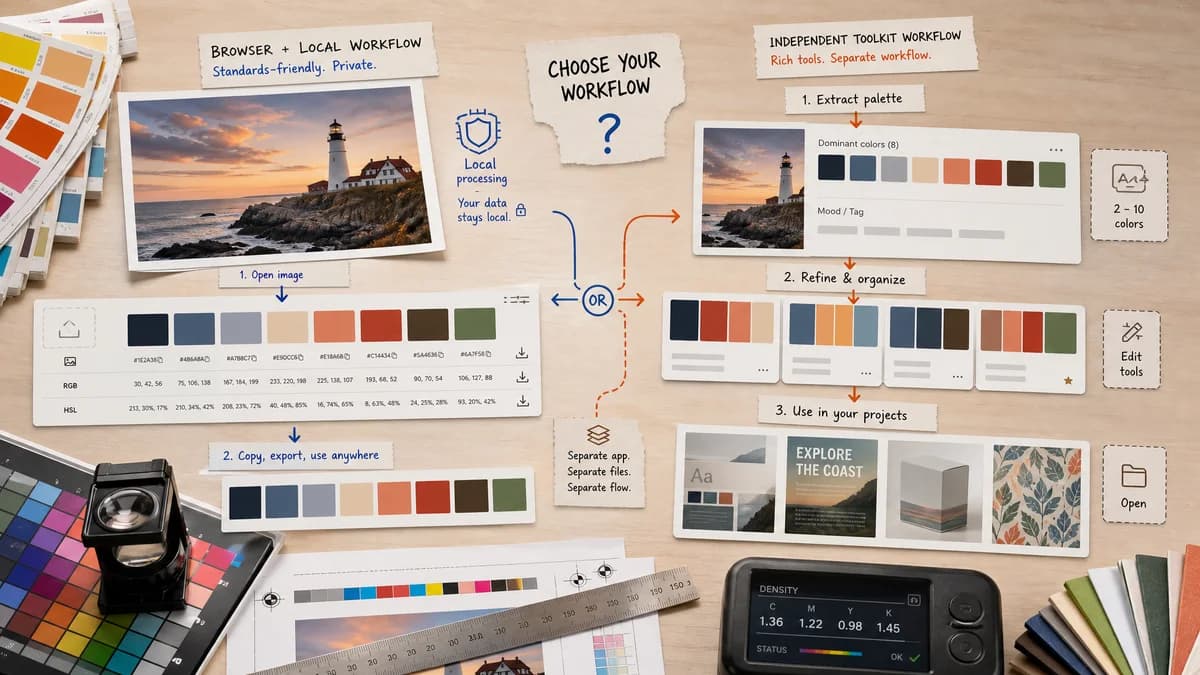
Color Palette Generator from Image is a browser-based alternative for users who need this focused result without installing a proprietary desktop app or entering a larger hosted workflow.
This research compares that workflow with ColorKit Color Palette from Image while keeping the outbound source link at the bottom after the analysis.
Why Color Palette Generator from Image fits
TextFaker can offer a similarly focused browser-local workflow while fitting the site's existing image-tool pattern: no upload, clear color metadata, copy buttons, and downloadable outputs.
What ColorKit Color Palette from Image offers
ColorKit's image palette tool lets users pick an image, extract 2 to 10 dominant colors, copy HEX values, open the palette in an editor, and create a collage; its page says it uses Color Thief and does not upload the image to its server.
Open alternative signals
Open-source component signal
Color Palette Generator from ImageCan be open-source-powered if implementation uses an open-source extraction library.
ColorKit Color Palette from ImageOfficial ColorKit page says it uses Color Thief.
Local processing
Color Palette Generator from ImageNo-upload local processing is core.
ColorKit Color Palette from ImageOfficial ColorKit page says images are never uploaded to its server.
Color formats
Color Palette Generator from ImageShows HEX, RGB, and HSL for every color.
ColorKit Color Palette from ImageOfficial page emphasizes copying HEX values.
Adjacent tools
Color Palette Generator from ImageFits TextFaker's local image utility library.
ColorKit Color Palette from ImageFits ColorKit's palette, gradient, contrast, and color library tools.
Decision guide
Best for users already using TextFaker's browser-local image utilities and wanting a privacy-forward palette workflow alongside metadata and image tools.
Best for users who want ColorKit's broader palette editor, gradients, color libraries, and collage creator.
Side-by-side open source alternative comparison
| Decision point | Color Palette Generator from Image | ColorKit Color Palette from Image | Takeaway |
|---|---|---|---|
| Privacy | Our workflowBrowser-local no-upload processing. | Proprietary workflowColorKit also states no server upload. | Privacy alone is not enough; TextFaker also compete on output clarity and utility. |
| Formats | Our workflowHEX, RGB, and HSL are visible and copyable. | Proprietary workflowColorKit page focuses on HEX copying. | Multi-format display is a strong differentiator. |
| Palette editing | Our workflowCould keep editing simple: count, harmony, sort, copy, download. | Proprietary workflowColorKit can open palettes in its editor and create collages. | ColorKit is stronger for playful palette editing; TextFaker can stay practical. |
| Open-source-powered story | Our workflowCan explain the extraction algorithm and open standards used. | Proprietary workflowColorKit names Color Thief in its FAQ. | Be specific about libraries only after implementation confirms them. |
| Site fit | Our workflowPart of a privacy-oriented TextFaker image toolbox. | Proprietary workflowPart of a dedicated color-tool platform. | TextFaker can cross-link from image metadata, ICC, CMYK/RGB, and compression tools. |
| Export | Our workflowDownload palette data or image for handoff. | Proprietary workflowColorKit includes collage export and editor workflows. | TextFaker choose exports that serve developers and brand documentation. |
Detailed research
Why users compare it
ColorKit is a close functional match because it already emphasizes local image palette extraction and Color Thief. This makes the comparison useful but raises the bar for TextFaker's feature clarity.
- Very direct competitor.
- Also privacy-friendly.
- Differentiation is format depth and TextFaker ecosystem fit.
TextFaker positioning
TextFaker position itself as the practical palette extraction page for people who need exact values and quick downloads more than a palette community or editor.
- Show all color spaces at once.
- Offer copy all and per-value copy.
- Keep no-upload proof visible near the file input.
Research caveat
Since ColorKit already names an open-source component, TextFaker only mention specific open-source libraries after the implementation is known.
- Avoid invented implementation details.
- Say open-source-powered only when true.
- Use open standards language for HEX, RGB, HSL, CSS, JSON, and PNG.
Feature implications
A TextFaker tool includes color count control and possibly a palette sorting option to compete with dedicated color tools.
- Palette size control.
- Sort by dominance, hue, luminance, or original extraction order.
- Download swatch image or structured data.
Research notes
- Official ColorKit page explicitly mentions Color Thief, dominant color extraction, selectable color count from 2 to 10, HEX copying, and no server upload.
- Because ColorKit also makes local-processing claims, TextFaker differentiate through UI clarity, HSL/RGB display, and integration with TextFaker's tool ecosystem.
- Research supports calling the TextFaker workflow open-source-powered if it uses open-source libraries such as Color Thief or similar, but not calling TextFaker open source.
Official source
The proprietary product link is included once here for source checking after the alternative analysis.
Official ColorKit Color Palette from Image source