
Open Source Alternatives to Coolors Image Picker
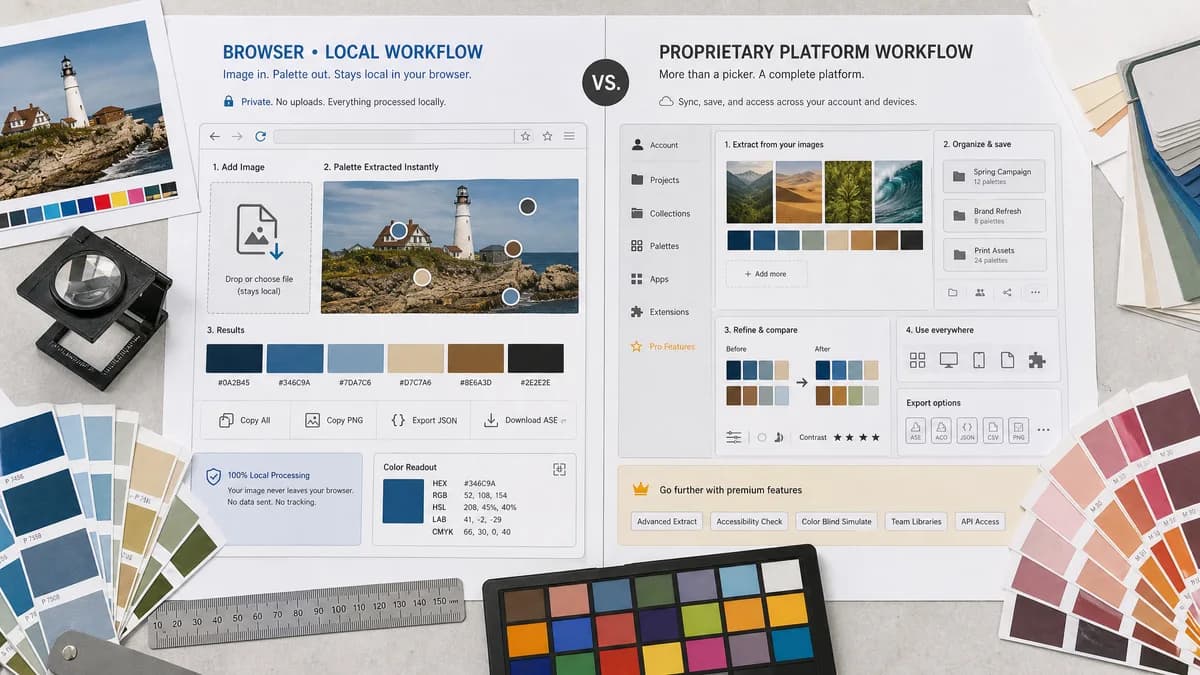
Color Palette Generator from Image is a browser-based alternative for users who need this focused result without installing a proprietary desktop app or entering a larger hosted workflow.
This research compares that workflow with Coolors Image Picker while keeping the outbound source link at the bottom after the analysis.
Why Color Palette Generator from Image fits
TextFaker can deliver a focused image extraction page that gives immediate palette values and exports while keeping the image local to the browser.
What Coolors Image Picker offers
Coolors Image Picker extracts palettes from photos, supports palette export, and belongs to a broader palette platform with accounts, projects, collections, apps, extensions, and Pro features.
Open alternative signals
Platform scope
Color Palette Generator from ImageOne browser-local tool for image-to-palette extraction.
Coolors Image PickerFull color platform with generator, exploration, visualizer, extensions, and account features.
Exports
Color Palette Generator from ImageCan emphasize copy, JSON, CSS, and image download if implemented.
Coolors Image PickerOfficial UI lists export options including URL, PDF, image, CSS, ASE, SVG, code, and Tailwind.
Storage
Color Palette Generator from ImageNo need to save palettes to a profile.
Coolors Image PickerProjects, collections, and saved palettes are part of the platform.
Privacy angle
Color Palette Generator from ImageLocal processing is the page's central claim.
Coolors Image PickerImage picker supports upload, URL, camera, and stock image sources.
Decision guide
Best for users who need a quick private palette extraction result with visible HEX/RGB/HSL values.
Best for users who want palette discovery, saved collections, extensions, and a broad color workflow around Coolors.
Side-by-side open source alternative comparison
| Decision point | Color Palette Generator from Image | Coolors Image Picker | Takeaway |
|---|---|---|---|
| Depth | Our workflowNarrow and direct image extraction. | Proprietary workflowBroad palette ecosystem with discovery, storage, and exports. | Coolors is richer; TextFaker can be faster for users who only need the extracted palette. |
| Local workflow | Our workflowDesigned around browser-only processing. | Proprietary workflowSupports multiple image sources in a hosted app. | TextFaker can appeal to users avoiding cloud or profile workflows. |
| Export expectations | Our workflowIncludes common developer formats like CSS variables and JSON. | Proprietary workflowCoolors offers many export formats, with some options tied to product tiers. | TextFaker keep export choices practical and visible. |
| Account value | Our workflowNo account required for core use. | Proprietary workflowSaving and organization are part of Coolors' account model. | No-account extraction is the clearest contrast. |
| Color exploration | Our workflowCan include harmony presets but remain utility-first. | Proprietary workflowCoolors is stronger for browsing millions of palettes and visualizing designs. | Do not overpromise discovery depth. |
| Search fit | Our workflowTargets image palette extraction and private color values. | Proprietary workflowTargets broad color palette generation and design exploration. | The page use image-specific headings rather than generic palette-generator copy. |
Detailed research
Why users compare it
Coolors is a direct competitor because its Image Picker is specifically about extracting palettes from photos. It is also a broader freemium platform, giving TextFaker a clean simplicity angle.
- Direct functional overlap.
- Strong export and palette-management feature set.
- Good comparison for users seeking no-account utility.
TextFaker positioning
TextFaker is framed as a compact alternative for extracting colors from an image in the browser and taking the values elsewhere immediately.
- No-upload messaging is prominent.
- Show HEX, RGB, and HSL together.
- Offer copy all and download controls.
Feature gap
Coolors has strong ecosystem features such as palette exploration, saved collections, extensions, and many export formats. TextFaker does not claim to match the entire platform.
- Compete on privacy and focus.
- Avoid claiming parity with Coolors Pro features.
- Mention broader Coolors workflows as a reason to choose Coolors.
SEO opportunity
Use Coolors comparison pages to capture users looking for a lighter image picker or a local alternative after trying a hosted color platform.
- Target phrases such as Coolors image picker alternative.
- Explain browser-local extraction in the first screen.
- Add FAQ around image upload, supported formats, and color accuracy.
Research notes
- Official Coolors page labels the feature Image Picker and says it extracts palettes from photos.
- The official page includes export palette options and broader Coolors features such as palette generator, contrast checker, visualizer, apps, and extensions.
- Coolors has Pro features, so comparison content separates free extraction needs from account and platform workflows.
Official source
The proprietary product link is included once here for source checking after the alternative analysis.
Official Coolors Image Picker source