
Open Source Alternatives to PhotoColors
Color Palette Generator from Image is a browser-based alternative for users who need this focused result without installing a proprietary desktop app or entering a larger hosted workflow.
This research compares that workflow with PhotoColors while keeping the outbound source link at the bottom after the analysis.
Why Color Palette Generator from Image fits
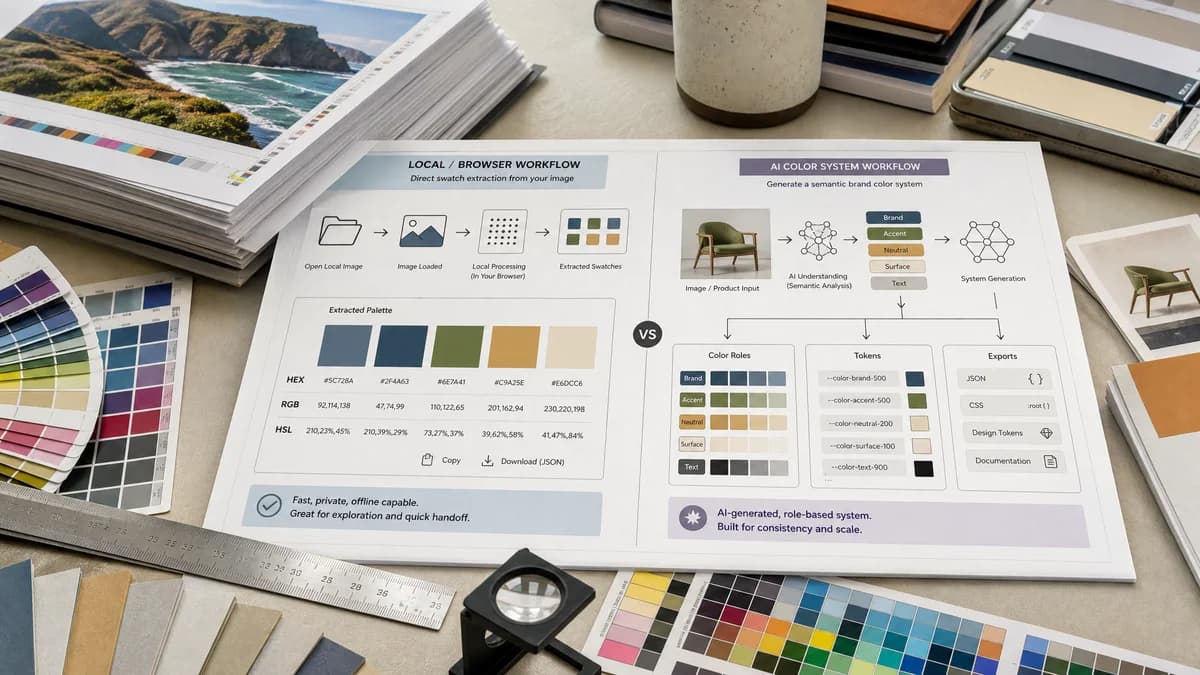
TextFaker can focus on extracting harmonious color swatches from an image locally, exposing HEX, RGB, and HSL, and supporting copy/download actions for practical design handoff.
What PhotoColors offers
PhotoColors describes itself as an AI color palette generator that turns an image, logo, or product photo into an accessible brand color system with semantic roles and exportable design tokens.
Open alternative signals
Primary output
Color Palette Generator from ImagePalette swatches with HEX/RGB/HSL and simple downloads.
PhotoColorsAccessible brand color system with semantic roles and design tokens.
AI positioning
Color Palette Generator from ImageOpen-source-powered extraction and harmony logic.
PhotoColorsAI color palette generator from image.
Complexity
Color Palette Generator from ImageLow-friction image-to-values workflow.
PhotoColorsBrand system and token workflow.
Best input
Color Palette Generator from ImageAny browser-supported image for palette extraction.
PhotoColorsBrand asset, product shot, logo, or moodboard.
Decision guide
Best for quick, private image palette extraction where the user wants color values rather than semantic brand-token generation.
Best for teams that want AI-assisted brand color roles, accessibility framing, and design-token exports from images or logos.
Side-by-side open source alternative comparison
| Decision point | Color Palette Generator from Image | PhotoColors | Takeaway |
|---|---|---|---|
| Job to be done | Our workflowFind usable colors from an image quickly. | Proprietary workflowGenerate a broader brand color system from an image. | TextFaker targets quick extraction, not full brand-system creation. |
| Output semantics | Our workflowColors as swatches and code values. | Proprietary workflowSemantic roles and design tokens are part of the product promise. | PhotoColors is stronger for teams that want assigned roles; TextFaker is simpler. |
| Privacy | Our workflowNo-upload browser processing is explicit. | Proprietary workflowOfficial copy mentions first-pass extraction without sending through a server, but product is AI-branded. | TextFaker makes the whole workflow local if possible. |
| Developer use | Our workflowCSS variables or JSON downloads would be natural. | Proprietary workflowDesign tokens are a key PhotoColors feature. | TextFaker can offer lightweight exports but does not overclaim token-system depth. |
| Accessibility | Our workflowCan add contrast checks as an enhancement. | Proprietary workflowAccessible brand color system is central to its positioning. | TextFaker presents the first version as extraction-first, not as an accessibility checker. |
| User type | Our workflowSolo designer, developer, marketer, or student needing values. | Proprietary workflowBrand and product teams seeking AI-generated systems. | The comparison separates utility users from brand-system users. |
Detailed research
Why users compare it
PhotoColors represents the newer AI brand-system side of image palette generation. TextFaker can appeal to users who do not need semantic token generation and just want precise values.
- AI-focused competitor.
- Strong brand and token language.
- Useful for contrasting simple extraction with generated systems.
TextFaker positioning
TextFaker position itself as the fast extraction stage: upload locally, get swatches, copy values, and download a palette to use in any design or code tool.
- Local extraction.
- No account-centered workflow.
- Simple color formats.
Future opportunity
When those workflows need contrast scoring or CSS variable naming, it can address some design-system needs without becoming a full AI brand kit product.
- Optional semantic labels.
- Contrast checks.
- CSS variable export.
Content caution
Do not claim to generate accessible brand systems unless the tool actually checks contrast and assigns roles. For the first version, comparison copy emphasizes extraction accuracy and privacy.
- Avoid accessibility overclaims.
- Avoid token export claims unless implemented.
- Keep claims tied to verified features.
Research notes
- Official PhotoColors page states it creates accessible brand color systems with semantic roles and exportable design tokens.
- Official page says users can upload brand assets, product shots, or moodboards and extract dominant colors, with the first pass not sent through a server according to its page copy.
- TextFaker can compete as a simpler, non-AI, no-upload utility if implemented locally.
Official source
The proprietary product link is included once here for source checking after the alternative analysis.
Official PhotoColors source