
Open Source Alternatives to Pixlr Color Palette Maker
Color Palette Generator from Image is a browser-based alternative for users who need this focused result without installing a proprietary desktop app or entering a larger hosted workflow.
This research compares that workflow with Pixlr Color Palette Maker while keeping the outbound source link at the bottom after the analysis.
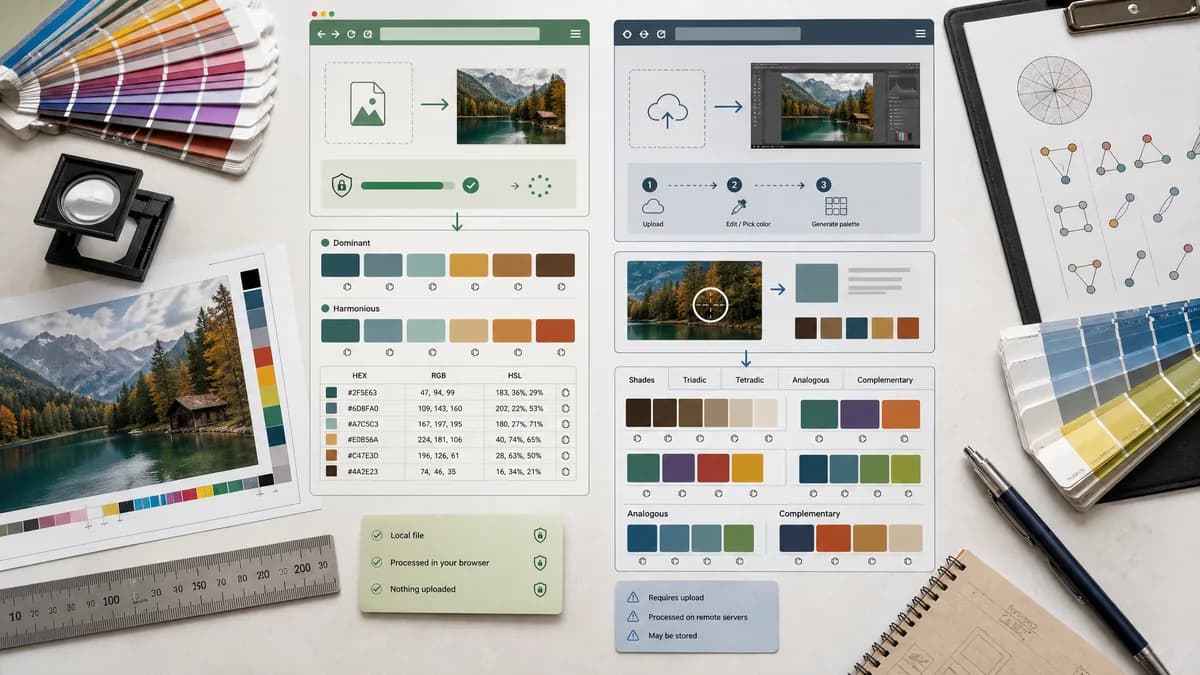
Why Color Palette Generator from Image fits
TextFaker can extract dominant and harmonious palettes directly from an image and expose copyable HEX, RGB, and HSL values in a compact utility interface.
What Pixlr Color Palette Maker offers
Pixlr's color palette maker is tied to Pixlr Editor: users upload an image, select colors with a picker, and Pixlr generates harmonious palettes such as shades, triadic, tetradic, analogous, and complementary.
Open alternative signals
Workflow entry
Color Palette Generator from ImageDrop image into a palette utility.
Pixlr Color Palette MakerOpen Pixlr Editor and use the Color Picker Tool.
Harmony generation
Color Palette Generator from ImageCan generate harmonious palette swatches from extracted colors.
Pixlr Color Palette MakerOfficial page names shades, triadic, tetradic, analogous, and complementary palettes.
Editor dependency
Color Palette Generator from ImageNo full image editor required.
Pixlr Color Palette MakerPalette maker is described through Pixlr Editor steps.
Output orientation
Color Palette Generator from ImageCopyable HEX/RGB/HSL and download options.
Pixlr Color Palette MakerFocused on selecting colors and generated palettes inside Pixlr.
Decision guide
Best for quick palette extraction and code-ready output when no image editing is needed.
Best for users already editing an image in Pixlr and wanting color selection inside that editor context.
Side-by-side open source alternative comparison
| Decision point | Color Palette Generator from Image | Pixlr Color Palette Maker | Takeaway |
|---|---|---|---|
| Ease of entry | Our workflowImage upload and immediate extraction. | Proprietary workflowOpen editor, upload image, choose color picker, select color. | TextFaker can be faster for one-off palette extraction. |
| Editing tools | Our workflowNot an image editor. | Proprietary workflowPart of a broader online photo editor. | Pixlr wins when the palette is part of editing; TextFaker wins for standalone color code extraction. |
| Harmonies | Our workflowCan offer harmony modes based on extracted base colors. | Proprietary workflowOfficial page lists multiple harmony types. | TextFaker include harmony language only if the tool implements it. |
| Privacy | Our workflowNo-upload browser processing can be a differentiator. | Proprietary workflowPixlr is a hosted editor workflow. | Local processing matters for private assets. |
| Developer use | Our workflowHSL and structured exports can support CSS workflows. | Proprietary workflowPixlr is more visual-editor oriented. | Developer-friendly export is a clear TextFaker angle. |
| Learning curve | Our workflowPurpose-built interface with swatches and values. | Proprietary workflowEditor UI offers more power but more controls. | A simpler page serves non-editing users better. |
Detailed research
Why users compare it
Pixlr is a familiar online editor, and its palette maker sits near image-editing workflows. Users who just need colors from an image may prefer a dedicated extraction tool.
- Strong editor-based competitor.
- Harmony features are relevant to the TextFaker concept.
- Good comparison for web and brand users.
TextFaker positioning
TextFaker present itself as the lighter step before design or editing: extract colors, copy values, download the palette, then use it wherever the user works.
- No editor required.
- Local image processing.
- Code-ready values.
Content caveat
Pixlr's strength is combining color selection with image editing. TextFaker avoids claiming it offers equivalent editing or retouching capabilities.
- Compare only palette extraction.
- Acknowledge Pixlr as better for editing.
- Focus on speed and privacy.
Useful features
For parity with this search intent, TextFaker include automatic dominant-color extraction and optional harmony generation from a selected swatch.
- Click a swatch to copy values.
- Choose palette size.
- Download palette as PNG or data file.
Research notes
- Official Pixlr page describes opening Pixlr Editor, uploading an image, using the color picker, and generating palette harmonies from a selected color.
- Pixlr's workflow is editor-centered, while TextFaker can be upload-and-extract centered.
- TextFaker does not claim to replace Pixlr's editing features.
Official source
The proprietary product link is included once here for source checking after the alternative analysis.
Official Pixlr Color Palette Maker source