
Dominant Colors Extractor vs Adobe Color
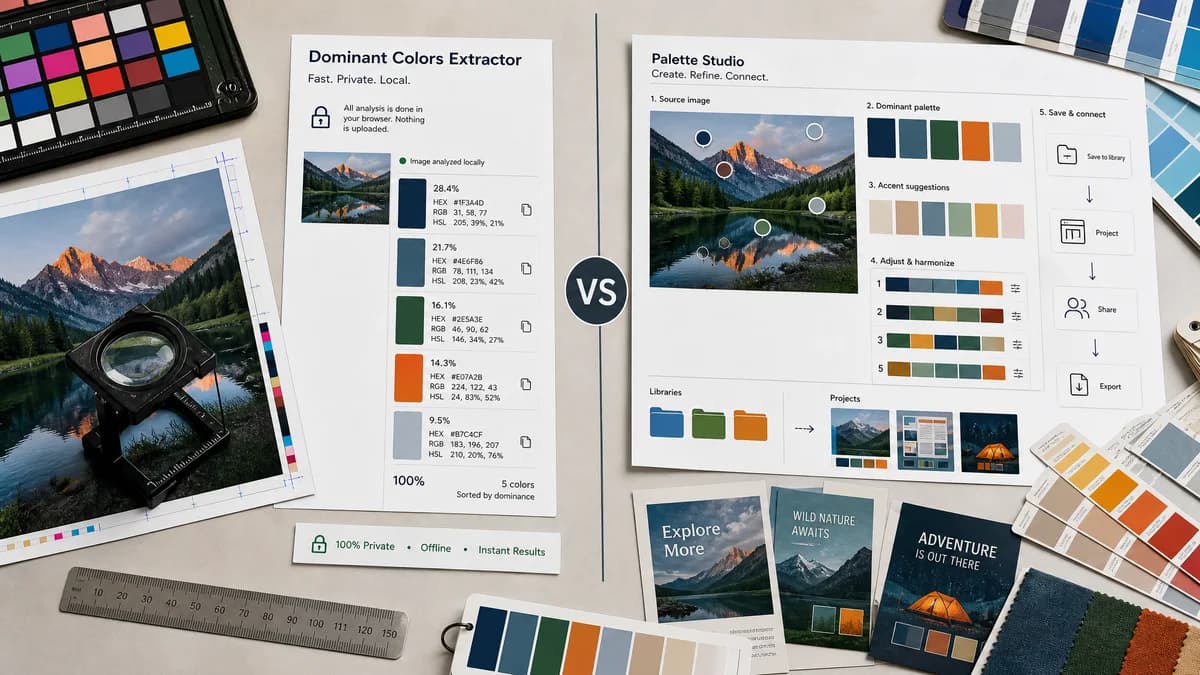
Dominant Colors Extractor is the baseline in this comparison: Upload an image and extract a ranked browser-local color palette with HEX, RGB, HSL, and percentage values without sending the file to a server.
Adobe Color extracts a palette from an uploaded image and connects the result to Adobe creative workflows.
Quick verdict
Choose TextFaker for fast private color measurement and percentage-ranked swatches; choose Adobe Color when the extracted palette needs to flow into Adobe design libraries or Adobe Express projects.
How Dominant Colors Extractor fits
Dominant Colors Extractor is a lightweight browser-local analysis tool that ranks colors by image share and shows copyable HEX, RGB, HSL, and percentages without requiring an account or design-suite workflow.
How Adobe Color fits
Adobe Color focuses on generating a cohesive palette from an uploaded image, detecting dominant and accent colors, letting users adjust mood and swatch handles, and saving palettes for use in Adobe Express and creative projects.
Side-by-side comparison
| Decision point | Dominant Colors Extractor | Adobe Color | Takeaway |
|---|---|---|---|
| Primary workflow | Our workflowUpload an image locally and receive ranked dominant swatches with exact color values and percentages. | Competitor workflowUpload an image, generate a five-color theme, refine swatches, and save or use the palette in Adobe creative tools. | Dominant Colors Extractor is better suited to measurement; Adobe is better suited to design continuation. |
| Privacy posture | Our workflowProcesses the selected image locally in the browser without an upload step. | Competitor workflowAdobe's page is an online Adobe service tied to Adobe Express and library workflows. | Dominant Colors Extractor can make local processing the core promise. |
| Output detail | Our workflowHEX, RGB, HSL, and percentage share for each ranked color. | Competitor workflowAdobe advertises HEX or RGB values and palette refinement, but not percentage coverage as the central output. | Percentages are a differentiator for audit-style dominant color extraction. |
| Account dependency | Our workflowDesigned for direct use without sign-in. | Competitor workflowSaving and using palettes across Adobe projects naturally points users into Adobe accounts and Express. | TextFaker minimizes friction for one-off users. |
| Palette control | Our workflowLikely controls focuses on number of colors, ignored transparency, and color grouping clarity. | Competitor workflowAdobe offers mood and selector adjustments for creative refinement. | Adobe has stronger creative adjustment; TextFaker keeps analytical controls simple. |
| SEO intent match | Our workflowTargets extract dominant colors from image, color percentage from image, and image color swatches directly. | Competitor workflowAdobe targets palette generation and creative project reuse. | Dominant Colors Extractor can own a narrower utility search intent. |
Use Dominant Colors Extractor when
- Privacy-first browser-local extraction
- Ranked dominant-color percentages
- Quick copy of HEX, RGB, and HSL values
- Users who do not need an Adobe account workflow
Use Adobe Color when
- Adobe Express and Creative Cloud users
- Designers refining palettes by mood
- Users who want saved palettes in an Adobe workflow
- Template-driven social or brand design work
Detailed comparison
Positioning
Adobe Color is a broad creative-platform entry point, while Dominant Colors Extractor can be a focused utility for extracting measurable dominant colors from an image.
- Lead with no upload, ranked swatches, and percentages.
- Avoid presenting the tool as a design template generator.
Feature Gap
Adobe's refinement tools are useful for designers, but the source page emphasizes palette creation more than quantitative image analysis.
- Show percentage coverage per swatch.
- Include HSL alongside HEX and RGB.
- Add one-click copy per format and copy-all rows.
User Fit
Dominant Colors Extractor fits developers, SEO users, and brand reviewers who need color values quickly. Adobe fits users already planning to design inside Adobe Express.
- Support logo, screenshot, product photo, and artwork use cases.
- Make the initial result usable without saving a project.
Research Notes
Adobe's official page states that the tool detects dominant and accent colors and lets users fine-tune swatches before saving or using them in creative projects.
Research notes
- Adobe's official page describes image upload, automatic dominant and accent color detection, mood adjustment, and Adobe Express integration.
- The page mentions HEX or RGB values, but percentage share is not presented as the main workflow.
- TextFaker's no-upload and percentage-ranked output would separate it from Adobe's creative-suite positioning.
Official source
The only outbound competitor link on this page is placed here for source checking after the comparison.
Official Adobe Color source