
Dominant Colors Extractor vs Canva Color Palette Generator
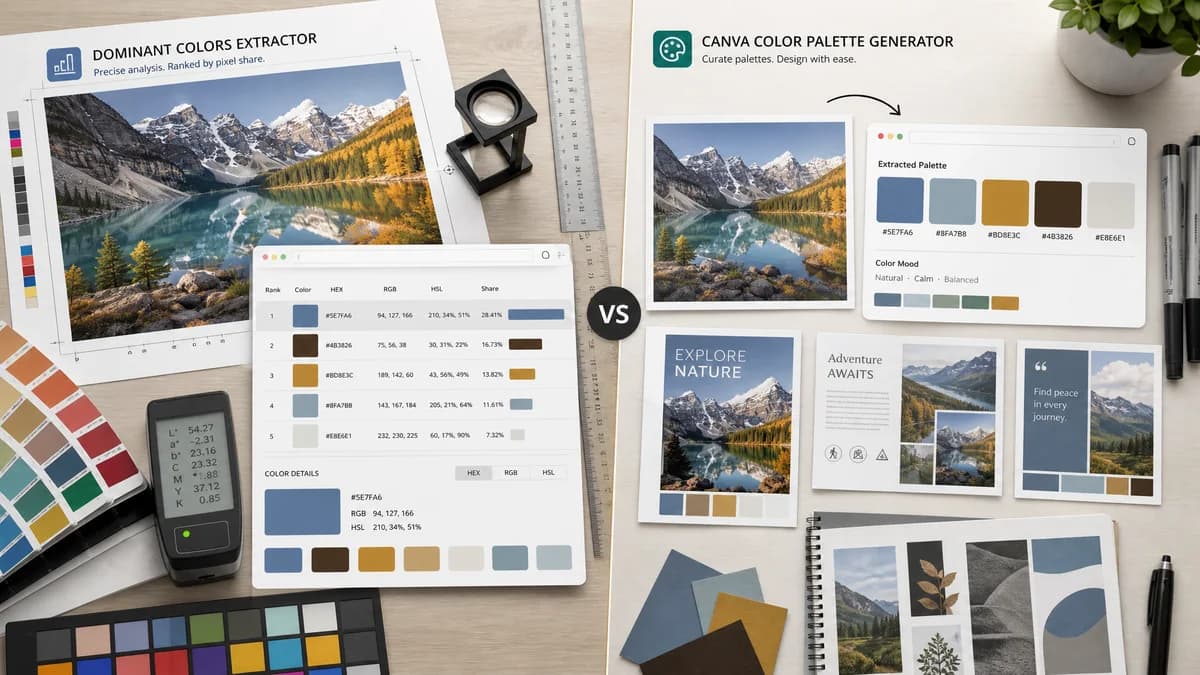
Dominant Colors Extractor is the baseline in this comparison: Upload an image and extract a ranked browser-local color palette with HEX, RGB, HSL, and percentage values without sending the file to a server.
Canva generates a small color palette from an uploaded photo and routes users toward Canva templates and design creation.
Quick verdict
Choose TextFaker for precise dominant-color reporting; choose Canva when the next step is creating a graphic in Canva.
How Dominant Colors Extractor fits
TextFaker provides a utilitarian color extraction page that ranks dominant colors by share and exposes HEX, RGB, HSL, and percentages without design-editor distractions.
How Canva Color Palette Generator fits
Canva's palette generator creates a palette from a photo in seconds, shows named colors and hex values, and encourages using the palette in Canva templates and design projects.
Side-by-side comparison
| Decision point | Dominant Colors Extractor | Canva Color Palette Generator | Takeaway |
|---|---|---|---|
| Result structure | Our workflowRanked swatches with HEX, RGB, HSL, and percent coverage. | Competitor workflowA compact generated palette with color names and hex values. | Dominant Colors Extractor is more analytical; Canva is more inspirational. |
| Design integration | Our workflowStandalone extraction with copyable results. | Competitor workflowConnects naturally to Canva templates and design creation. | Canva wins for users staying inside Canva. |
| Number of colors | Our workflowShould allow adjustable palette size for different image complexity. | Competitor workflowCanva commonly presents a small fixed palette from the uploaded photo. | Dominant Colors Extractor can serve more technical cases by exposing more ranked swatches. |
| Privacy message | Our workflowNo-upload browser-local processing can be explicit in the UI and SEO copy. | Competitor workflowCanva is a cloud design platform; the palette page asks users to upload an image. | Privacy-first positioning is important against Canva. |
| Color formats | Our workflowHEX, RGB, and HSL are central outputs. | Competitor workflowThe official page prominently displays hex values with named colors. | Dominant Colors Extractor can better serve developers who need multiple formats. |
| Best next action | Our workflowCopy values, export a simple palette, or inspect distribution. | Competitor workflowUse the palette in Canva and explore templates. | The tools serve different jobs after extraction. |
Use Dominant Colors Extractor when
- Copying exact color values quickly
- Seeing approximate image color distribution
- Avoiding template or account workflows
- Privacy-sensitive image checks
Use Canva Color Palette Generator when
- Canva users building graphics
- Beginners who like named color suggestions
- Template-based social media design
- Simple four-color palette inspiration
Detailed comparison
Search Intent
Users searching for dominant color extraction may want a direct answer rather than a design editor. Canva captures casual palette inspiration, but Dominant Colors Extractor can target measurement and privacy.
- Use title language around dominant colors, HEX, RGB, HSL, and no upload.
- Keep the first screen centered on upload and results.
Output Strategy
Canva's color names are friendly, but Dominant Colors Extractor can prioritize formats used in CSS, design tokens, and documentation.
- Offer copy buttons for each color format.
- Show percentages as numeric values and visual bars.
UX Difference
Canva's broader ecosystem is helpful when users want templates. Dominant Colors Extractor can reduce the flow to one task: image in, ranked colors out.
Research Notes
Canva's official page says the generator creates a color palette from a photo in seconds and displays example swatches with hex codes.
Research notes
- Canva's official page presents a simple photo-to-palette workflow.
- The page promotes Canva templates after palette generation.
- Dominant Colors Extractor can differentiate with percentage ranking, HSL output, and no-upload messaging.
Official source
The only outbound competitor link on this page is placed here for source checking after the comparison.
Official Canva Color Palette Generator source